AppLaunchFlow
Share
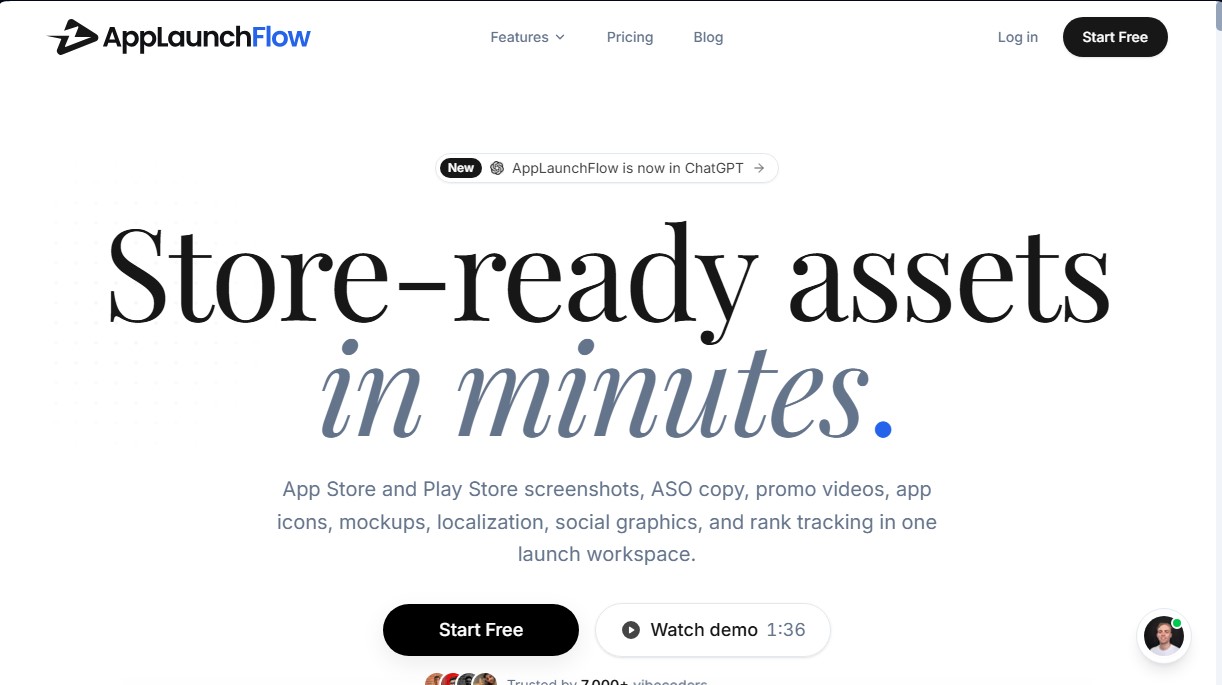
Generate screenshots, ASO copy, icons, videos, and mockups for app stores. Includes localization, social graphics, and app ranking tracking.
What is AppLaunchFlow?
AppLaunchFlow is a comprehensive platform designed to centralize and automate app launches on the App Store and Google Play. This tool serves as a unified workspace where developers and studios can transform basic screenshots into professional marketing assets in a matter of minutes. Its goal is to simplify tedious tasks such as graphic asset creation, metadata copywriting, and App Store Optimization (ASO), eliminating the reliance on external designers.
AppLaunchFlow’s technology leverages artificial intelligence to generate cohesive designs and persuasive copy. The system analyzes screenshots uploaded from a mobile device or computer to suggest visual templates, generate optimized descriptions, and create automatic storyboards. Additionally, it integrates AI-powered app localization capabilities, allowing users to translate screenshots, videos, and text into more than 50 languages, while automatically adjusting layouts to ensure content fits perfectly for every global market.
The tool's core capabilities include:
- Screenshot Generator: Create complete sets for iOS and Android using 3D device frames and over 20 high-performance templates.
- ASO Copywriter: Generate keywords, titles, and descriptions based on competitor analysis to maximize visibility.
- AI Icon Editor: Create multi-layer icon concepts that can be manually refined in a professional editor.
- Promo Videos and 3D Mockups: Transform static images into cinematic motion videos ready for store listings.
- Landing Page Builder: Automatically generate a website for the app that includes store links and mandatory legal documents.
AppLaunchFlow is ideal for independent developers (indie devs) and marketing teams that require agility in their launches. The platform facilitates direct store management through connections that allow users to publish assets and conduct screenshot A/B testing without leaving the dashboard.
In addition to its web interface, the platform stands out for its integration with modern workflows via its ChatGPT plugin and compatibility with MCP servers for development environments like Claude Code or Cursor. This versatility allows users to design and export assets directly from their standard workspace. With additional features such as real-time keyword tracking and daily ranking monitoring, the tool positions itself as an advanced technical solution for mobile app growth and visibility.
AppLaunchFlow features and use cases
How to use AppLaunchFlow
AppLaunchFlow FAQ
What is AppLaunchFlow, and what kinds of assets can I create with it?
AppLaunchFlow is an all-in-one workspace that allows you to generate app store screenshots, ASO copy, promotional videos, app icons, 3D mockups, and landing pages.
Do I need to be a designer to use AppLaunchFlow?
No design experience is required. The platform uses optimized templates and AI-powered tools to make creating professional assets simple and straightforward.
Can I adapt my screenshots for both iOS and Android at the same time?
Yes. Within a single project, the tool allows you to export full screenshot sets that adhere to the specific guidelines and dimensions for both the Apple App Store and Google Play Store.
How does content localization work in AppLaunchFlow?
The platform can automatically translate your screenshot captions and metadata into over 50 different languages, intelligently adjusting the layout to accommodate various text lengths.
What are the benefits of the AppLaunchFlow Launch Pass compared to a monthly subscription?
The Launch Pass is a one-time payment that unlocks all export features for a single app for seven days. It is the perfect option for developers who only need to handle a one-off launch.
Does the tool allow me to manage reviews and store testing?
Yes. By connecting your developer accounts, you can respond to reviews, run A/B tests on screenshot variants, and publish metadata updates directly from the AppLaunchFlow dashboard.
Can I use AppLaunchFlow within ChatGPT or Claude?
The tool features a ChatGPT plugin and an MCP server, allowing you to design and generate visual assets directly within your existing workflow with AI assistants.
What is included in the AppLaunchFlow free plan?
The free plan allows you to create a workspace for one app, use all eight creation tools, and publish a landing page on a platform subdomain to preview your results.
AppLaunchFlow pricing and plans
Free Plan
Price: 0 €
- 1 workspace for one application.
- Access to all 8 creative tools (screenshots, graphics, videos, icons, ASO copy, web, and keywords).
- 2 variants per content type.
- Website publishing on an applaun.ch subdomain (includes legal pages).
- Track 5 keywords and 5 competitors with a 30-day history.
- 1 AI-generated illustration per month.
- Restrictions: Preview-only exports (no high-resolution), no translations, and no direct connection to app stores.
Launch Pass
Price: 9 € (one-time payment, 7-day access)
- Everything included in the Free plan for a single workspace.
- Unlimited high-resolution exports and variants during the 7-day access period.
- Translations into 50+ languages for screenshots, videos, and metadata.
- Direct publishing to App Store Connect and Google Play Console.
- Optimization tools: A/B testing and custom product pages.
- 10 AI-generated illustrations per month.
- Perk: The full amount is applied as a credit if you upgrade to the Unlimited plan within 90 days.
Unlimited
Price: 15 € per month (or 99 € per year)
- Unlimited app workspaces, variants, and exports.
- Web publishing with a custom domain.
- Unlimited keyword and competitor tracking with a 1-year history.
- Team collaboration with email invitations and live sync.
- 200 AI-generated illustrations per month.
- Integration with ChatGPT, Claude, Claude Code, and API (includes 5 monthly exports via API/Assistant).
- Priority support for issues and critical launches.
- Optional: Automation add-on for 19 €/month for unlimited API exports.
AppLaunchFlow Screenshots
AppLaunchFlow user reviews
Write a review
Checking your session...
AppLaunchFlow Reviews
Loading reviews...
AppLaunchFlow alternatives



Velivo One
Monitor AI engine mentions, verify accuracy, and manage your brand's SEO, local presence, and social media to optimize visibility and digital reputation.