BrickCenter
Share
BrickCenter
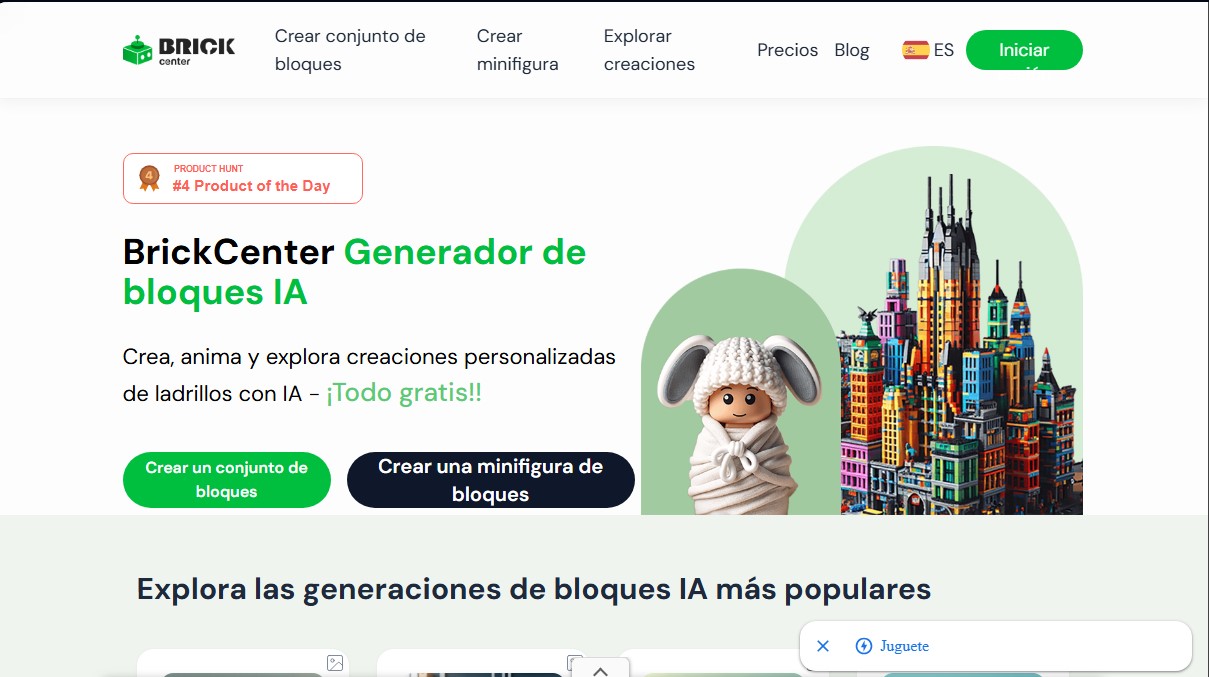
Generate and animate custom brick sets or minifigures from text and images. Get detailed designs and videos of your builds quickly and easily.
General Information about BrickCenter
BrickCenter is a specialized platform for generating custom building block designs using artificial intelligence. This tool allows users to transform text descriptions or images into detailed brick sets and unique minifigures. Its primary function is to facilitate the creation of virtual models that follow the aesthetic of classic construction toys, offering a creative solution for both hobbyists and designers seeking rapid prototypes or digital art in a 3D pixel art style.
The technology driving this system, known as brick AI, utilizes advanced machine learning algorithms to analyze text inputs or visual files. The AI engine interprets key factors such as structure, color palette, theme, and geometric shapes to generate a cohesive visual representation. The workflow consists of three operational steps: first, the user enters a detailed description in the designated field; second, the AI generates the image for review and adjustment; and finally, a motion command can be applied to animate the brick set, converting the static image into a short video clip.
BrickCenter's core capabilities include:
- AI Block Generator: Allows for the creation of everything from complex vehicles and buildings to sci-fi scenes, animals, or decorative elements, all while maintaining a realistic toy aesthetic.
- Custom Minifigure Creation: Transforms user-uploaded photos into block-style characters, ideal for avatars or project personalization.
- Model Animation: A tool to generate 5-second MP4 videos from the generated designs, adding motion to your creations.
- Multi-format Downloads: Users can export their designs as high-resolution images or 3D model files, which are compatible with DIY 3D printing processes for those who wish to bring their projects to life at home.
- Community Gallery: A space to explore popular generations, such as spaceships, castles, or famous character figures, which serve as a foundation for new creations.
This application is particularly useful for content creators, building block enthusiasts, and professionals who require product visualization with a brick aesthetic. The tool streamlines the creative process by allowing users to save and edit designs later from their profile, facilitating experimentation without the need for complex technical modeling software. By focusing on the precision of custom block sets, the AI ensures that every design is unique and tailored to the user’s specifications, whether for recreational purposes or digital design projects.
Features and Use Cases of BrickCenter
How BrickCenter Works
Frequently Asked Questions about BrickCenter
What is BrickCenter and what can I create with this tool?
BrickCenter is an AI platform designed to generate custom building block sets and minifigures for free.
How does the BrickCenter image generator work?
Simply enter a detailed description of the set you're imagining, and the AI technology will handle turning that text into a unique visual image.
Is it possible to animate my designs within BrickCenter?
Yes, the tool allows you to transform your static images into five-second animations by using specific text prompts for movement.
What is included in the BrickCenter Free plan for new users?
The Free plan allows you to generate a total of four images and provides access to the platform's basic building block designs.
What are the benefits of subscribing to the BrickCenter Premium Plan?
This plan offers thirty images per month, high-resolution downloads, commercial use rights, and priority in the design generation queue.
How many images can I generate per month with the BrickCenter Pro Plan?
Pro Plan users have a quota of 150 monthly images and early access to all new features as they are implemented.
How does creating animations affect my image quota on BrickCenter?
Every time you choose to animate a brick set, three units will be deducted from the total image quota available in your plan.
Can I use BrickCenter creations for commercial purposes?
Commercial use rights are reserved for users with an active subscription to the tool's Premium or Pro plans.
What kind of categories can I explore in the BrickCenter gallery?
You can find inspiration in various categories such as vehicles, sci-fi, animals, toys, and designs created by other community members.
How can I download my finished animations on BrickCenter?
Once the AI finishes the animation process, you can download the video file directly from the website or share it via a link.
BrickCenter Pricing
FREE PLAN
Perfect for beginners.
Price: 0 $/month.
• Generate a total of 4 images.
• Access to basic block set designs.
PREMIUM PLAN (MONTHLY)
Best value for enthusiasts.
Price: 2,45 $ for the first month (50% off) and 4,90 $/month thereafter.
• Generate 30 images per month.
• High-resolution downloads.
• Commercial use rights.
• Create 5-second animations from brick sets.
• Restrictions: Creating an animation deducts 3 images from your monthly quota.
PRO PLAN (MONTHLY)
Ideal for professionals.
Price: 9,90 $/month.
• Generate 150 images per month.
• Includes all Premium plan features.
• Early access to new features.
• Create 5-second animations from brick sets.
• Restrictions: Creating an animation deducts 3 images from your monthly quota.
PREMIUM PLAN (ANNUAL)
Best value for enthusiasts with annual billing.
Price: 39 $/year (equivalent to 3,25 $/month).
• Generate 30 images per month.
• High-resolution downloads.
• Priority generation queue.
• Commercial use rights.
• Create 5-second animations from brick sets.
• Restrictions: Creating an animation deducts 3 images from your monthly quota.
PRO PLAN (ANNUAL)
Ideal for professionals with annual billing.
Price: 79 $/year (equivalent to 6,58 $/month).
• Generate 150 images per month.
• Includes all Premium plan features.
• Early access to new features.
• Create 5-second animations from brick sets.
• Restrictions: Creating an animation deducts 3 images from your monthly quota.
BrickCenter Screenshots