Share
Identify and automate repetitive administrative tasks. Train AI agents via chat or screen sharing to manage emails, documents, and internal processes.
What is Caddi?
Caddi is an advanced AI agent designed to identify and automate repetitive tasks within the back-office environment. Unlike traditional automation tools, this platform uses agentic artificial intelligence to discover inefficient workflows directly from the systems a company already uses, allowing operational capacity to scale without the need to increase headcount.
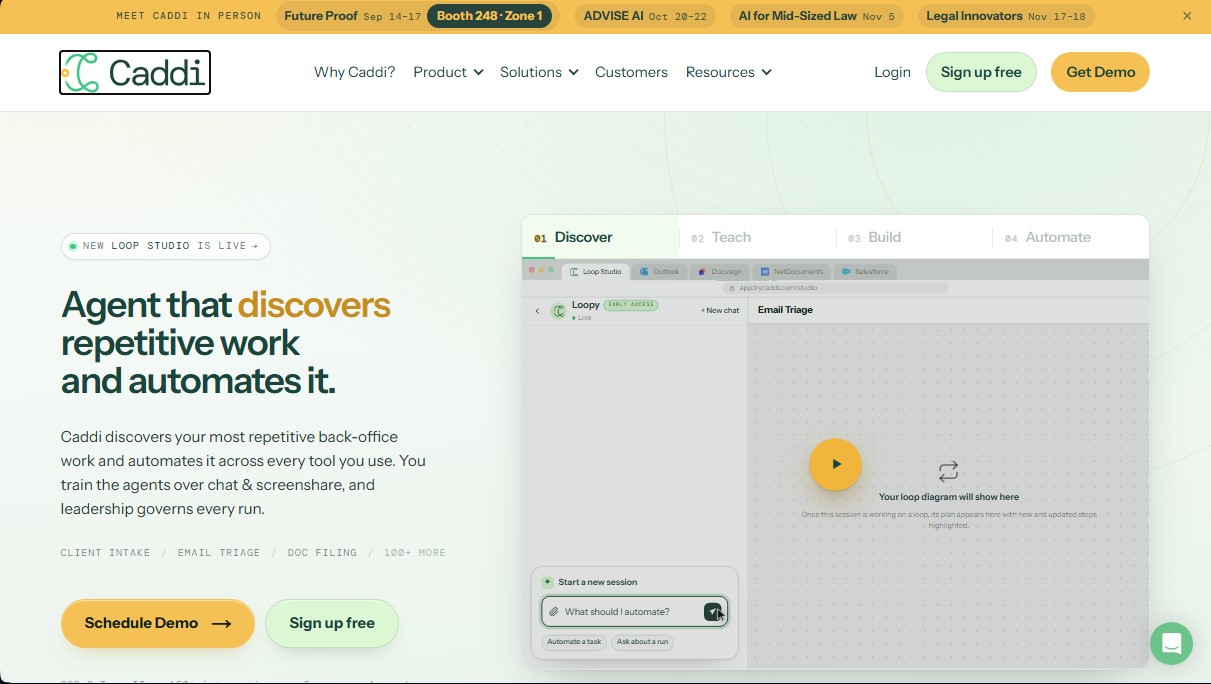
Caddi’s operation is structured into four key phases that ensure precision and control over processes. First, the Discover feature analyzes corporate application usage to detect which tasks are repeated most frequently and which are ideal candidates for automation. Subsequently, users can train the agent through the Teach function by performing a screen recording on their computer and explaining the process via voice or chat—similar to how one would train a new employee.
One of Caddi’s greatest technological advantages is its hybrid approach: it uses AI for judgment and data interpretation but generates deterministic code to execute tasks. This eliminates the "black box" effect, ensuring the agent always follows the same path when faced with the same stimulus, which is vital for reliability in professional environments. Additionally, the platform offers a detailed execution history where every decision, its reasoning, and the permissions used at each step are recorded.
Key capabilities and practical benefits include:
- Email triage and automatic message classification based on content.
- Case management and document filing in platforms like NetDocuments or Salesforce.
- Automated client intake and processing of signed contracts.
- Payment reconciliation and data extraction for billing.
- Connectivity with over 150 integrations, including Microsoft 365, Google Workspace, DocuSign, and industry-specific tools like Clio, iManage, or QuickBooks.
This tool is specifically aimed at law firms, financial services companies, and operations departments that manage a high volume of administrative workloads. With SOC 2 Type II certification, Caddi guarantees a secure and transparent environment, allowing security officers to oversee every automation loop. It is a robust solution for transforming manual processes into autonomous workflows, optimizing time and drastically reducing the margin for human error in data and document management.
Caddi features and use cases
How to use Caddi
Caddi FAQ
What is Caddi and how can it help my business?
Caddi is an AI agent that identifies repetitive administrative tasks and automates them end-to-end using the applications you already use every day.
How are Caddi agents trained to handle my work?
Training is simple: you just use a screen-sharing session and chat to explain the process exactly as you would to a new hire.
What kind of integrations does Caddi offer with other software?
The platform features over 150 integrations with industry-leading tools like Salesforce, Outlook, DocuSign, NetDocuments, and various legal and financial management systems.
Can I monitor the actions the tool takes?
Yes, all executions are logged in a detailed history that allows you to audit which decisions the system made, why it made them, and which permissions it used at any given time.
What happens if Caddi encounters an error or an unexpected situation?
When the system encounters an exception that requires human judgment, it pauses the automation and requests your intervention to ensure no mistakes are made in critical processes.
Can I start using Caddi for free?
We offer a completely free individual plan with no time limit that includes ten active processes and 200 monthly credits to automate your personal tasks.
What security measures does Caddi have in place for my data?
The tool is SOC 2 Type II certified and is specifically designed to meet the security standards required by regulated firms and legal departments.
Caddi pricing and plans
Individual
0 $ (Free for one user, no time limit).
- 200 credits per month.
- 10 active loops.
- Single user.
- 30-day execution history.
- Multi-factor authentication (MFA) and security logs.
- Access to the knowledge base for support.
- Restriction: No overages allowed; a plan upgrade is required if limits are exceeded.
Team
250 $ per user per month (billed monthly).
- 1.000 credits per user per month.
- 20 active loops.
- Unlimited users (billed per individual user).
- 30-day execution history.
- Team management, MFA, and security logs.
- Access to the knowledge base for support.
- Self-service signup with no sales call required.
- Limits: Extra credits at 1,25 $ each and additional active loops for 100 $ per month.
Business
6.500 $ per month (billed monthly).
- Includes everything in the Team plan.
- 20.000 credits per month.
- 100 active loops.
- Unlimited users at a fixed monthly price.
- Advanced integrations and "Scout" feature.
- SAML SSO and DPA available upon request.
- 2-year execution history.
- 99% uptime SLA and 2-business-day support response.
- Limits: Extra credits at 0,75 $ each and additional active loops for 100 $ per month.
Enterprise
Custom pricing (annual contract).
- Includes everything in the Business plan.
- Starting at 50.000 credits per month.
- Starting at 200 active loops.
- Multi-instance support.
- Centralized integration governance.
- Priority loop execution.
- Same-day support and implementation services.
- Limits: Extra credits starting at 0,60 $ each.
- Additional features: SCIM, detailed audit logs, and a dedicated account manager at higher tiers.
Caddi Screenshots
Caddi user reviews
Write a review
Checking your session...
Caddi Reviews
Loading reviews...