Share
What is CamArt AI?
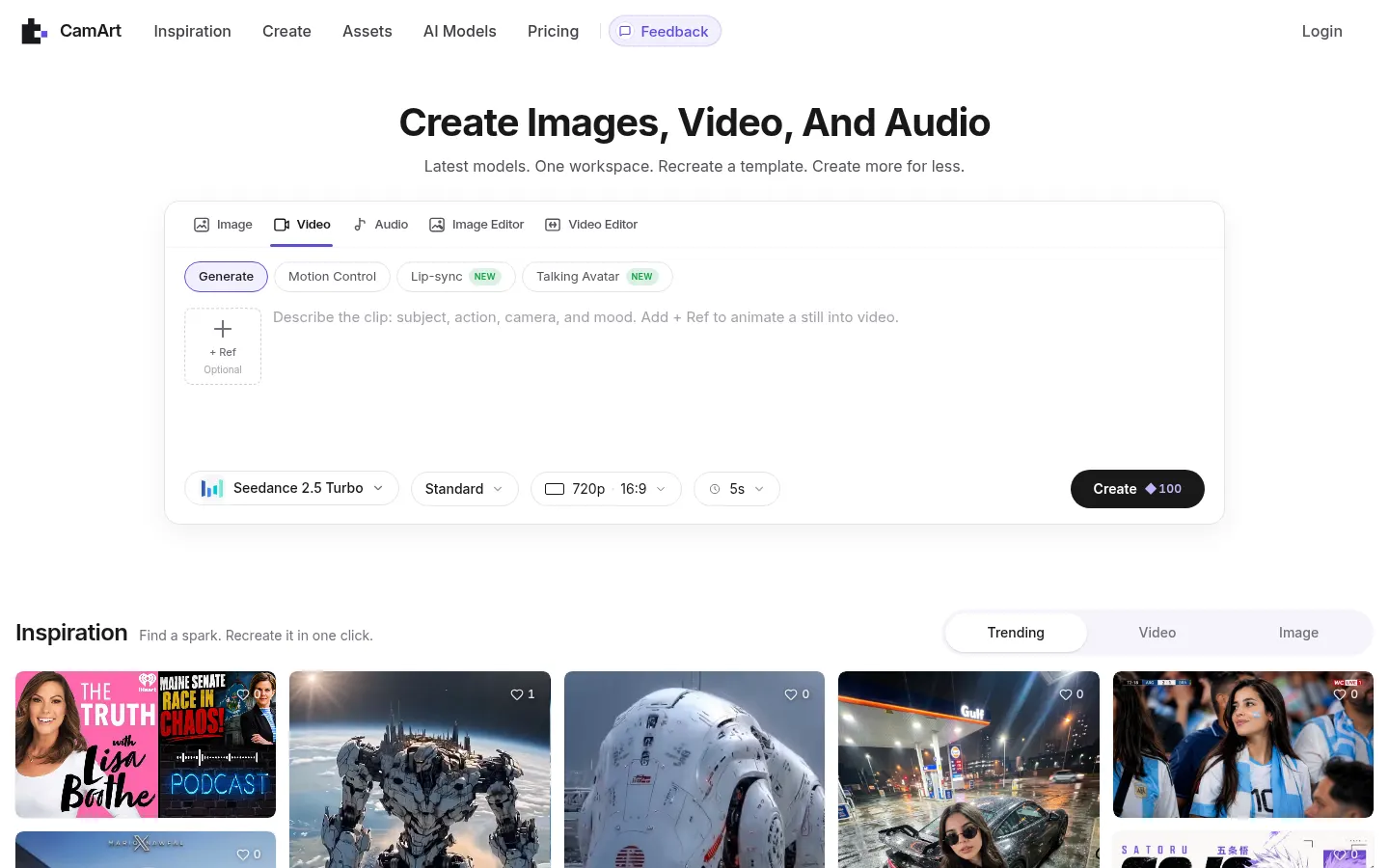
CamArt AI is an AI video generator and online creative studio that puts image, video and audio in a single working session. Its signature feature is Inspiration: a feed of social media "playbooks" that are already working, turned into templates you can recreate in one click because CamArt fills in the prompt for you.
What is CamArt AI used for?
It's for producing social clips, product ads, talking portraits, covers and storyboards without switching tools. On the video side you get text to video, image to video, start and end frames, motion control from a reference clip, talking avatars, lip sync, extend, upscale, restyle, relight and background or character replacement with authorized media. For images you can generate, edit by instruction, upscale to 4K and restyle; for audio there's text to speech, music and sound effects.
How does CamArt AI work and which models does it use?
Pick a playbook from the feed or start from scratch in Create, choose a model and set resolution and length; the exact credit charge shows before you generate. Video runs on Seedance 2.5, Kling 3.0, Veo 3.1, Wan, Vidu, MiniMax, Runway Gen-4 and FLUX, with clips up to 30 seconds and output up to 4K depending on the model, while GPT Image, Nano Banana Pro, Seedream and Qwen Image handle stills with readable text. Failed generations refund their credits automatically.
Who is CamArt AI for?
- Creators adapting viral formats to their brand in 9:16.
- Online stores placing a product in a new scene and animating it.
- Content teams building storyboards and the soundtrack for the edit.
CamArt AI pros and cons
Upsides: one workspace for everything, credit usage shown before every run, private creations by default and commercial use allowed. CamArt doesn't train its own models on your content. Downsides: it relies on third-party providers with their own terms, the entry tier caps resolution and marks outputs, and it blocks deceptive deepfakes, NSFW content and other prohibited uses.
CamArt AI features and use cases
How to use CamArt AI
CamArt AI FAQ
Is CamArt AI free?
You get 20 trial credits at signup for fast and standard models up to 720p; higher resolution and volume need a paid plan (see pricing).
What is a playbook in CamArt AI?
It's a template based on content that's already working on social; hit Recreate and CamArt fills in the prompt so you can make your own version.
Which video models does CamArt AI include?
Seedance 2.5, Kling 3.0, Veo 3.1, Wan 2.7 and 3.0, Vidu Q3, MiniMax H3, FLUX 3 and Runway Gen-4, among others.
How long can a video be?
It depends on the model: Seedance 2.5 and Wan 3.0 reach 30 seconds, Kling 3.0 goes to 15 and Veo 3.1 to 8.
Can I use CamArt outputs commercially?
Yes, commercial use is allowed on every plan, subject to the law, each model provider's terms and other people's rights.
Are my creations public?
No, they're private by default and only go public if you deliberately publish them.
Does CamArt AI train models on my content?
It doesn't train its own models on your content, though third-party generation services may process data under their own policies.
What happens if a generation fails?
CamArt holds the credits when a task starts and returns them automatically if it doesn't finish successfully.
Can CamArt AI make voice and music?
Yes, text to speech, instrumental music and sound effects sit in the same session as your video.
What are some CamArt AI alternatives?
In our directory you can compare Molyin, Higgsfield and Krea AI, which also bring several video and image models together.
CamArt AI pricing and plans
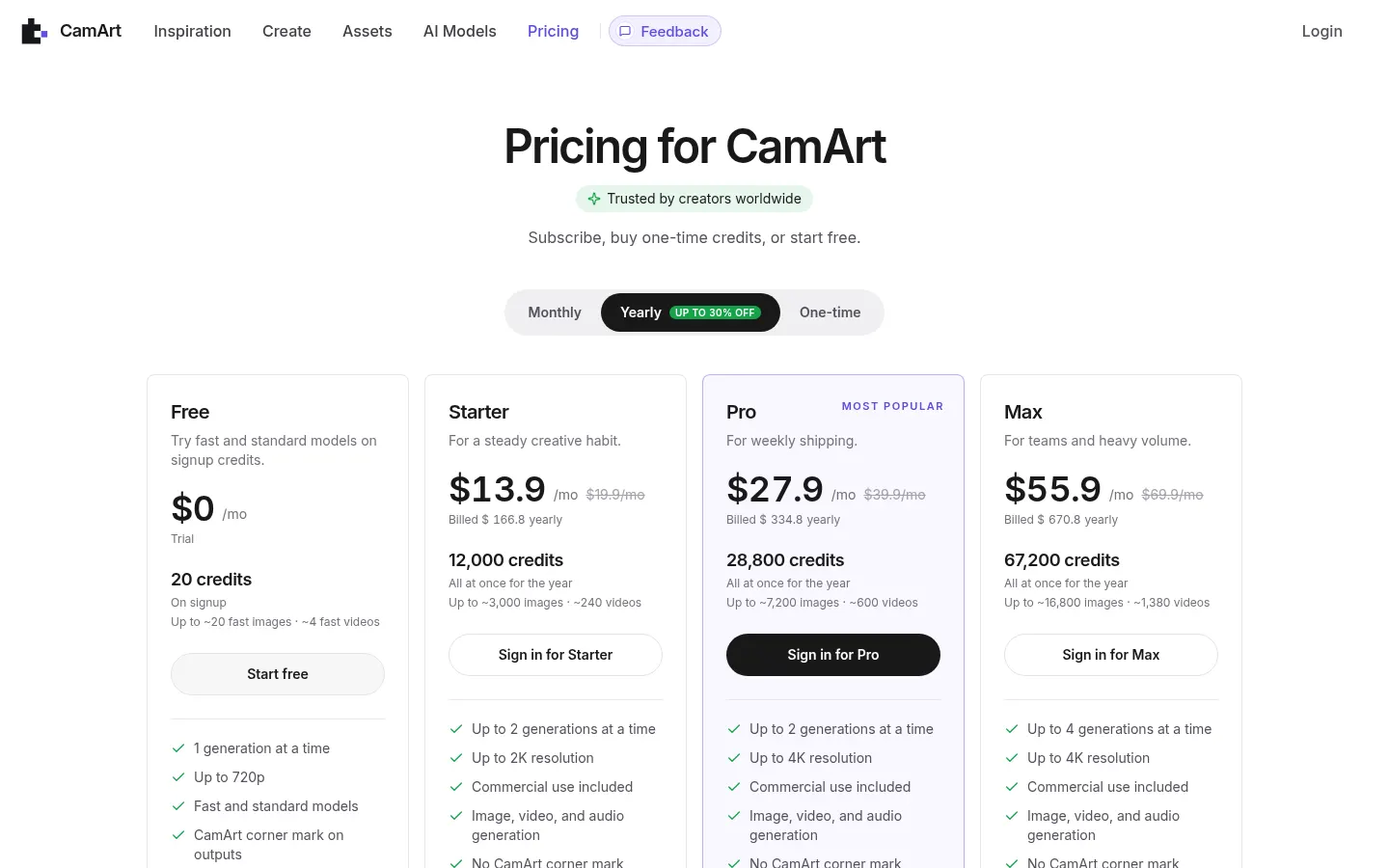
Reference price: 19.9 USD / month. Source · Verified: November 11, 2026
Prices in US dollars from the official website (Checked on: 11/11/2026). Annual billing saves up to 30%. Checkout runs on Stripe; any tax is shown before you pay.
Free: 20 trial credits at signup, 1 generation at a time, up to 720p, fast and standard models, CamArt corner mark, commercial use included.
Starter: $19.90/month with 1,000 credits a month, or $13.90/month billed $166.80 yearly (12,000 credits upfront). 2 parallel generations, up to 2K, no mark, image, video and audio.
Pro: $39.90/month, or $27.90/month billed $334.80 yearly (28,800 credits). Up to 4K and flagship models.
Max: $69.90/month, or $55.90/month billed $670.80 yearly (67,200 credits). 4 parallel generations and priority support.
One-time credits: packs that never expire and work with or without a subscription. Monthly credits don't roll over.
CamArt AI Screenshots
CamArt AI user reviews
Write a review
Checking your session...
CamArt AI Reviews
Loading reviews...
CamArt AI alternatives


Shortodella
Shortodella is an AI image and video generator that combines creation, editing, photo animation and batch review on one chat-driven canvas.
EverGen AI
EverGen AI is an AI video generator that turns a prompt or product photo into vertical Shorts, UGC-style ads or clips with sound, using 14 video models.