

Share
AI interview assistant that listens to questions and suggests real-time answers based on your resume. It’s invisible on video calls and offers mock practice sessions.
What is FlexQ?
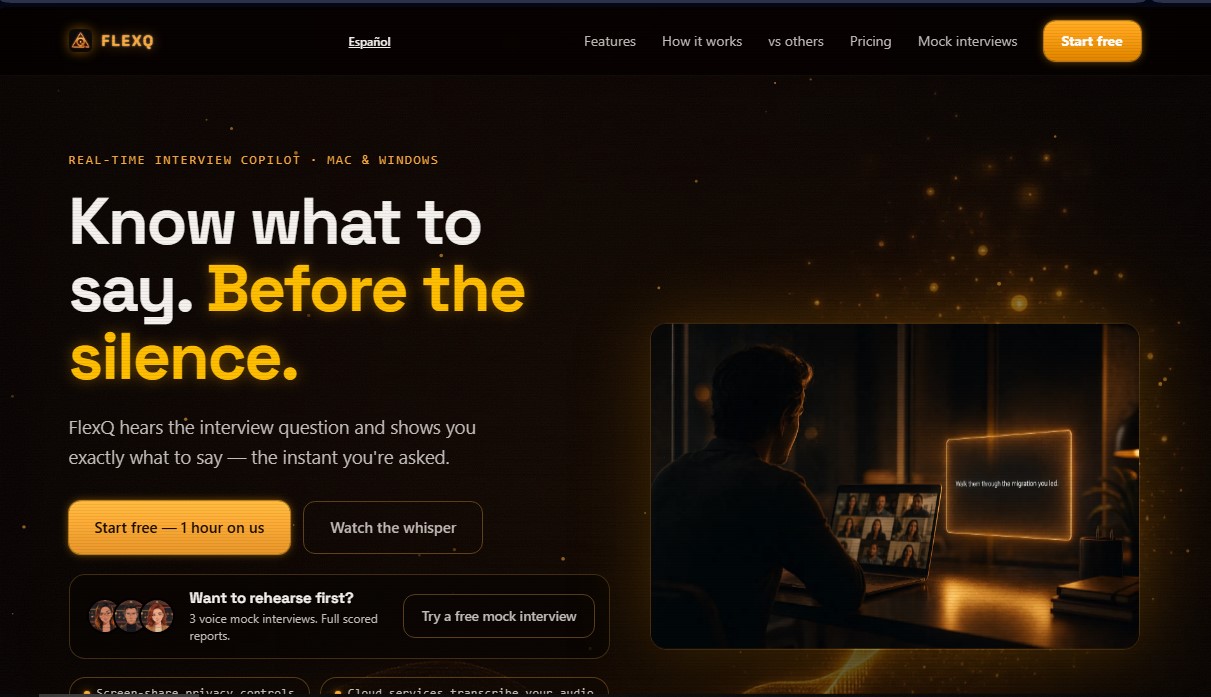
FlexQ is a real-time interview co-pilot designed to assist candidates during video conference hiring processes. This tool functions as an intelligent assistant that listens to the recruiter's questions and displays instant response suggestions on the computer screen. Its primary goal is to mitigate nerves and memory blocks, allowing the user to maintain the flow of conversation without losing eye contact with the interviewer. It is a solution geared toward professionals looking to optimize their performance in technical or management interviews on platforms like Zoom, Google Meet, and Microsoft Teams.
The operation of FlexQ is based on natural language processing and cloud-based audio transcription. Before starting, the user uploads their resume and the job description, allowing the artificial intelligence to contextualize every answer. The app's technology generates "whispers" or help cards that appear in a visual overlay. A distinctive technical feature is its privacy system: it uses operating system functions to make the app window completely invisible during screen sharing, ensuring the recruiter only sees the standard video call.
The core capabilities of this AI tool for job interviews include:
- Instant response generation: Identifies the interviewer's question and offers a narrative guide based on the candidate's previous experience.
- Mock interviews: Enables voice practice with a virtual interviewer that analyzes responses and generates detailed performance reports.
- Call summary and follow-up: At the end of the session, it provides a recap of the key points discussed and the necessary follow-up actions.
- Dynamic customization: The user can modify the focus of the suggested response (adding more detail, simplifying it, or taking a different angle) with a single tap during the conversation.
The FlexQ architecture is optimized for macOS and includes a version for Windows. Its focus is not on fabricating data, but on the efficient retrieval of information from the user's professional history to present it coherently and quickly. In addition to its primary live function, the tool acts as a training environment thanks to its AI-based practice interviews, which help identify weak points before the actual meeting.
This application supports multiple languages, including Spanish, English, French, German, and Portuguese, making it versatile for international hiring processes. By integrating job posting analysis with the candidate's profile, FlexQ ensures that every intervention is aligned with the specific requirements of the position, improving the accuracy of the pitch and the professional's confidence.
FlexQ features and use cases
How to use FlexQ
FlexQ FAQ
What is FlexQ, and how does it help me during a job interview?
It’s a real-time copilot that listens to the interviewer’s questions and instantly provides suggested answers based on your resume.
Can the interviewer see the FlexQ window if I share my screen?
No, the tool uses OS-level content protection to ensure the window remains invisible in screenshots and on platforms like Zoom, Teams, or Meet.
Which operating systems and applications is FlexQ compatible with?
It is available for macOS and Windows, and it works directly within Google Meet, Microsoft Teams, and Zoom meetings.
Does FlexQ offer a free option to test its features?
Yes, you can sign up without a credit card to get one free hour for real interviews and three practice sessions with score reports.
Do I need to set up API keys or have technical knowledge to use FlexQ?
No, the service is fully managed, so you only need to download the app, upload your resume, and start using it without any complex configuration.
Are FlexQ’s answers based on my real experience, or does it make things up?
Suggestions are based exclusively on your resume and the job description to ensure that the answers are truthful and personalized.
Can I use FlexQ if my job interview is in Spanish?
Yes, the tool offers full support for Spanish and other European languages, allowing you to receive assistance and call summaries in your native language.
What do the practice interviews included in the tool involve?
They are voice simulations that use your profile to ask specific questions, evaluating your responses and providing a detailed report to help you improve your performance.
What happens once the interview with FlexQ is over?
After you hang up, you will receive a clean summary of the key points discussed and the necessary follow-up actions to help you prepare for the next round.
FlexQ pricing and plans
Free - 0 $
1 hour of live interviewing.
3 mock interviews with detailed score reports.
No credit card required.
Monthly - 49 $/mes
12 hours of live interviewing per month.
Call summaries and preparation based on your resume and the job description.
Up to 30 monthly mock interview sessions (up to 45 minutes each).
Cancel anytime.
Job Hunt Pass - 99 $ (One-time payment)
25 hours of live interviewing.
90-day access.
Includes call summaries and contextualized preparation.
Up to 30 monthly mock interview sessions.
No recurring subscriptions.
Top-up - 25 $
8 additional hours of live interviewing.
One-time payment that stacks with any active plan.
Perfect for adding more hours if you run out during your job search.
FlexQ Screenshots
FlexQ user reviews
Write a review
Checking your session...
FlexQ Reviews
Loading reviews...
FlexQ alternatives


HannahDream
Chat with virtual partners for adults with customizable memory. Build romantic bonds, evolve your relationship, and generate realistic photos with no explicit content.

SayLingo.ai
Practice 30 languages with AI tutors. Improve your pronunciation and grammar through real conversations, guided lessons, and official exam preparation.
JapanesePal
Practice Japanese conversation with an AI tutor. Improve your fluency and pronunciation for travel, work, or culture with instant corrections.