
Share
Transcribe, translate, and embed subtitles for Mac videos. Batch process files with AI and high-precision speech recognition in a single, streamlined workflow.
What is GeekLink?
GeekLink is a native macOS application designed to unify transcription, translation, and subtitle embedding into a single workflow for video files. This tool functions as an automated subtitle factory that enables efficient management of large volumes of content, eliminating the need to switch between different external services or platforms. It is geared toward content creators, video editors, and localization professionals who need to process multiple files simultaneously.
At its technical core, GeekLink relies on high-performance artificial intelligence models. For speech recognition or speech-to-text, it integrates OpenAI Whisper technology, which guarantees over 95% accuracy and multi-language support. Additionally, it includes a Smart OCR feature based on RapidOCR, capable of detecting and extracting hardcoded subtitles from images using a color picker and manual correction tools. Text translation is processed through DeepSeek AI, which supports more than 13 languages—including Spanish, English, French, German, Japanese, and Korean—offering semantic quality superior to traditional machine translators.
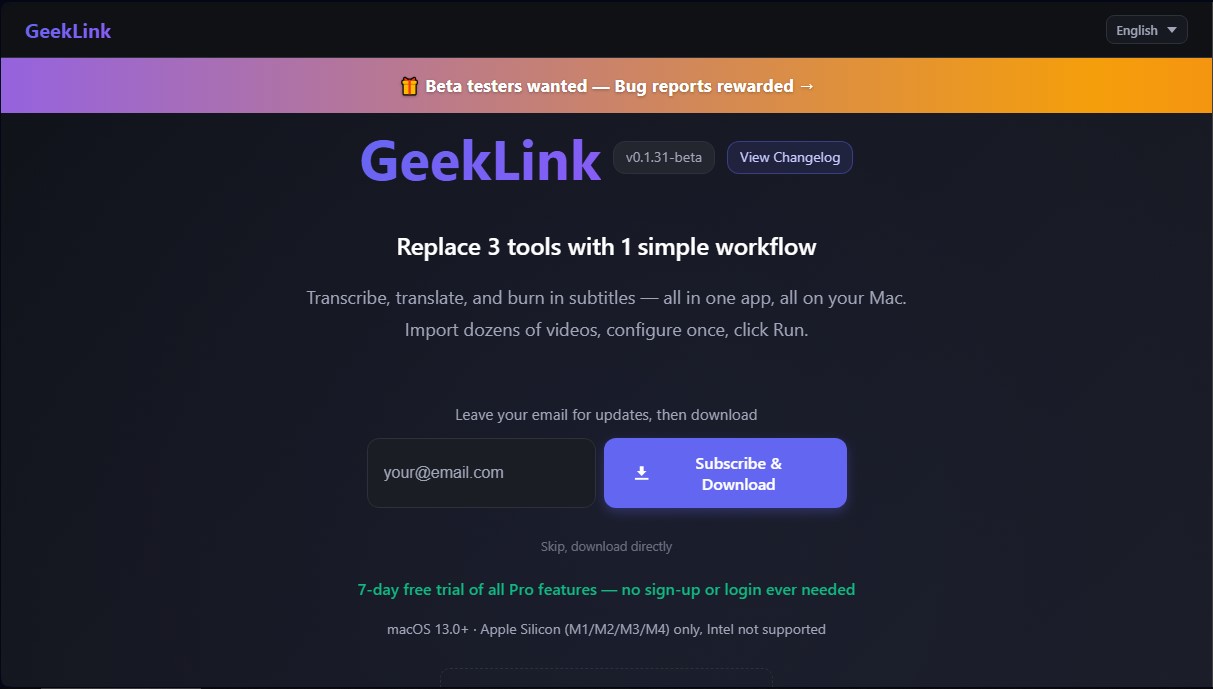
This tool is exclusively optimized for computers with Apple Silicon (M1, M2, M3, and M4) architecture and requires macOS 13.0 or later. Its primary focus is productivity through a Batch Pipeline, allowing users to import dozens of videos at once—such as TV series episodes, entire YouTube channels, or training videos—so the system can automatically process them in a queue after a single initial setup.
Key capabilities and practical benefits include:
- Advanced speech recognition: Accurate audio-to-text transcription with timestamp generation.
- Smart translation: Subtitle conversion into multiple languages while maintaining content consistency.
- Subtitle style editor: An integrated tool to customize font, color, position, and text animations before final export.
- Flexible export: Allows for permanently burning subtitles into the video (burned-in) or exporting them as standalone text files in SRT or TXT formats.
- Local operation: After the initial model download, speech recognition and OCR run locally on the computer, ensuring greater privacy and speed by not relying on external servers for these tasks.
GeekLink solves the problem of tool fragmentation in video post-production, making it possible to go from the original file to a subtitled and translated video in a single step. It is a robust solution for those looking to automate repetitive editing tasks with the precision offered by generative AI and modern machine learning.
GeekLink features and use cases
How to use GeekLink
GeekLink FAQ
What are the main features of GeekLink?
GeekLink allows you to transcribe audio, translate subtitles, and burn them directly into your videos using an automated workflow designed for Mac.
What are the system requirements for GeekLink?
The app requires macOS 13.0 or later and runs exclusively on Apple Silicon Macs with M1, M2, M3, or M4 processors; it is not compatible with Intel-based systems.
Do I need an internet connection to use GeekLink?
Speech recognition and subtitling work locally once the initial models are downloaded, though the AI translation feature does require an active internet connection.
What is the difference between the free and Pro versions?
The free version includes a watermark on videos and has time limits, while the Pro version offers unlimited exports, no watermarks, and batch processing.
How do I activate my GeekLink license after the trial period?
Once your seven-day trial ends, click the "Activate" button in the top-right corner of the app and enter your license key.
Can GeekLink process multiple videos at once?
Yes, the tool includes a batch processing feature that allows you to import dozens of videos at a time to be processed automatically in a queue.
Is GeekLink available for Windows?
Currently, the app is only compatible with Mac, though a Windows version is under development and will be released soon.
Where are exported videos and app data saved?
By default, exported videos are saved in your user "Movies" folder, and internal data is stored in the Application Support library.
GeekLink pricing and plans
Free Plan
Price: Free (not a trial, it's permanent).
OCR Subtitle Extraction: limited to 5 minutes per video.
Video Library: limited to 1 video.
Video Export: includes GeekLink watermark.
Included Features: speech recognition, AI translation, subtitle editor, SRT/TXT export, and batch processing.
Monthly Plan
Price: 12,99 $/month.
OCR Subtitle Extraction: unlimited.
Video Library: unlimited.
Video Export: no watermark.
Customization: includes the option to upload your own watermark.
Full Access: includes speech recognition, AI translation, subtitle editor, SRT/TXT export, and batch processing.
Annual Plan
Price: 99 $/year.
OCR Subtitle Extraction: unlimited.
Video Library: unlimited.
Video Export: no watermark.
Customization: includes the option to upload your own watermark.
Full Access: includes speech recognition, AI translation, subtitle editor, SRT/TXT export, and batch processing.
Lifetime License
Price: 169 $ (one-time payment, limited-time offer; regular price 199 $).
One-time payment for long-term use with no subscriptions.
OCR Subtitle Extraction: unlimited.
Video Library: unlimited.
Video Export: no watermark.
Customization: includes the option to upload your own watermark.
Full Access: includes speech recognition, AI translation, subtitle editor, SRT/TXT export, and batch processing.
GeekLink Screenshots
GeekLink alternatives


AI Translate Manga.com
Translate Japanese manga into English or Simplified Chinese directly in the panels. Supports PNG, JPG, and PDF files, plus a Chrome extension for online reading.

Kapwing Hinglish Subtitles Generator
Generate automatic Hinglish captions for videos in 100+ languages. Includes AI-powered editing and dubbing tools to reach bilingual audiences.
Ask BONBON
AI assistant for electricians that answers NEC and CEC code questions with official citations. Includes calculation tools, blueprint analysis, and a voice assistant.

GLMImage AI Scientific Illustration Generator
Generate precise, labeled scientific illustrations from text. Covers 9 disciplines, including botany and anatomy, for articles and educational materials.