Share
LectMate
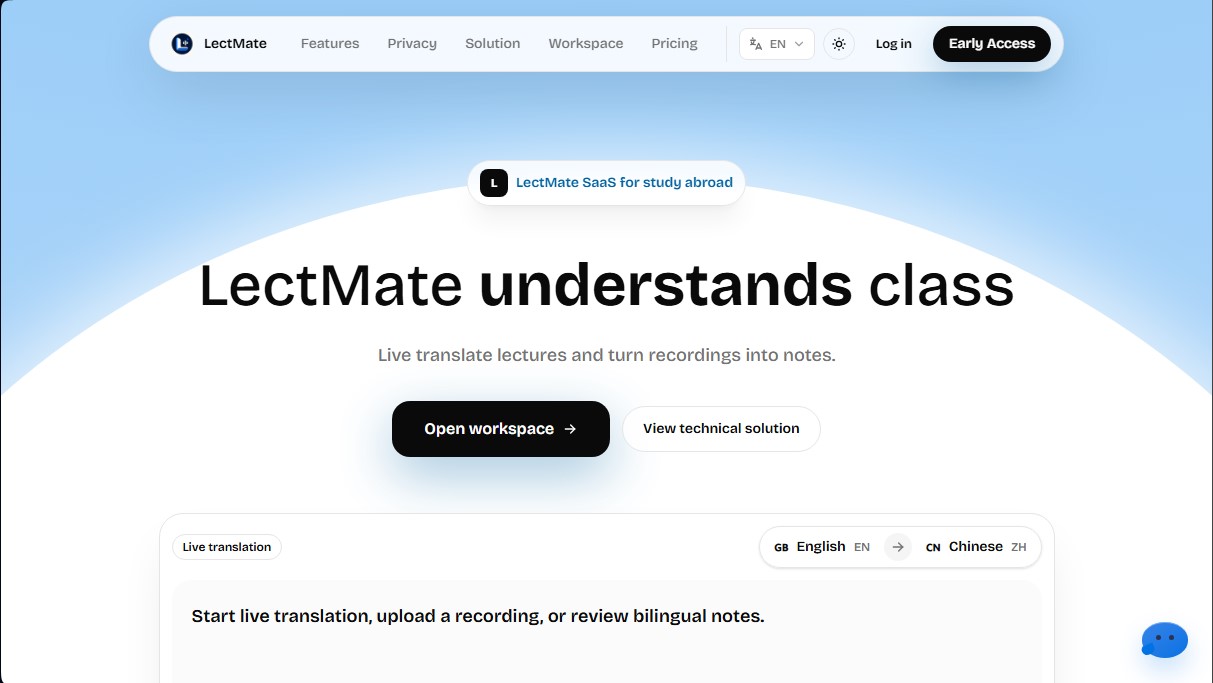
Transcribe and translate live classes. Generate bilingual notes, summaries, and searchable material from recordings to facilitate learning in other languages.
General Information about LectMate
LectMate is an AI SaaS platform specifically designed for international students and professionals who need to follow classes, meetings, or conferences in a foreign language. Its primary function is to transform live audio into real-time transcriptions and simultaneous translations, allowing users to focus on listening instead of rushing to take notes. This tool is especially useful in academic settings where fast speech, heavy accents, or technical vocabulary can hinder comprehension and create context gaps.
The technology behind LectMate is based on OpenAI's simultaneous interpretation models, ensuring low latency in generating captions and translations. The system works by capturing audio through a computer or access device and processing it via advanced language models to clean up punctuation, identify different speakers, and extract key concepts. In addition to live management, it allows for the upload of previous recordings to automatically generate structured study material through its technical transcription solution.
Among its core capabilities, the creation of bilingual notes stands out, where the original text and the translation remain aligned for easier review later. The tool's features include:
- Live transcription with identification of technical jargon and specific terms while the class is in progress.
- Simultaneous class translation to keep up with the speaker without losing the thread of the explanation.
- Generation of summaries with keywords to quickly identify the most important points of a long session without reading the entire text.
- An advanced search engine that allows you to locate any term within the session and play back the exact moment of the original audio.
- File import and export to manage transcription results externally.
The use of LectMate extends beyond the physical classroom, serving as an effective solution for online classes via Zoom, interviews, tutoring, or technical consulting meetings. By turning speech into a searchable study asset, users avoid losing critical information and improve their academic performance. The interface is optimized for scannability, allowing sessions to be organized by subject or topic within a centralized, professional workspace.
Regarding privacy, the application ensures that the content of recordings and transcriptions remains under the user's total control, with clear deletion options and policies that prevent the use of private data for model training by default. LectMate offers multilingual support, covering combinations of English, Chinese, and numerous European and Asian languages, making it a versatile tool for international mobility and global learning.
Features and Use Cases of LectMate
How LectMate Works
Frequently Asked Questions about LectMate
What is LectMate and how can it help me with my studies?
LectMate is a platform designed for study abroad students that transcribes and translates classes in real time to generate bilingual study notes.
Can LectMate be used in in-person classes or only for online sessions?
The tool works for both in-person classes by capturing live audio and for Zoom meetings, interviews, or recordings uploaded to the web.
How does LectMate's credit system work?
LectMate uses one-time payment credit packs that are consumed based on usage time and the type of processing, with no monthly subscriptions required.
Is the information I record and transcribe on the platform private?
Yes, LectMate ensures that users have full control over their data, allowing them to delete recordings and preventing the use of private content to train models.
What languages does LectMate support for lesson translation?
While the primary focus is English and Chinese, the system supports a wide range of global languages, including Spanish, French, German, Japanese, and Korean.
Does the tool allow for searching specific terms within recordings?
Yes, you can search for any word in the session and play back the audio at the exact moment it was mentioned to make studying easier.
What are the bilingual notes generated by LectMate?
They are documents that keep the original text and the translation synchronized, accompanied by keywords and automatic summaries to streamline your review.
Can I upload audio files I’ve already recorded to LectMate?
Yes, the platform allows you to import external recordings to process them, extract transcripts, and generate organized study materials.
LectMate Pricing
200 Credits
Price: 29,9 $ (one-time payment)
Includes 200 LectMate credits for use in classes or short recordings.
Equivalent to approximately 1,000 minutes of standard recording or 600 minutes with speaker separation.
Allows for approximately 200 minutes of real-time transcription.
Allows for approximately 66 minutes of real-time translation.
Validity limit: Credits expire 6 months after purchase.
500 Credits (Popular)
Price: 59,9 $ (one-time payment)
Includes 500 LectMate credits at a reduced price per unit.
Equivalent to approximately 2,500 minutes of standard recording or 1,500 minutes with speaker separation.
Allows for approximately 500 minutes of real-time transcription.
Allows for approximately 166 minutes of real-time translation.
Validity limit: Credits expire 1 year after purchase.
1,500 Credits
Price: 99,9 $ (one-time payment)
Includes 1,500 LectMate credits at the lowest price per unit.
Equivalent to approximately 7,500 minutes of standard recording or 4,500 minutes with speaker separation.
Allows for approximately 1,500 minutes of real-time transcription.
Allows for approximately 500 minutes of real-time translation.
Validity limit: Credits expire 2 years after purchase.
Credit usage information:
Standard recording transcription: 1 credit per 5-minute increment.
Transcription with speaker separation: 1 credit per 3-minute increment.
Real-time transcription and subtitling: 1 credit per minute started.
Live audio interpretation (voice translation): 3 credits per minute started.
LectMate Screenshots