

Share
What is Letros?
Letros is an AI tool for language teachers and schools that brings classes, courses, homework and games into one place, with an exercise generator and an essay checker. It is built for private tutors and language schools that prepare materials and track student progress.
What is Letros used for?
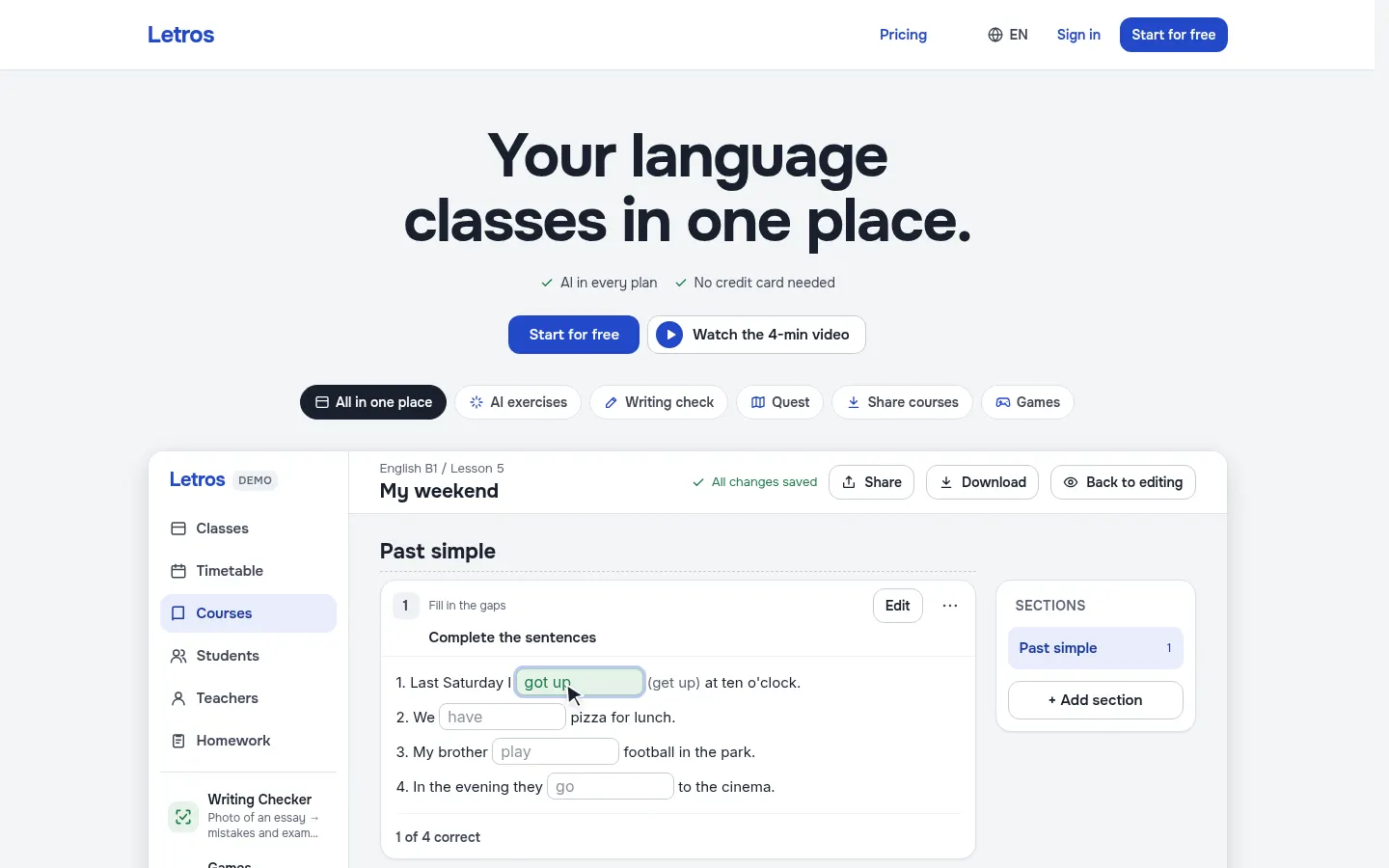
It lets you prepare lessons in minutes and teach live while seeing each student's answers as they type. The AI turns a textbook photo, PDF or Word file into interactive exercises, or builds them from a description: it picks the activity type from 18 options (gap fills, matching, word order, quizzes, spoken answers and more) and fills in the answers. Every exercise can be edited, assigned to a class or printed as a PDF worksheet.
How does Letros grade essays?
The Writing Checker reads handwritten essays from a photo, marks and explains every mistake and scores them against Cambridge criteria, from A2 Key to C2 Proficiency, in about 20 seconds. It also grades Spanish, French, German, Portuguese and Italian essays against DELE, DELF, Goethe, CAPLE and CELI levels. Teachers can leave voice comments on homework and send progress reports to parents.
Who is Letros for?
- Private English or other language tutors managing their own students.
- Language schools with several teachers and a shared timetable.
- Teachers of teen groups who want to gamify lessons with Quest and class games.
Letros pros and cons
On the plus side, AI is included in every account with no credits to buy, students never pay, they sign in without email using logins the teacher creates, and courses export as a ZIP with PDFs. The team will move courses from other platforms, PowerPoint or PDF at no charge. On the downside, the essay checker has a daily cap and the entry account only allows a handful of students.
Letros features and use cases
How to use Letros
Letros FAQ
What is Letros?
Letros is an AI platform for language teachers and schools that combines classes, courses, homework, games, an exercise generator and an essay checker.
Is Letros free?
There is a free-forever account for up to 4 students, and during the launch any plan is free until the end of 2026. See the pricing section.
Can it build exercises from a textbook?
Yes. Snap a photo or upload a PDF or Word file and the AI generates interactive exercises with answers that you can edit.
How does it grade essays?
It reads handwritten essays from a photo, explains every mistake and scores them against Cambridge criteria or DELE, DELF, Goethe, CAPLE and CELI levels.
Do students need an email address?
No. The teacher creates their logins and passwords, and students never pay.
Does it work for schools with several teachers?
Yes. The school invites teachers by link, each runs their own classes, and there is one shared school timetable.
Does Letros have an API?
The official site does not mention a public API; it runs as a web app.
Does Letros work in Spanish?
Yes for teaching Spanish: it grades Spanish essays against DELE levels. The website interface itself is in English.
What are the alternatives to Letros?
On GptZone you can compare it with MagicSchool, Eduaide or Curipod, which also help teachers prepare lessons with AI.
Letros pricing and plans
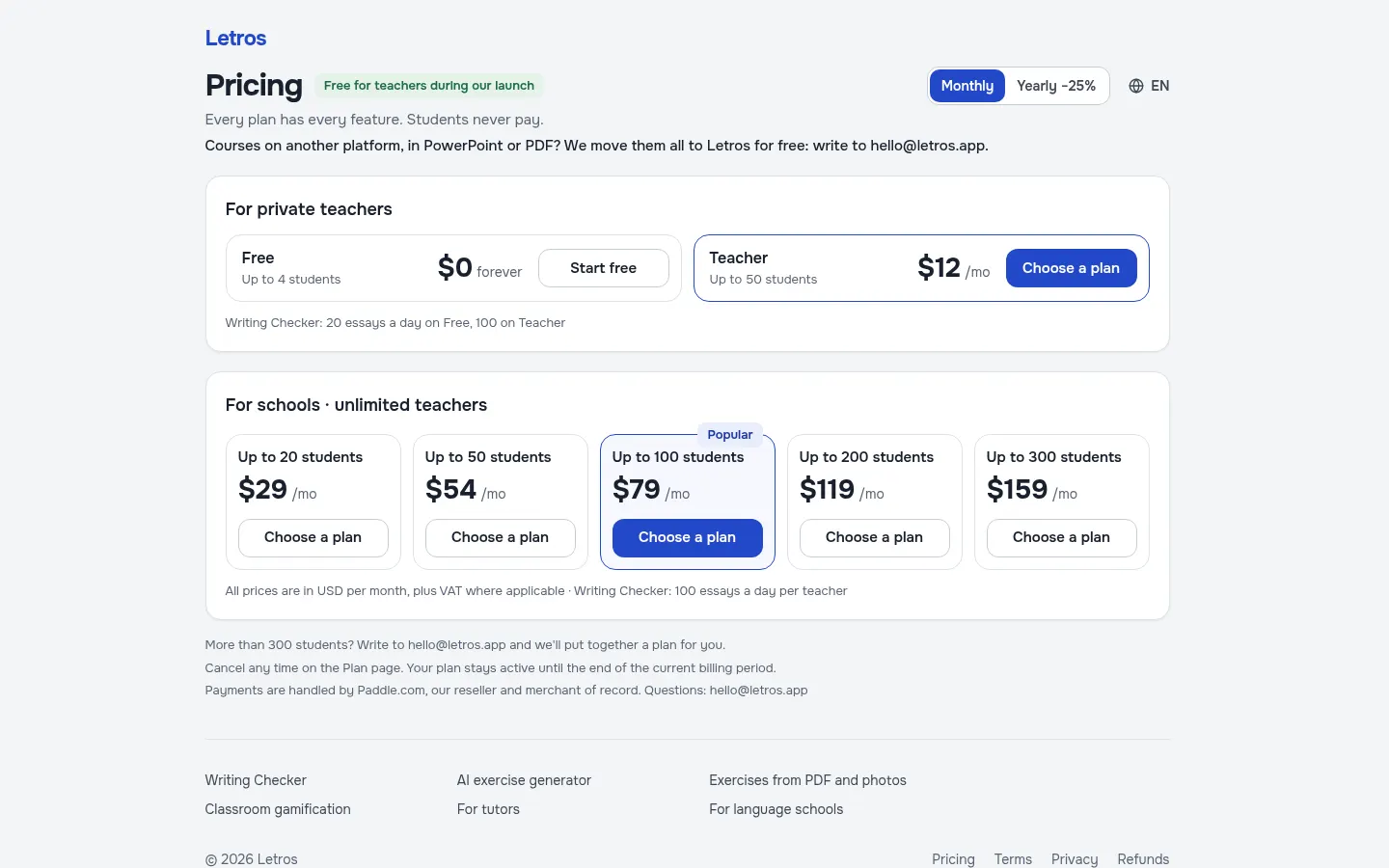
Reference price: 12 USD / month. Source · Verified: November 15, 2026
Prices in US dollars (USD) per month, plus VAT where applicable, as listed on the official site. Checked on: 15/11/2026. Every plan includes every feature; students never pay. Annual billing saves 25%.
Launch offer: any plan free until 31/12/2026, no card needed.
Private teachers: Free, $0, up to 4 students and 20 essays a day; Teacher, $12/month, up to 50 students and 100 essays a day.
Schools (unlimited teachers): $29/month up to 20 students; $54 up to 50; $79 up to 100; $119 up to 200; $159 up to 300. Writing Checker: 100 essays a day per teacher. Over 300 students: custom pricing.
Payments handled by Paddle. Cancel anytime.
Letros Screenshots
Letros user reviews
Write a review
Checking your session...
Letros Reviews
Loading reviews...
Letros alternatives



SayLingo.ai
Practice 30 languages with AI tutors. Improve your pronunciation and grammar through real conversations, guided lessons, and official exam preparation.
JapanesePal
Practice Japanese conversation with an AI tutor. Improve your fluency and pronunciation for travel, work, or culture with instant corrections.