Meaning
Share
Meaning
Manage screen time by blocking distracting apps. Chat with an AI to unlock them, curbing impulsive use and fostering mindful consumption.
General Information about Meaning
Meaning is an innovative AI screen time coach designed specifically for iOS devices. Its primary function is to help users reduce excessive smartphone use by blocking addictive apps or those that cause unnecessary distractions. Unlike conventional blockers, this tool ensures that every time an app is opened, it is a conscious decision, allowing users to access what they truly need while limiting time wasted on infinite or compulsive scrolling.
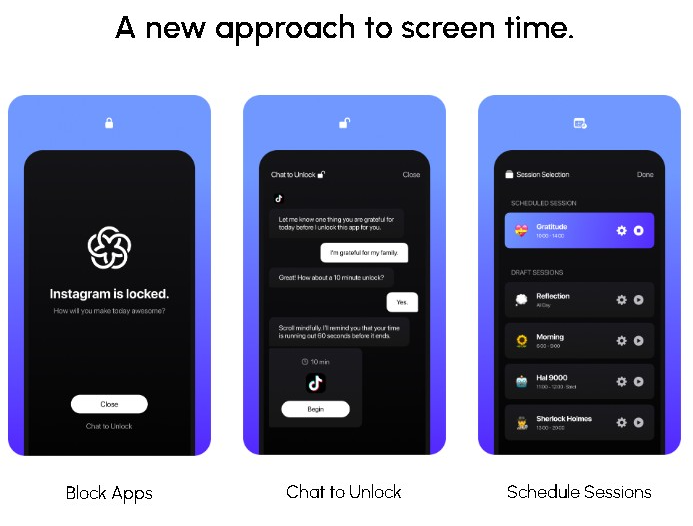
The technology behind Meaning combines the robustness of Apple’s Screen Time API with the power of the GPT-4 language model. This technical approach enables the implementation of a dynamic and conversational app blocking system. To unlock a restricted tool, the user must interact with the AI via chat, explaining their reason for using it. This "positive friction" forces the user to reflect on their true intention before accessing content, breaking the automatic habit of opening apps out of boredom.
Key capabilities and practical benefits include:
- Smart App Blocking: Restricts access to social media, games, and entertainment platforms that typically cause the most distraction.
- Chat-to-Unlock: Uses a Large Language Model (LLM) to converse with the user, ensuring that app access serves a defined purpose.
- Session Scheduling: Allows users to set specific focus periods during which selected apps remain inaccessible.
- Customized Friction: Offers an adjustable level of resistance that is more effective than simple blockers, helping to save hours of daily screen time.
The goal of Meaning is to transform the smartphone into an efficient tool for work and communication, preventing it from becoming a source of wasted time. It is an ideal solution for students, professionals, and anyone looking to improve their digital well-being and regain control over their daily habits. By spending just a few minutes interacting with the assistant to unlock an app, users can avoid long sessions of unproductive browsing.
The app is available on the App Store and follows an accessible functional model. The free plan allows users to utilize basic screen time control features and app blocking, while advanced options are available for those who want to further customize their productivity experience with artificial intelligence.
Features and Use Cases of Meaning
How Meaning Works
Frequently Asked Questions about Meaning
What exactly is Meaning, and how does it help me reduce my screen time?
Meaning is an app blocker that uses artificial intelligence to help you use your phone more mindfully and productively.
How does Meaning’s technology work to restrict access to my apps?
The tool utilizes Apple's official Screen Time API combined with an AI engine based on GPT-4.
Why do I have to chat with the AI to unlock an app?
This system creates a necessary level of friction that forces you to consider your actual reason for using the app, preventing you from opening it out of pure habit.
How is Meaning different from other similar options like Opal or OneSec?
Our app offers a unique approach based on personalization and natural language interaction to help you manage your time.
Is Meaning a free app for all users?
You can download the app for free to access basic control and app-blocking features.
What benefits do I get by subscribing to Meaning’s advanced plan?
The paid plan provides access to premium features and additional tools designed to maximize your productivity and reduce distractions.
Is it really worth the time it takes to unlock apps with Meaning?
Yes—taking a couple of minutes to reflect before opening an app saves you hours of mindless scrolling every day.
Can I schedule specific focus sessions with Meaning?
The app allows you to set up custom schedules and sessions to block distractions when you need to focus on your tasks most.
Meaning Pricing
Free Plan
Price: Free.
• Access to basic screen time management features.
• Block distracting or addictive apps.
Premium Plan
Price: Check the App Store for specific pricing (freemium model with in-app purchases).
• Access to all advanced features and app extras.
• AI chat system (powered by GPT-4) to unlock apps.
• Custom scheduling for focus sessions.
• Configure friction levels for accessing essential apps.
Meaning Screenshots