

Share
Automate patent office action responses. Analyze PDFs, verify citations, and generate official legal drafts ready for review in minutes.
What is PatentSolve?
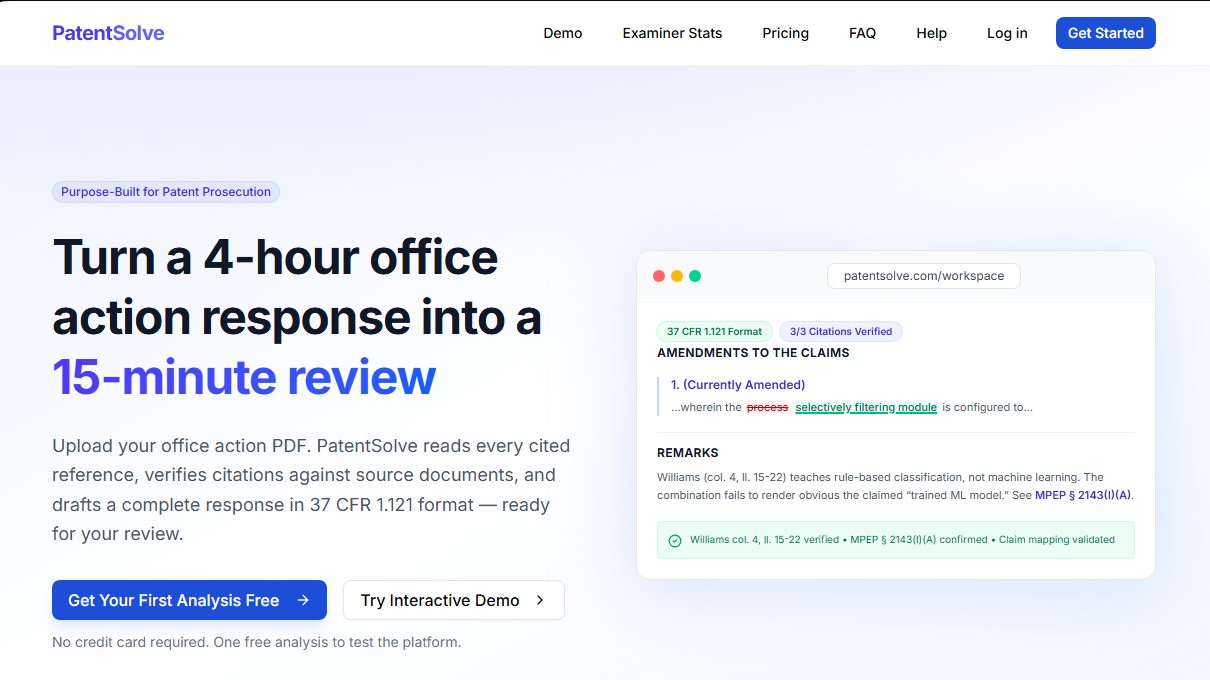
PatentSolve is an AI platform specialized in patent processing, specifically designed to optimize Office Action responses. This tool allows legal professionals and patent agents to transform a manual process that typically requires three to four hours of work into a technical review of just 15 minutes. Its primary function is to assist in drafting comprehensive, structured, and verified responses, ensuring strict compliance with USPTO regulations.
The system’s workflow begins with the upload of PDF documents, including scanned files processed via integrated OCR technology. PatentSolve automatically identifies all rejections, claims, and legal grounds cited by the examiner. The platform's technology goes beyond simple text generation; it performs detailed reference mapping, verifying every citation against original documents, MPEP sections, and relevant case law to prevent referencing errors.
Among its functional capabilities, the automated management of various types of rejections under U.S. law stands out:
- Section 101: Subject matter eligibility analysis using the Alice/Mayo framework.
- Section 102: Anticipation challenges with step-by-step element mapping.
- Section 103: Technical arguments regarding obviousness and motivation to combine references.
- Section 112: Validation of written description, enablement, and term precision.
An advanced technical feature is the Examiner Prosecution Playbook, which analyzes the complete prosecution history of the examiner assigned to the case. It provides statistical data on allowance rates, interview success, and previous behavioral patterns, allowing users to proactively adjust their legal strategy based on real-world data. Additionally, PatentSolve automates the drafting of amendments in the 37 CFR 1.121 regulatory format, correctly applying the required strikethrough and underline markings for direct export to a computer and subsequent filing.
Regarding security, the tool utilizes AES-256 encryption and complies with SOC 2 standards. A critical aspect of confidentiality is that data processed in PatentSolve is never used to train artificial intelligence models. The result is a Word document ready for final attorney review, eliminating repetitive formatting tasks and manual reference searches, thereby maximizing efficiency in intellectual property management.
PatentSolve features and use cases
How to use PatentSolve
PatentSolve FAQ
What types of patent rejections can PatentSolve process?
The tool handles Section 101, 102, 103, and 112 rejections, as well as double patenting and restriction requirements, for both final and non-final Office Actions.
How does PatentSolve ensure the security of my documents and confidential data?
We use AES-256 encryption at rest and TLS 1.3 in transit, while also guaranteeing that your data is never used for training artificial intelligence models.
Can the platform be used with scanned PDF documents?
Yes, the system automatically detects scanned files and uses advanced OCR technology to extract text without requiring any preprocessing on your part.
In what format are PatentSolve’s generated responses delivered?
Responses are exported as Word documents that strictly comply with 37 CFR 1.121 formatting, including strikethroughs for deletions and underlining for additions.
What does the tool’s initial free analysis include?
You can perform a full analysis of an actual Office Action to identify rejections and view examiner statistics without needing to enter a credit card.
How does PatentSolve help users better understand the examiner assigned to a case?
It provides a playbook based on historical data that includes allowance rates, interview receptivity, and appeal outcomes for the specific examiner.
What is the main difference between PatentSolve and a generic AI drafting tool?
Unlike generic tools, this platform is purpose-built for patent law, verifies citations against actual source documents, and understands USPTO procedures.
Can drafts be edited before the final export?
Yes, the workspace includes a full-featured editor where you can modify arguments and claim amendments before downloading the final document.
PatentSolve pricing and plans
Free
0 $
- 1 free trial analysis; no credit card required.
- Full Office Action (OA) analysis and rejection mapping.
- Examiner statistics and insights.
- Prior art reference retrieval.
- Generated response preview (restricted access to full drafting).
Pay Per Use
75 $ per response
- Limit of up to 10 responses per month with no recurring subscription.
- Full AI-powered response generation with specific arguments.
- Claim amendment suggestions.
- Citation verification against source documents.
- Export to Word in 37 CFR 1.121 format.
Pro
299 $ per month
- Limit of up to 50 Office Actions and 25 responses per month.
- Includes the "Examiner Prosecution Playbook" (strategies based on examiner history).
- Priority processing queue.
- Full response history and integrated search functionality.
- Export to Word with rich editing features.
- Email support.
Team
249 $ per user per month (2-seat minimum)
- Limit of up to 50 Office Actions per user.
- Shared workspace for collaboration between firm attorneys.
- Usage dashboard and team analytics.
- Centralized billing.
- Priority email support.
- Volume pricing options for large teams.
PatentSolve Screenshots
PatentSolve alternatives






Persona Assistant
AI-powered identity verification platform that automates KYC and KYB processes, prevents fraud, and securely manages regulatory compliance.