

Share
Generate full-length AI songs in various styles. Create music and vocals from text. Includes a developer API.
What is Treblo?
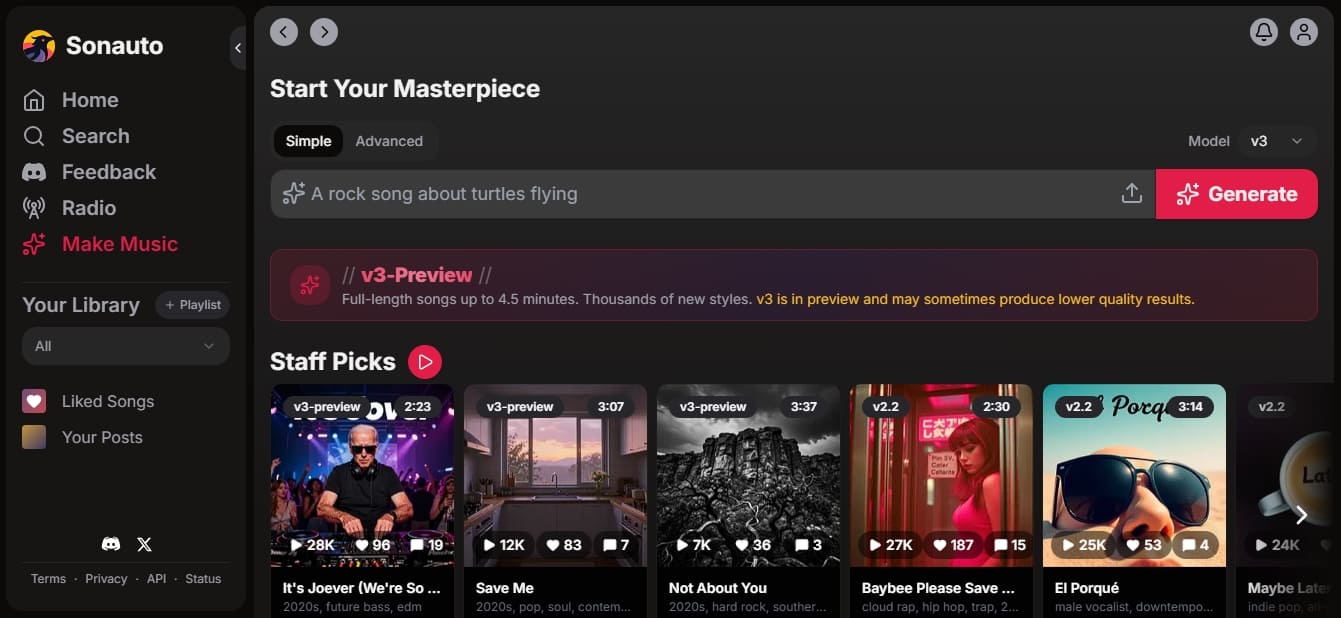
Treblo (formerly Sonauto) is an advanced AI music generation platform designed to transform text descriptions into full songs with musical coherence. This tool allows musicians, content creators, and developers to produce high-quality musical pieces efficiently, removing the technical barriers of traditional composition. Through a desktop-accessible interface, users can define the style, lyrics, and structure of a work using prompts or descriptive tags.
The application utilizes deep learning models to process information and generate audio across various genres. Currently, it features two primary engines: the v2 model and the v3-preview. The v2 system is ideal for quick, 1-minute and 35-second creations, allowing users to adjust technical parameters like beats per minute (BPM) and the seed for reproducible results. Meanwhile, the v3 model enables the generation of full-length songs reaching up to 4.5 minutes, featuring enhanced audio quality and the ability to stream in real-time while the track is being processed.
Key functional capabilities of Treblo include:
Inpainting: Allows for the selection of specific sections of a generated audio track to replace them with new content, making it easy to fix segments without altering the rest of the song.
Audio Extension: Provides the ability to extend an existing track to the left (beginning) or right (end), allowing for the construction of complex structures like extended intros or outros.
Lyrics Alignment: Automatically synchronizes text with the vocals at the word level, providing precise timing metadata.
Instrumental Mode: An option to generate backing tracks without any vocals, based exclusively on genre and style tags.
Parameter Control: Adjust prompt strength to determine how closely the AI should stick to the original instructions versus the model's own creativity.
For technical users, Treblo offers a robust API that allows these functions to be integrated into external applications. It supports multiple output formats, including mp3, wav, flac, m4a, and ogg, with the option to customize the bitrate. The ecosystem is rounded out by a community section where users can explore groups, charts, and a radio station to discover trends and styles generated by other creators. It is a versatile solution for both creative experimentation and professional AI-generated audio production.
Treblo features and use cases
How to use Treblo
Treblo FAQ
What is Treblo and what is it used for?
It is an artificial intelligence platform designed to create full-length songs from text descriptions, style tags, or custom lyrics.
Is it free to generate music on the Treblo website?
Yes, generating songs through the official website is free for all users.
What is the maximum length of songs created with Treblo’s v3 model?
The v3 model allows for the generation of long-form tracks that can reach up to four and a half minutes.
How long are files stored on Treblo?
Songs are deleted from the servers one week after they are created, so it is recommended to download them before that 168-hour window expires.
Can I create instrumental songs with Treblo?
Yes, simply enable instrumental mode and the tool will generate a track focused exclusively on the musical composition without including vocals.
What audio formats does the platform support?
You can export your creations in various audio formats, such as MP3, WAV, FLAC, M4A, and OGG.
Does Treblo offer any options for developers?
Yes, we provide an API with various subscription plans and a free trial of 1,500 credits for technical integrations.
What is the difference between Treblo’s v3 and v2 models?
The v3 model offers superior audio quality and longer songs, and it also allows for real-time listening while the track is being generated.
Treblo pricing and plans
Reference price: 11 USD / month. Source · Verified: October 19, 2026
Free Version
Price: 0 €
Unlimited free song generation through the Treblo web interface.
API Free Trial: 3,000 free credits after a card check (nothing is charged).
Starter Plan
Price: 11 $ / month
20,000 monthly credits (equivalent to approximately 200 songs per month).
Additional credits for 0.06 $ per 100 credits.
Priority user support.
Cost breakdown: a standard 1:35 minute song consumes 100 credits.
Pro Plan
Price: 88 $ / month
160,000 monthly credits (equivalent to approximately 1,600 songs per month).
Additional credits for 0.06 $ per 100 credits.
Priority user support.
Scale Plan
Price: 330 $ / month
660,000 monthly credits (equivalent to approximately 6,600 songs per month).
Additional credits for 0.05 $ per 100 credits.
Priority user support.
Enterprise Plan
Price: 1,150 $ / month
2,875,000 monthly credits (equivalent to approximately 28,750 songs per month).
Additional credits for 0.04 $ per 100 credits.
Priority user support.
Pay As You Go
Price: Based on usage
On-demand credit purchases with no fixed monthly subscription.
Base price of 0.06 $ per 100 credits.
Purchase the exact amount of credits required for the API.
Treblo Screenshots
Treblo user reviews
Write a review
Checking your session...
Treblo Reviews
Loading reviews...
Treblo alternatives

MusicGenerater.com
Generate songs with vocals and music from descriptions or lyrics. Create any genre, extend tracks, and easily separate vocals from instruments.

Music Prompt Studio
Structured AI music prompt generator. Define genres, instruments, and structures to optimize results in tools like Suno, Udio, and MusicGen.


CreateYourMusic.ai
Generate professional music, lyrics, and videos from text or images. Create songs in any style with AI and get licenses for commercial use.

AI Beat Maker
Create music and rap, trap, or lofi beats from text. Quickly generate instrumentals for videos and podcasts without needing complex production software.