Share
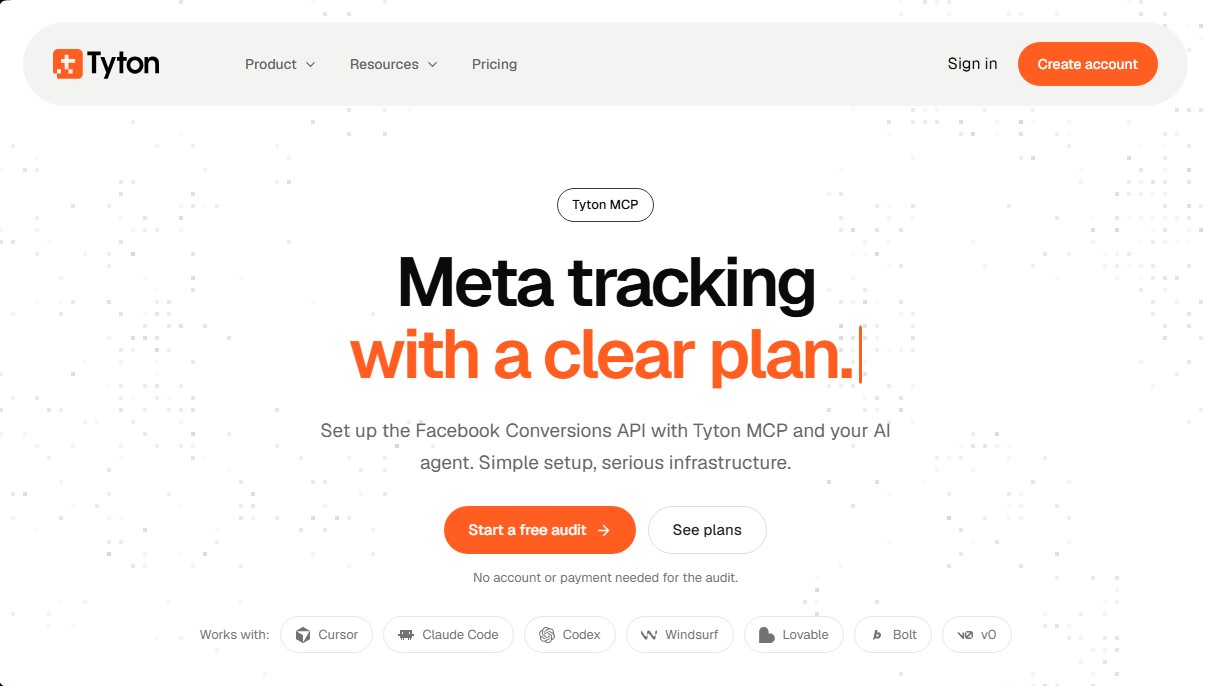
Set up Meta Conversions API and Pixel with AI agents. Streamline tracking audits, event deduplication, and consent management.
What is Tyton MCP?
Tyton MCP is a technical infrastructure designed to simplify the implementation of the Facebook Conversions API (CAPI) and Meta tracking through the use of AI agents. This tool leverages the Model Context Protocol (MCP) to enable AI assistants—such as Cursor, Claude Code, Windsurf, or ChatGPT—to manage event tracking configurations directly and accurately within both website and server code.
The functionality of Tyton MCP is built on delegating complex technical integration tasks to an AI agent. Rather than relying on manual configurations prone to duplication errors or data loss, users connect their agent to the Tyton MCP server. The process begins with a free audit, where the AI analyzes accessible code and the current tracking status to generate a detailed diagnostic report.
The tool’s core capabilities include:
- Hybrid Tracking: Configures events from both the browser (pixel) and the server to ensure robust measurement, even against ad blockers.
- Automatic Deduplication: Implements an event ID matching system so Meta recognizes when a browser action and a server action correspond to the same user, preventing inflated metrics.
- Consent Management: Connects tracking with the site’s cookie management tools, ensuring that tracking is enabled or disabled based on visitor permissions.
- Delivery Monitoring: Provides a real-time dashboard showing event status, indicating whether they have been sent, are being retried, or require technical attention.
- User-Approved Planning: Before implementing any changes, the AI agent proposes a detailed action plan that the developer must validate.
This solution is particularly valuable for web developers, data engineers, and technical marketing teams working in AI-assisted development environments. Compatible with platforms such as v0, Bolt, Lovable, and Codex, Tyton MCP removes the technical friction of connecting an application’s backend to Meta’s servers.
The Tyton MCP approach prioritizes security and control. The tool does not send events immediately; instead, it allows for testing in a verification mode that does not affect live metrics until the user chooses to push to production. This ensures a solid data infrastructure and guarantees that the Meta pixel receives clean, structured information, thereby optimizing ad campaign performance and conversion attribution across desktop and mobile devices.
Tyton MCP features and use cases
How to use Tyton MCP
Tyton MCP FAQ
What exactly is Tyton MCP, and how does it help with Meta tracking?
It’s a tool designed to set up the Meta Pixel and Conversions API using AI agents, streamlining both technical implementation and data infrastructure.
Can I run a free audit with Tyton MCP without creating an account?
Yes. You can connect your AI agent and provide your website URL to receive a diagnostic report without needing to sign up or make a payment.
Which AI development tools is Tyton MCP compatible with?
The platform supports a wide variety of agents, including Cursor, Claude Code, Codex, Windsurf, Lovable, Bolt, and v0.
How does Tyton MCP prevent duplicate event counting?
The system assigns the same event name and ID to actions reported by both the browser and the server, allowing Meta to recognize them as the same conversion.
How does Tyton MCP handle user consent?
It integrates with your website’s consent management platform to ensure tracking only begins with permission and stops immediately if a visitor withdraws their consent.
Do I need to give Tyton MCP full access to my Meta account?
You only need to provide your Pixel ID and a Conversions API token. These are stored using encryption to facilitate the technical transmission of events.
What if I already use Google Tag Manager for my current tracking?
You can keep your current setup while running the audit, which will help you decide which tool should manage each event to avoid unnecessary duplication.
Does Tyton MCP offer a money-back guarantee after I subscribe?
There is a 30-day money-back guarantee applicable to your first subscription payment, whether you choose monthly or annual billing.
Will my AI agent start sending events to Meta automatically?
No. The agent first proposes a tracking plan for your review and approval, then runs tests in verification mode before activating live data transmission.
Tyton MCP pricing and plans
Free Audit
Price: 0 $
Website and code analysis accessible via AI agents.
Diagnostic report to identify tracking errors and plan improvements.
No account creation or payment details required.
Compatible with MCP tools such as Cursor, Claude Code, Windsurf, Lovable, Bolt, and v0.
Starter
Price: 17 $ per month (or 13.60 $ per month billed annually).
1 website.
100,000 monthly event limit.
Meta Pixel and Conversions API setup.
Live event dashboard.
Browser and server-side event deduplication.
7-day event history.
Email support.
Pro
Price: 49 $ per month (or 39.20 $ per month billed annually).
Up to 3 websites.
500,000 monthly event limit.
Includes all Starter plan features.
Extended 30-day event history.
Priority support.
30-day money-back guarantee on the first subscription payment.
Tyton MCP Screenshots
Tyton MCP alternatives

Amplify AI
Automatically generate and post daily TikTok and Instagram videos with AI creators. Create viral content for your brand and manage multiple accounts without filming.


Kairosy AI
Audit and improve your brand reputation in AI search engines. Monitor mentions on ChatGPT or Claude, analyze sentiment, and optimize visibility to attract more customers.