Userdesk
Share
Userdesk
Build no-code AI assistants trained on your documents and website. Automate customer acquisition and offer 24/7 multilingual support on your site.
General Information about Userdesk
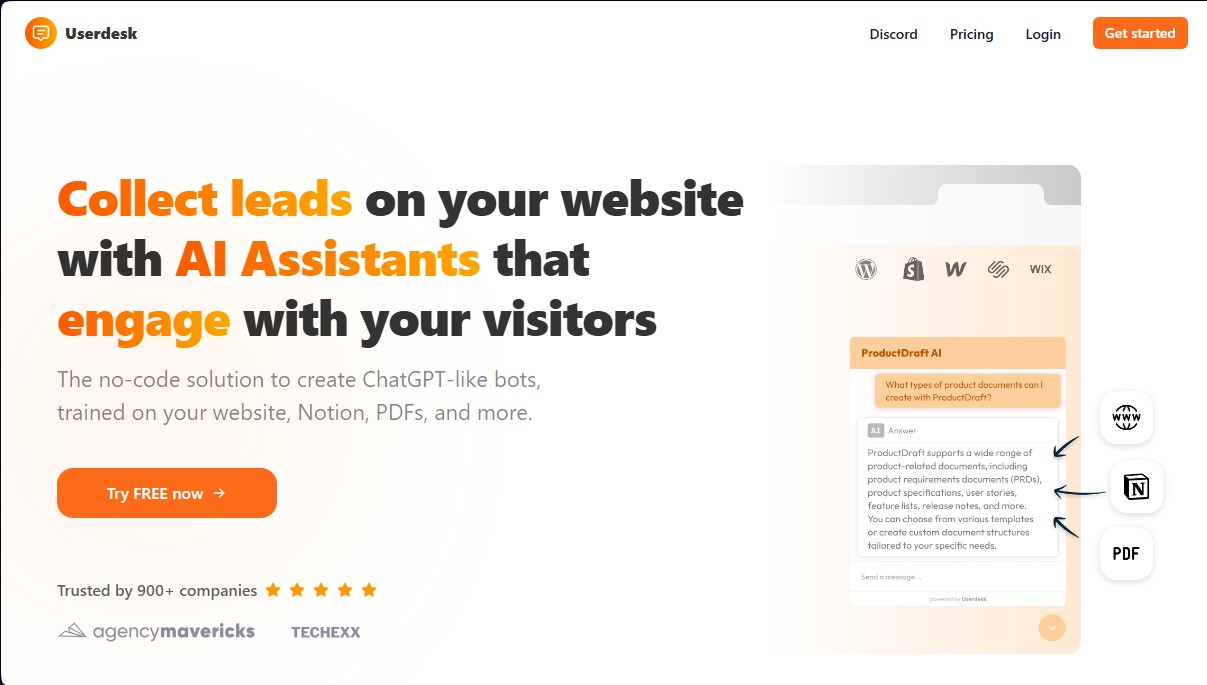
Userdesk is a no-code platform designed for creating custom AI assistants focused on lead generation and automated support. This tool allows businesses to deploy a ChatGPT-powered chatbot trained specifically on their own knowledge base, including websites, sitemaps, PDF documents, Notion pages, or Google Drive files. Its primary function is to interact with visitors autonomously, resolving inquiries and facilitating conversions without the need for constant human intervention.
Userdesk operates using advanced OpenAI language models, such as GPT-3.5 and GPT-4. The setup process is streamlined, allowing you to have an operational assistant ready in just a few minutes. The AI processes the provided content to understand the business context and deliver precise answers based exclusively on that information. A key technical feature is its daily auto-sync capability, which ensures the chatbot automatically retrains whenever information is updated at the original source, such as a website or a shared workspace.
This tool is highly beneficial for marketing, sales, and customer service teams looking to optimize lead generation and improve user satisfaction through instant responses. Its core capabilities and functional benefits include:
- Lead capture on autopilot: The assistant interacts with visitors to identify buying intent, schedule calls, and proactively close deals.
- Native multi-language support: The system supports over 52 languages, allowing the chatbot to respond in the user's language even if the original training material is in a different language.
- Multi-platform integration: It is compatible with popular ecosystems such as WordPress, Shopify, Wix, Webflow, and Squarespace. Additionally, it can be integrated into work environments like Slack or connected via an HTTP API.
- Interaction analytics: It provides a visitor insights dashboard to monitor conversation history, identify common issues, and better understand market needs.
By implementing Userdesk, companies can offer 24/7 support from both desktops and mobile devices, ensuring no query goes unanswered. The platform allows for customizing the widget's aesthetics to maintain consistency with the brand's visual identity. It is a practical solution for businesses requiring a scalable and intelligent customer service infrastructure, eliminating the need to manually manage every initial user interaction.
Features and Use Cases of Userdesk
How Userdesk Works
Frequently Asked Questions about Userdesk
Is there a free version of Userdesk?
Yes, we offer a free plan that allows you to create one chatbot and send up to thirty AI messages per month at no cost.
What types of files can I use to train my assistant?
You can use website links, Notion pages, PDFs, and even Google Drive documents to build your bot's knowledge base.
Does Userdesk support multiple languages?
Our platform supports over fifty-two languages and can automatically respond in the user's preferred language.
Can I use the GPT-4 model in my chatbot?
Access to the GPT-4 model is available to all users subscribed to our Growth, Pro, or Enterprise plans.
How do I add the Userdesk assistant to my website?
Each assistant comes with a unique embed code that you can copy and paste into your site. It is compatible with platforms like WordPress, Shopify, and Webflow.
Does the chatbot's content update automatically if I change my website?
Plans at the Growth level and above include a daily sync feature that automatically updates data from your website or Notion.
Is it possible to view the conversations visitors have with the bot?
You have full access to the interaction history from your dashboard, allowing you to analyze customer inquiries and improve your product.
Can I remove the Userdesk branding from the chat widget?
You can remove the platform's branding through the Enterprise plan or by purchasing a specific add-on to remove branding from all your widgets.
Does Userdesk offer a Slack integration?
Yes, we provide a Slack integration that allows your team to query the assistant directly from your workspace.
How can I contact technical support?
You can send an email to our official support address to resolve any technical issues or request custom features.
Userdesk Pricing
Free
- 1 chatbot.
- 30 AI messages per month.
- Unlimited live chat messages.
- 50,000 training words.
- GPT-3.5 model.
- API access.
- Slack integration.
Hobby: $19 per month ($16 per month billed annually).
- 1 chatbot.
- 2,000 AI messages per month.
- 500,000 training words.
- GPT-3.5 model.
- API access.
Growth: $49 per month ($41 per month billed annually).
- 2 chatbots.
- 4,000 AI messages per month.
- 1,000,000 training words.
- GPT-3.5 and GPT-4 models.
- API access.
- Daily auto-sync.
Pro: $99 per month ($83 per month billed annually).
- 5 chatbots.
- 15,000 AI messages per month.
- 2,000,000 training words.
- GPT-3.5 and GPT-4 models.
- API access.
- Daily auto-sync.
Enterprise: $499 per month ($416 per month billed annually).
- 50 chatbots.
- 100,000 AI messages per month.
- 50,000,000 training words.
- GPT-3.5 and GPT-4 models.
- API access.
- Remove "Powered by Userdesk" branding.
- Daily auto-sync.
Add-on: $39 per month.
- Remove "Powered by Userdesk" branding from all chat widgets (included by default in the Enterprise plan).
Userdesk Screenshots