
Share
Turn images into 3D VTuber avatars. Features AI expressions, face tracking, and OBS integration for simple, professional live streaming.
What is virmii?
Virmii is a platform specialized in creating VTuber avatars from static images. Its primary function is to transform a character illustration into a functional 3D model ready for live streaming. This tool is designed for content creators and streamers looking for an accessible way to enter the world of VTubing without needing advanced technical knowledge in professional modeling or rigging.
Virmii's operation is based on an infrastructure that combines image processing and 3D generation. It utilizes advanced technology for base 3D model creation and automatic humanoid rigging, handling processing management, VRM format export, and facial tracking features. The process begins by uploading a front-facing image of the character—preferably full-body—which the AI interprets to build the avatar's 3D geometry and bone structure.
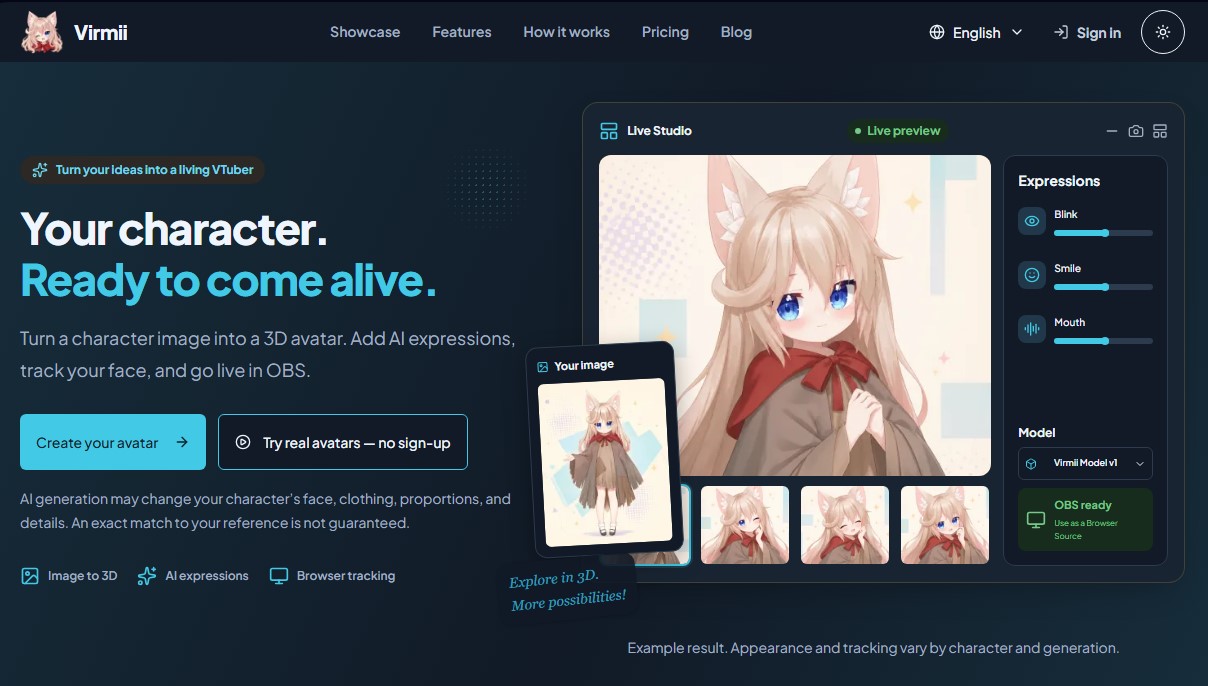
One of the tool's standout capabilities is AI expression generation. The system allows for the creation of a set of essential gestures, such as blinking, smiling, winking, and mouth movements for speech. These expressions are fundamental for giving the avatar personality during live streams. It is important to note that, as an AI-based process, the final result may show variations in details, clothing, or proportions compared to the original reference image, as the system always prioritizes the technical viability of the 3D model.
For setup, Virmii offers a Live Studio solution that runs directly from a computer browser. The system uses a webcam for real-time facial tracking, instantly translating the user's movements and gestures to the avatar. Integration with streaming software is seamless via an OBS Browser Source, which simplifies the technical configuration and eliminates the need to install complex additional software on the device.
Its main features include:
- Image-to-3D Conversion: Automated transformation of 2D files into three-dimensional models with volume.
- Camera-based Facial Tracking: Control the avatar through the user's actual movement in front of the monitor without additional sensors.
- VRM Format Compatibility: Option to download the generated model for use in other applications compatible with this industry standard.
- Native OBS Studio Integration: Optimized setup for live streams via private browser source links.
- Expression Generation: Creation of a set of automatic facial animations to enhance on-screen expressiveness.
The practical benefits of Virmii lie in the automation of processes that traditionally require weeks of manual work and specialized knowledge. By centralizing modeling, rigging, and tracking into a single web interface, it allows any user to quickly obtain a functional custom avatar for their video projects or live broadcasts.
virmii features and use cases
How to use virmii
virmii FAQ
What is Virmii and what is this platform used for?
It is a tool that transforms a static character image into a functional 3D avatar designed specifically for content creators and VTubers.
Do I need 3D modeling experience to use Virmii?
No prior design experience is required, as the platform automates the entire creation and rigging process.
Will the final Virmii result be an exact copy of my drawing?
Due to the nature of artificial intelligence, variations in proportions or clothing details may occur, so the likeness is not always exact.
How do I integrate the avatar into streaming software like OBS?
The system generates a private browser source that you can copy and paste directly into your OBS scene without needing to install any additional software.
Can I download my Virmii model to use in other applications?
Yes, you can download the file in VRM format, though AI-generated expressions are limited to use within our own platform and browser source.
How many credits do I need to generate a model and its expressions?
Creating the base 3D model costs fifty credits, and the set of additional facial expressions requires another twenty credits.
What are the requirements for the image I upload to the site?
For the best possible results, we recommend uploading a clear, full-body, front-facing image that allows all of the character's features to be easily identified.
virmii pricing and plans
Free
0 $
Purchase credits as needed.
AI Expressions: 20 credits per set.
Storage for up to 5 models.
Standard generation queue.
Includes VRM downloads, browser-based tracking, OBS output, and commercial use.
Creator
15,00 $ per month (plus tax)
150 credits included every month.
3 AI expression generations per month (then 20 credits per set).
Storage for up to 50 models.
Priority generation queue.
Credit rollover limit of 420.
Includes VRM downloads, browser-based tracking, OBS output, and commercial use.
Pro
29,99 $ per month (plus tax)
400 credits included every month.
6 AI expression generations per month (then 20 credits per set).
Storage for up to 200 models.
Top priority generation queue.
Credit rollover limit of 1120.
Early access to new features.
Includes VRM downloads, browser-based tracking, OBS output, and commercial use.
Credit Packs (One-time payment)
From 7,99 $ to 34,99 $
Starter (7,99 $): 70 credits (enough for 1 model and 1 expression set).
Popular (18 $): 210 credits (enough for 3 models and 3 expression sets).
Creator Pack (34,99 $): 560 credits (enough for 8 models and 8 expression sets).
Purchased credits never expire and do not require a subscription.
Usage Costs (Credits)
3D model generation: 50 credits per unit.
AI expression set: 20 credits per set.
Tracking, OBS output, and downloads: No additional credit cost.
virmii Screenshots
virmii alternatives

Avatar SDK
Create photorealistic, animated 3D avatars from a selfie for gaming, the metaverse, or marketing. Offers local or cloud integration with instant results.

Eternity AC
Create interactive 3D digital clones that replicate your voice, thoughts, and appearance. Generate realistic avatars for personal, professional, or social media use.


KnowLens.ai
KnowLens.ai uses AI to create infographics, visual summaries, posters, carousels and short explainer videos from a topic, notes or plain text.