
Share
Create custom outfits by uploading photos of your clothes and yourself. Includes virtual try-on, color analysis, and tips to optimize your wardrobe.
What is WhatToWear?
WhatToWear.ai is a smart styling platform designed to simplify the creation of personalized outfits starting from a single piece of clothing. This AI tool allows users to visualize complete looks without having to physically try on every item, streamlining daily decision-making in front of the closet or before making a purchase.
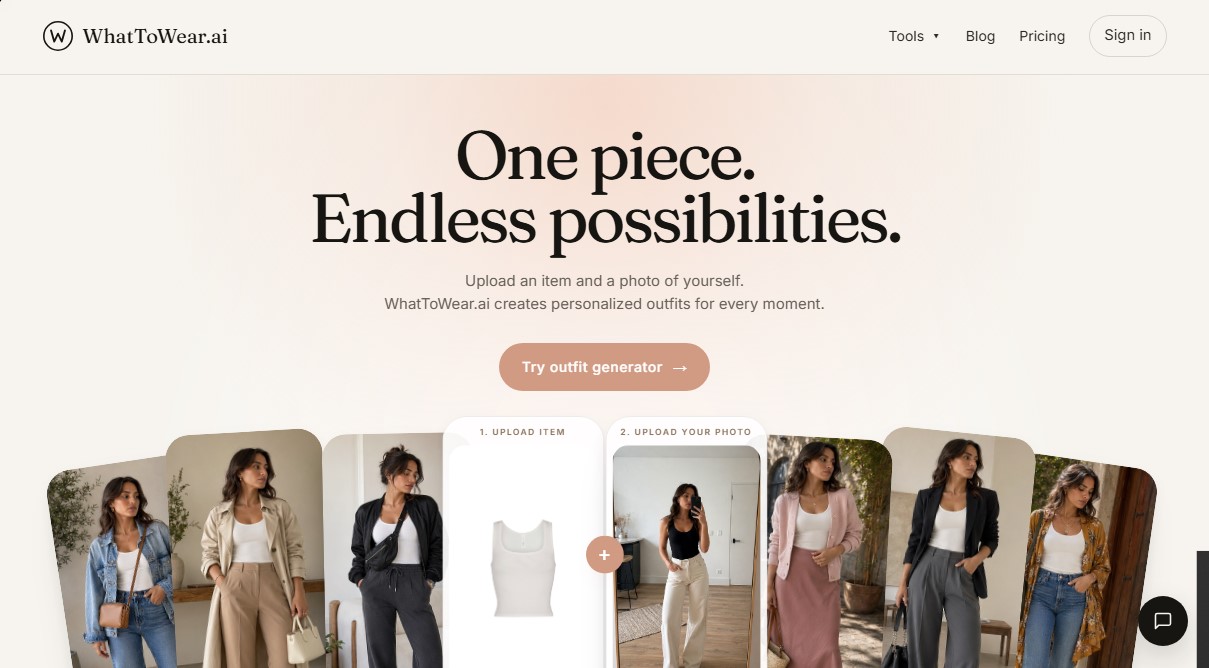
The way WhatToWear.ai works is straightforward and functional. Users upload a clear, well-lit image of the garment they want to style (in JPG, PNG, or HEIC formats). The system uses image recognition algorithms to automatically detect the category and dominant color of the piece. For more precise and personalized results, the app allows users to upload a full-body photo, activating Person Mode to generate a virtual try-on that shows how outfits look on their own silhouette and physical features.
Core Capabilities and Key Features:
- Multi-Scene Outfit Generator: Automatically creates suggestions for specific contexts, such as office wear, casual weekend styles, or evening looks.
- Virtual Try-On: Uses a real reference of the user to evaluate how garments harmonize with their body and face.
- Personal Color Analysis: An integrated tool that evaluates which color palettes best suit the user based on their physical features.
- Hairstyle Analysis: Provides comprehensive aesthetic recommendations that complement the style of the chosen outfit.
- Professional Style Notes: The AI applies design rules, such as balancing proportions, using two- or three-tone palettes, and selecting a single focal point to avoid cluttered outfits.
The technology behind WhatToWear.ai focuses on offering wearable and realistic suggestions that users can easily replicate with clothes they already own or through new purchases. By processing images locally on the device, it ensures a seamless experience from both desktop and mobile.
This solution is ideal for individuals looking to optimize their wardrobe and save time every morning, as well as for fashion enthusiasts who want to explore new possibilities with basics or hard-to-style pieces. By focusing on functionality and speed, WhatToWear.ai eliminates the need to browse through endless trend catalogs, providing direct, coherent styling solutions tailored to each person's body type.
WhatToWear features and use cases
How to use WhatToWear
WhatToWear FAQ
What is WhatToWear and what is its purpose?
WhatToWear is an AI-powered personal stylist that creates complete outfits based on a single item from your wardrobe.
How do I generate a new outfit on WhatToWear?
Simply upload a clear photo of the garment and a full-body photo of yourself, and the tool will automatically generate four styling suggestions.
What are the requirements for the photos I upload to WhatToWear?
Photos must be in JPG, PNG, or HEIC format, under 8MB in size, and show the item or your body with clear, sharp lighting.
Is there a way to try WhatToWear for free?
The platform offers a free plan that includes one outfit generation every three days and access to your saved look history.
What is the difference in credit costs between Garment Mode and Person Mode?
Generating an outfit using only the garment costs one credit, while using your own photo as a reference in Person Mode costs two credits.
What are the benefits of a monthly WhatToWear Pro subscription?
The Pro plan provides 30 monthly credits that can be used for all features, including the virtual try-on and personal color analysis.
How does WhatToWear ensure my photos stay private?
The tool processes images directly on your device, meaning your private photos are never uploaded to our servers during the design process.
Do credit packs purchased separately ever expire?
One-time credit packs have no expiration date; they remain in your account until you are ready to use them.
WhatToWear pricing and plans
Free
0 $ forever
1 free look every 3 days.
Saved look history.
Ability to purchase credit packs at any time.
Restrictions: Does not include monthly credits or access to Person Mode.
Pro Monthly
9,99 $ per month
30 monthly credits.
Standard tool usage: 1 credit.
Person Mode usage: 2 credits.
Credits reset every month.
Pro Annual
4,99 $ per month (billed annually at 59,88 $)
30 monthly credits.
Standard tool usage: 1 credit.
Person Mode usage: 2 credits.
Credits reset every month.
Credit Packs (One-time payment)
From 14,99 $ (30 credits) to 29,99 $ (90 credits)
Credits never expire.
One-time payment, no subscription.
Usage per tool: 1 credit for color analysis, hairstyle, or garment generator; 2 credits for generator or virtual try-on with person reference.
WhatToWear Screenshots
WhatToWear user reviews
Write a review
Checking your session...
WhatToWear Reviews
Loading reviews...
WhatToWear alternatives

Hairporium
AI that recommends hairstyles, cuts, wigs, and extensions based on your lifestyle and budget. Offers personalized care plans to help you nail your new look.


BodyTypeCalculator.ai
Determine your body type and proportions with three measurements. Get instant results and optional AI analysis to improve your style and clothing choices.

The Muse Shop
Turn Pinterest photos and boards into a personalized shop. This AI identifies your aesthetic to offer real clothes and accessories you can buy directly.

Wearly Labs
Analyze your seasonal color and body type with AI. Get color palettes, flattering cuts, styling, and a profile for ChatGPT, Claude, or Gemini.