

Share
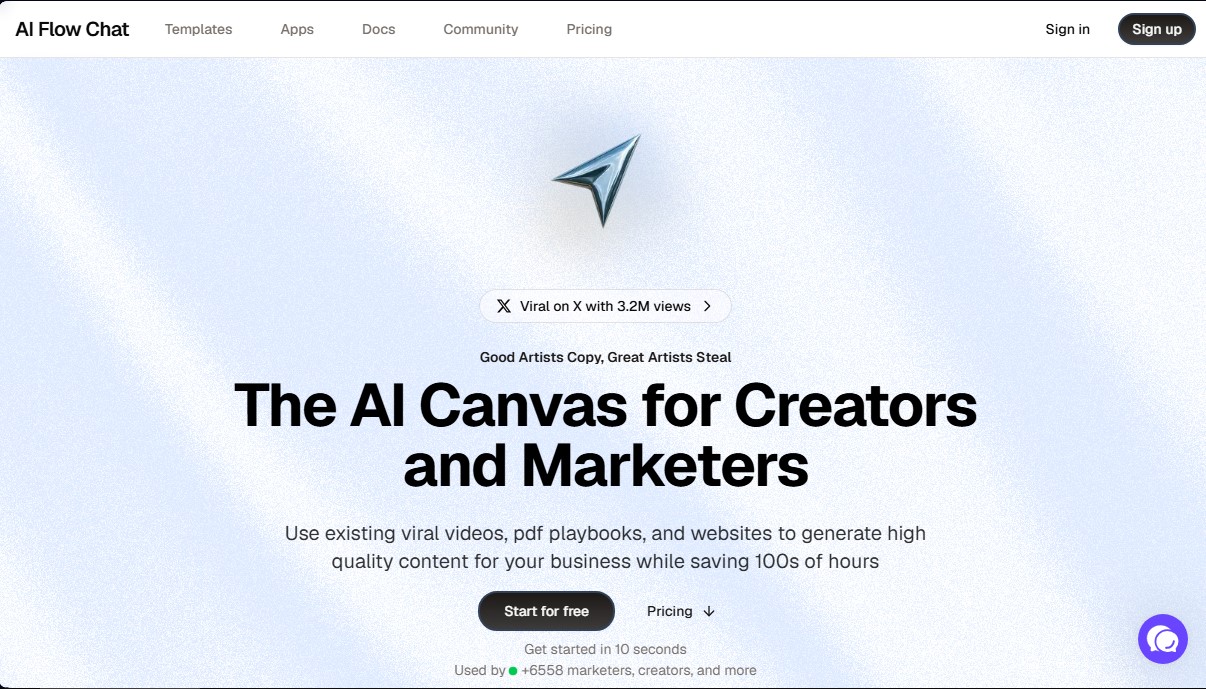
Visual canvas to generate marketing content and scripts. Automate workflows using videos, PDFs, and websites as references to create original copy.
What is AI Flow Chat?
AI Flow Chat is an advanced platform designed as a visual canvas for creators and marketers looking to optimize their content creation through artificial intelligence. Unlike traditional linear chats, this tool uses a system of nodes and interactive boards that allows users to connect various information sources to generate high-quality results in a structured and visual way.
The primary function of AI Flow Chat is to allow users to "model" the success of existing viral content—such as YouTube videos, TikToks, Reels, or PDF documents—and transform them into original pieces for their own business. It is an ideal solution for video strategists, copywriters, and agencies that need to scale their production without losing consistency or style, saving hundreds of hours in the research and writing process.
The application’s technical operation is based on the integration of multiple next-generation large language models (LLMs), including GPT-4, Claude, and Gemini. Through a drag-and-drop interface, users can build visual workflows (flowcharts) that eliminate the need to copy and paste information between different tools. The technology allows context to flow automatically between nodes, ensuring the AI uses only the provided data, which drastically reduces hallucinations and the need to constantly rephrase instructions.
Among its most notable capabilities are:
- Multi-source referencing: Directly import website links, video files, Twitter threads, Meta ads, and Notion pages to use as context.
- SEO article automation: Facilitates the planning, briefing, and writing of search-engine-optimized content through repeatable systems.
- Video scripting: Optimizes the creation process for social platforms, allowing users to visualize the script structure graphically.
- AI application creation: Users can package their workflows into shareable apps (AI wrappers) to capture leads or automate specific tasks.
- Prompt library: Includes a space to save and manage your best instructions, allowing them to be reused in any workflow.
AI Flow Chat positions itself as an efficient alternative to conventional chat tools by offering total control over data flow. As a visual platform, it is especially useful for professionals managing complex digital marketing and process automation workflows, allowing individual creators and agencies to operate with the capacity of a full team. Its focus on a credit-based system and the availability of all models in a single interface simplifies tech management and maximizes desktop productivity.
AI Flow Chat features and use cases
How to use AI Flow Chat
AI Flow Chat FAQ
What exactly is AI Flow Chat, and what is it used for?
It’s a visual canvas designed for creators and marketers that lets you automate workflows by connecting different AI models to generate high-quality content.
What types of information sources can I use in AI Flow Chat to generate content?
You can use YouTube videos, TikToks, or Reels, as well as PDFs, Notion documents, websites, and Meta ads for the tool to analyze and use as context.
How does AI Flow Chat differ from using tools like ChatGPT or Claude directly?
Unlike linear chats, this tool allows you to connect multiple data sources in a visual and organized way, so you don't have to constantly copy and paste data between different windows.
Do I need programming skills to create workflows on the platform?
No, the tool uses a very intuitive drag-and-drop interface that allows any user to build complex AI systems without writing a single line of code.
How does AI Flow Chat’s credit system work?
Each operation consumes a certain number of credits depending on the AI model used, and paid plans include a generous monthly credit allowance.
Can I cancel my AI Flow Chat subscription at any time?
Yes, you can cancel your subscription whenever you like with just a few clicks, and you’ll continue to have access to your workflows until the end of your current billing cycle.
Which AI models are available within the tool?
The platform offers built-in access to the most advanced models on the market today, including the latest versions of GPT-4, Claude, and Gemini.
Can I use AI Flow Chat to create video scripts based on viral content?
Yes, you can import existing viral videos to extract their structure and style, allowing you to create unique, brand-optimized scripts in a matter of minutes.
AI Flow Chat pricing and plans
Free Plan
- Test the platform and create workflows to experiment with features before upgrading to a paid plan.
Basic Plan
- Price: $29/month (or $24/month billed annually at $288).
- Includes a 7-day free trial for new customers.
- 8,000 monthly credits.
- Access to all AI models.
- 5 app schedules.
- Optional free onboarding call.
- Option to purchase 1,000 extra credits for $6.
Scale Plan
- Price: $59/month (or $48/month billed annually at $576).
- 18,000 monthly credits.
- 50% rollover on unused credits.
- Access to all AI models.
- 10 app schedules.
- Optional free onboarding call.
- Option to purchase 1,000 extra credits for $6.
Pro Plan
- Price: $119/month (or $96/month billed annually at $1,152).
- 40,000 monthly credits.
- Full rollover on unused credits.
- Access to all AI models.
- 15 app schedules.
- Remove AI Flow Chat watermark on embedded apps.
- Optional free onboarding call.
- Purchase extra credits at half price (2,000 credits for $6).
AI Flow Chat Screenshots
AI Flow Chat user reviews
Write a review
Checking your session...
AI Flow Chat Reviews
Loading reviews...
AI Flow Chat alternatives

AppLaunchFlow
Generate screenshots, ASO copy, icons, videos, and mockups for app stores. Includes localization, social graphics, and app ranking tracking.



Velivo One
Monitor AI engine mentions, verify accuracy, and manage your brand's SEO, local presence, and social media to optimize visibility and digital reputation.