AppGrowthKit
Share
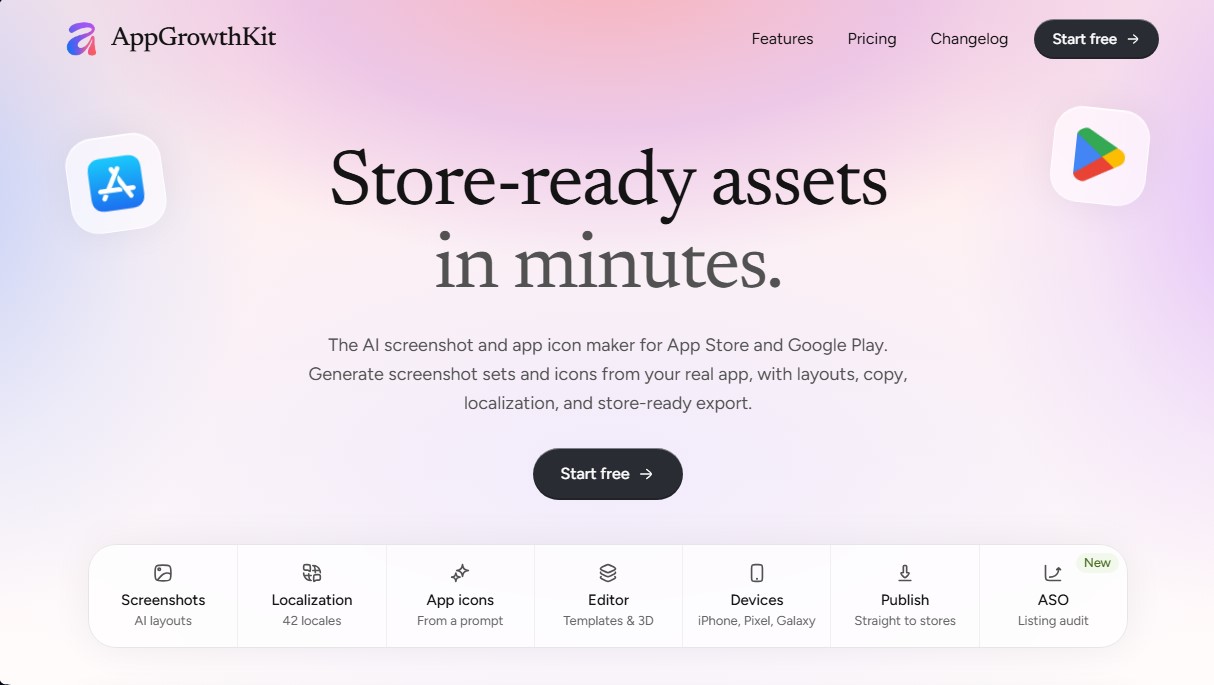
Generate AI screenshots and icons for the App Store and Google Play. Features 3D mockups, localization in 42 languages, and ASO audits to boost mobile rankings.
What is AppGrowthKit?
AppGrowthKit is a browser-based platform designed to simplify the creation of visual assets for App Store and Google Play listings. This artificial intelligence tool specifically targets indie developers and small teams who need to generate professional screenshots and app icons without relying on a graphic designer. Its primary function is to transform raw mobile or simulator screenshots into publication-ready assets, optimizing both aesthetic design and ASO (App Store Optimization).
AppGrowthKit’s workflow is built on an AI-assisted process. Users upload their actual screenshots and describe their product’s functionality. From there, the generative AI plans the layout, drafts headlines, and automatically applies device frames and backgrounds. Unlike general-purpose design tools, it keeps all layers editable on an interactive canvas, allowing for manual adjustments to fonts, colors, and spacing using snap guides and keyboard shortcuts. The technology also facilitates automatic localization across 42 different markets, naturally adapting text for each region without altering the original visual structure or image layers.
Key capabilities and practical benefits include:
- AI Icon Generator: Allows you to create icon proposals from text prompts, making it easy to explore styles and visual concepts in seconds.
- 3D Device Models: Includes updated frames, such as the iPhone 17, Pixel 10, or Galaxy S25, with options for isometric views, glass reflections, and adjustable depth.
- Integrated ASO Audit: Analyzes store listings to provide an optimization score and critical suggestions for improving visibility through metadata.
- Keyword Research: Offers tools to track keyword rankings and analyze the competition, allowing you to adjust titles and subtitles based on real data.
- Export and Direct Publishing: Automatically generates the exact sizes required by Apple and Google (including the 6.9-inch set for iPhone), enabling direct asset uploads to App Store Connect and Google Play Console via official API keys.
Using AppGrowthKit eliminates the need for manual image resizing or complex software during the final launch phase. By integrating competitor analysis and historical rank tracking, users can centralize visual and strategic management into a single workflow. Graphics are processed locally on the user's computer via the browser, ensuring speed and efficiency. It is a technical solution designed to maximize conversion in app stores through a highly automated app screenshot generator.
AppGrowthKit features and use cases
How to use AppGrowthKit
AppGrowthKit FAQ
What is AppGrowthKit and how does it help app developers?
It is a browser-based tool that uses artificial intelligence to create screenshots, icons, and visual assets optimized for the App Store and Google Play.
Do I need advanced design skills to use AppGrowthKit?
No, the platform is designed for indie developers and small teams who need professional results quickly and easily.
What devices and frame models are available in the tool?
AppGrowthKit offers the latest iPhone, iPad, Google Pixel, and Samsung Galaxy models, including 3D viewing options and realistic finishes.
How does screenshot localization work in AppGrowthKit?
The AI translates and adapts your screenshot titles and subtitles into 42 different languages while maintaining the original design and layout of each screen.
Can I generate my app icon directly with this tool?
Yes, it includes an AI icon generator that creates several options based on a text description, allowing you to choose the one that best fits your brand.
Do exported images meet Apple and Google’s official size requirements?
Yes, the tool automatically generates files with the exact dimensions required by App Store Connect and Play Console, including formats for large-screen iPads and iPhones.
What is the difference between the Launch Pass and the AppGrowthKit Pro subscription?
The Launch Pass is a one-time payment ideal for a single launch, while the Pro plan offers a monthly or annual subscription for recurring projects with more AI credits.
Is it possible to publish screenshots directly to the stores from the editor?
Yes, you can connect your own API keys to upload images directly to your App Store Connect or Google Play Console listing without leaving the platform.
What ASO optimization features does AppGrowthKit offer?
It includes an auditing system that scores your listing, allows you to research competitor keywords, and tracks your app’s rankings.
How does AppGrowthKit ensure screenshots look good on all devices?
The tool automatically scales your actual screenshots to the size of the chosen frame and lets you preview the final result before exporting.
AppGrowthKit pricing and plans
Free ($0 forever)
1 active project.
Full access to the manual design editor.
All device frames and models available.
Custom fonts and gradients.
ASO audit summary and score.
Limitations: Does not include store-ready exports, AI credits, AI localization, or icon generation.
Launch Pass ($9.99 one-time payment)
Full access to all features for 7 days (no renewal).
250 AI credits.
Unlimited projects and unlimited store exports.
AI screenshot localization.
AI app icon generation and Apple-ready exports.
Advanced ASO tools: live-score editor, keyword research and tracking, and competitor benchmarking.
Pro ($14.99 per month or $99.99 per year)
750 monthly AI credits.
Unlimited projects and unlimited store exports.
Full design editor with layer management.
AI screenshot localization.
AI app icon generation and export.
Full ASO suite: listing audits, keyword rank tracking, and competitor analysis.
AppGrowthKit Screenshots
AppGrowthKit alternatives

Kairosy AI
Audit and improve your brand reputation in AI search engines. Monitor mentions on ChatGPT or Claude, analyze sentiment, and optimize visibility to attract more customers.