
Burning Bridges AI
Share
Create custom videos by inserting your photos into preset scenes. Swap the lead and audience while keeping the original choreography and audio.
What is Burning Bridges AI?
Burning Bridges AI is an AI video generation tool designed to create personalized cinematic recreations from pre-configured reference scenes. Its primary function allows users to swap actors in a video template with their own images while maintaining the original choreography, camera movements, and soundtrack. This application is especially useful for content creators, AI tool enthusiasts, and users looking to place themselves or their characters into a professional performance quickly and easily.
The operation of Burning Bridges AI is based on character-editing technology applied to a base video of approximately 29 seconds in horizontal format (16:9). The system does not require writing text descriptions or complex prompts; instead, it uses a motion transfer and appearance-based approach. The AI interprets visual information from uploaded photos—including face, hairstyle, build, and clothing—and integrates it into the scene's action, where the protagonist interacts with the environment and other characters.
The tool’s core capabilities include:
- Protagonist Customization: By uploading a "lead photo," the system generates a version of the main actor with the user's appearance, respecting elements such as jackets, shirts, or visible accessories.
- Supporting Cast Management: Users can choose to keep the original audience or replace them. The tool allows for up to 5 additional photos to recreate background characters, assigning them based on their order of appearance on screen.
- Resolution Settings: The platform allows users to configure the video output in various qualities, including 480p, 720p, and 1080p, making it easy to view on both computers and mobile devices.
- Audio Synchronization: The final result preserves the soundtrack and sound effects of the original performance, ensuring a cohesive audiovisual experience.
- Preview and Management: Projects are stored in a dedicated "my creations" section, allowing users to review the result before the final download.
From a practical standpoint, Burning Bridges AI offers an efficient solution for generating high-quality audiovisual content without the need for physical shoots. By relying on a template with pre-choreographed camera movements and gestures, it minimizes common errors found in "from-scratch" generative video AI, such as structural warping. It is an ideal option for creating trending videos, bringing character portraits to life, or developing digital entertainment projects with a professional and aesthetically polished finish.
Burning Bridges AI features and use cases
How to use Burning Bridges AI
Burning Bridges AI FAQ
What do I need to create my first video on Burning Bridges AI?
You only need to upload a clear main photo of the person you want to appear as the lead in the scene.
Is it possible to change the people in the background of the performance?
Yes, you can add up to five additional photos to replace secondary characters or leave the space empty to keep the original audience.
How long are the videos generated with Burning Bridges AI?
The videos have a fixed duration of approximately twenty-nine seconds and always follow the widescreen format of the reference scene.
Can I choose the resolution for my creation?
There are three quality options available in the settings menu: four hundred eighty, seven hundred twenty, and one thousand eighty pixels.
Do the final results from Burning Bridges AI include sound?
Yes, the final video incorporates the original soundtrack of the performance, and you can play it with audio from your dashboard.
Does organizing the photos before generating the video consume credits?
No, setting up the cast and previewing examples is free; credits are only deducted at the moment you confirm the generation.
Where can I download my Burning Bridges AI video once it's finished?
You will find all your finished works in the "My Creations" section of your account to view and save them to your device.
What happens if the video is generated without sound?
If the image is correct but the audio is missing, you can use the audio retry feature to restore the track without spending additional credits.
How do I select the clothes the character will wear in Burning Bridges AI?
The tool uses the clothing shown in the photo you upload, so it is recommended to use an image where the torso and the desired outfit are clearly visible.
Can I use photos of other people for my cast?
You must have the proper permission from the people appearing in the photos and ensure you comply with the platform's usage policies.
Burning Bridges AI pricing and plans
Basic
0 $ (Free)
18 one-time sign-up credits.
Generation history included.
Watermarked previews and downloads.
Limit of up to 3 images or 1 video.
Starter
29,9 $ per month (or 100 $ billed annually, equivalent to 8,3 $ per month)
800 credits per month.
Generate up to 133 images or 44 videos.
Images up to 4K and HD videos depending on the model.
Watermark-free downloads.
Access to image editing, video creation, and motion transfer.
Generation history saved to account.
Pro
49,9 $ per month (or 360 $ billed annually, equivalent to 30,0 $ per month)
1,800 credits per month.
Generate up to 300 images or 100 videos.
Use credits across all image and video models.
Images up to 4K and HD videos.
Watermark-free downloads and generation history.
Includes all editing and motion transfer tools.
Business
99,9 $ per month (or 599 $ billed annually, equivalent to 49,9 $ per month)
4,000 credits per month.
Generate up to 666 images or 222 videos.
Flexible credit usage across all image and video models.
Images up to 4K and HD videos.
Watermark-free downloads and generation history.
Full access to editing and motion transfer tools.
Flex Pack (One-time payment)
99 $
2,000 credits that never expire.
No subscriptions or recurring charges.
Up to 333 images or 111 videos.
Watermark-free downloads and generation history.
Image, video, and motion transfer tools included.
Starter Pack (One-time payment)
199,9 $
4,900 credits that never expire.
No subscriptions or recurring charges.
Up to 816 images or 272 videos.
Watermark-free downloads and generation history.
Access to all creation and motion transfer tools.
Pro Pack (One-time payment)
499,9 $
19,900 credits that never expire.
No subscriptions or recurring charges.
Up to 3,316 images or 1,105 videos.
Watermark-free downloads and generation history.
Total access to image, video, and motion transfer tools.
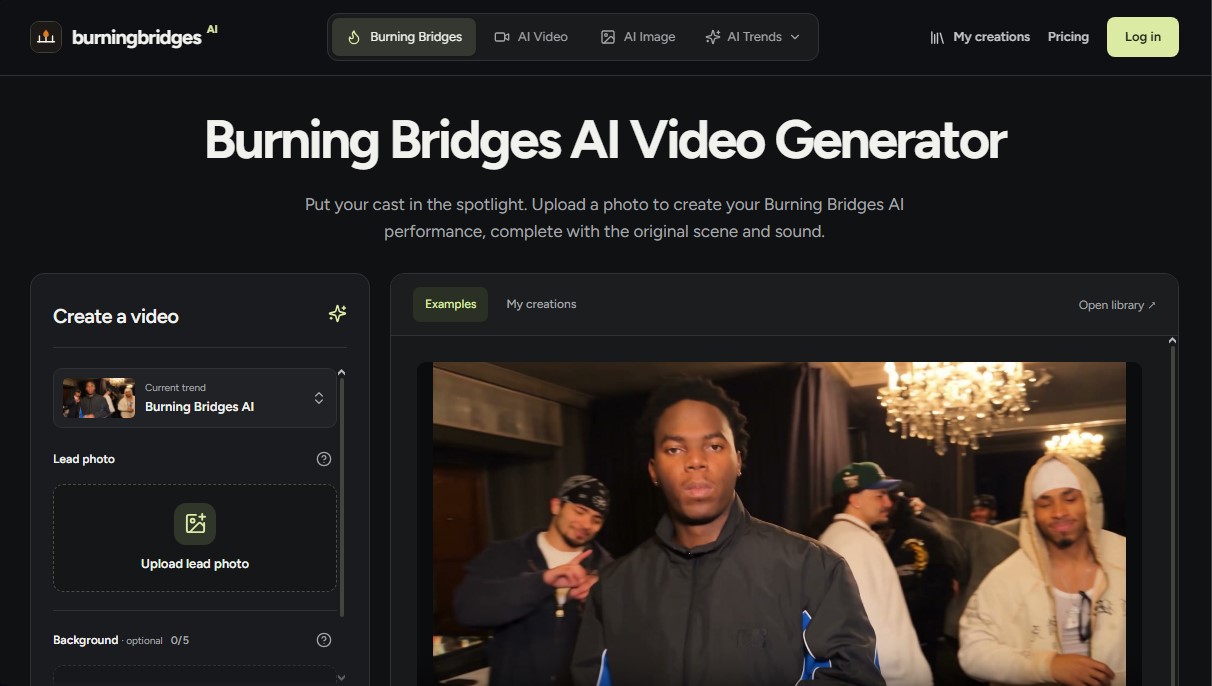
Burning Bridges AI Screenshots
Burning Bridges AI alternatives


FaceFusion
Local face manipulation tool for face swapping and lip-syncing in photos and videos. Features age editing and total privacy by running entirely without the cloud.

Comik AI-Anime Character Creator
Design anime characters using text or images. Generate multi-view design sheets to ensure visual consistency across comics, manga, and animated videos.
AI Microdrama Generator by Picsart
Create vertical micro-drama series with consistent characters. Plan seasons, generate scripts, and produce AI-powered short episodes with cliffhangers.