

Share
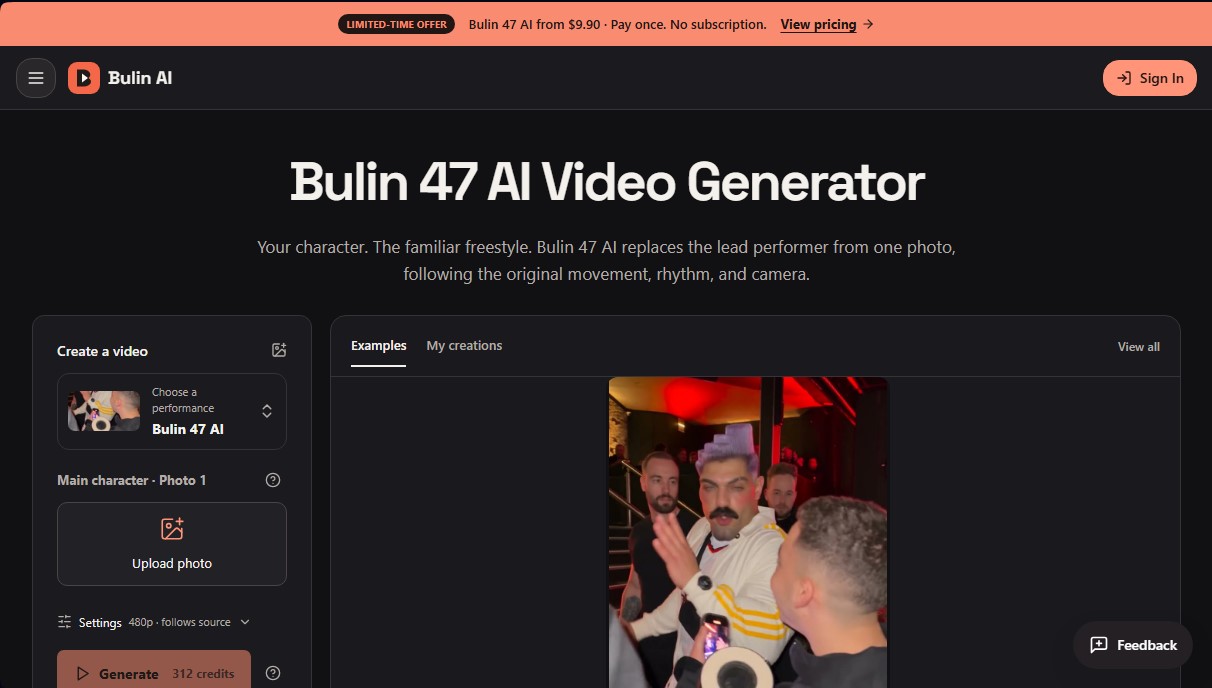
Replace the protagonist of a video scene with any character from a single photo, preserving the movement, rhythm, and framing of the original recording.
What is Bulin AI?
Bulin AI is a platform specializing in AI-generated video creation that allows users to integrate any character into a predefined, recognizable scene. Its flagship tool, Bulin 47 AI, utilizes motion and appearance transfer technology to replace the protagonist of a specific performance with an image provided by the user. The system analyzes the input photo to replicate the hairstyle, clothing, and physique, strictly maintaining the rhythm, gestures, and camera movements of the original clip.
The operation of this photo-to-video AI tool is based on a character rendering model that requires neither gesture recording nor complex video editors. Users only need to upload a clear image—preferably of the upper body—so that Bulin AI’s artificial intelligence can process the visual reference and merge it with a fixed choreography. In this scene, the new character takes the leader’s place, while environmental elements, such as the crowd and atmosphere, remain stable. It is an ideal solution for content creators looking to participate in visual trends automatically from their computers.
The tool's key features include:
- Main Character Replacement: Replaces the lead in the original performance while maintaining consistency with the provided photo (clothing, accessories, and features).
- Choreography Maintenance: The system faithfully follows the movement and cadence of the reference scene without the need for text commands or prompts.
- Audio Restoration: The technology attempts to recover the original source audio so that the final video retains the atmosphere and musical rhythm.
- Simplified Interface: The process is reduced to three steps (upload photo, review resolution settings, and generate), making it easy to use for non-technical users.
To achieve optimal results in Bulin 47 AI, it is recommended to use well-lit photographs where the subject is well-defined. Although the tool supports illustrated or stylized characters, the AI may reinterpret certain details during movement to adapt them to the three-dimensional environment. Once the process is finished, users can manage their clips in a creation dashboard, allowing for the direct download of the generated material. This generative AI application removes the technical barriers of manual video editing, offering a direct path from a static image to a dynamic and fluid performance. It is important to remember that, as synthetic content, background details or interactions between objects may vary slightly, so reviewing the final result before sharing is recommended.
Bulin AI features and use cases
How to use Bulin AI
Bulin AI FAQ
What exactly is Bulin 47 AI, and how does it work?
It’s a tool that lets you replace the main character in a predefined video scene with a person from a photo of your choice while maintaining the original movement and timing.
How much does it cost to create a video with Bulin AI?
Single-payment options start at €9.90 for one video, and there are also monthly subscription plans available for users who need more credits.
What kind of photo works best with Bulin 47 AI?
For the best results, upload a clear, well-lit image of a single person that shows their hairstyle, clothing, and upper body.
Can I edit the text prompt in Bulin 47 AI?
This tool uses a fixed configuration to ensure consistent results, so the descriptive text cannot be edited in this specific section.
What happens if my video generation fails?
If the creation process fails, the system will automatically refund your pass or credits so you don't lose your purchase.
Do Bulin 47 AI videos include the original music and sound?
The platform attempts to restore the original source audio so the animation syncs with the sound, though we recommend reviewing the final clip before sharing it.
Do I need a subscription to try Bulin AI?
No subscription is required. You can purchase individual one-time passes that never expire and allow you to download content without watermarks.
Is Bulin AI an official app linked to the original artist?
No, this is an independent creation tool and has no official affiliation with or endorsement from the artist featured in the video trend.
Bulin AI pricing and plans
Basic
0 $
18 one-time credits upon sign-up.
Generation history included.
Watermarked previews and downloads.
Limit of up to 3 images or 1 video.
Watermark-free downloads require a paid plan.
Bulin 47 AI Video Passes (One-time payment)
Starting at 9,90 $
1 video: 9,90 $.
3 videos: 19,90 $.
5 videos: 29,90 $.
Standard 480p quality.
Watermark-free downloads.
Passes never expire.
Pass refund if generation fails.
Restricted to the Bulin 47 AI standard preset (other tools require a subscription).
Starter
29,90 $/mes (or 100 $ per year)
800 credits per month.
Up to 133 images or 44 videos monthly.
Images up to 4K and videos in HD (depending on the model).
Image editing, video creation, and motion transfer.
Watermark-free downloads.
Account generation history.
Pro
49,90 $/mes (or 360 $ per year)
1.800 credits per month.
Up to 300 images or 100 videos monthly.
Images up to 4K and videos in HD.
Watermark-free downloads.
Generation history included.
Credits compatible with all image and video models.
Business
99,90 $/mes (or 599 $ per year)
4.000 credits per month.
Up to 666 images or 222 videos monthly.
Images up to 4K and videos in HD.
Watermark-free downloads.
Generation history included.
Credits compatible with all image and video models.
Bulin AI Screenshots
Bulin AI alternatives

Comik AI-Anime Character Creator
Design anime characters using text or images. Generate multi-view design sheets to ensure visual consistency across comics, manga, and animated videos.
AI Microdrama Generator by Picsart
Create vertical micro-drama series with consistent characters. Plan seasons, generate scripts, and produce AI-powered short episodes with cliffhangers.
DomoAI AI Drama Generator
Create AI vertical minidramas and short series. Use recurring characters and lip-synced dialogue to produce social media episodes in minutes.

Burning Bridges AI
Create custom videos by inserting your photos into preset scenes. Swap the lead and audience while keeping the original choreography and audio.

KiwiMotion AI
Generate videos, images, voices, and avatars with AI. Features motion control, voice cloning, background removal, and professional file upscaling.