

Share
Transform songs into music videos. Generate narrative scenes, lyric videos, or synced performances by automatically analyzing audio rhythm and lyrics.
What is Solmi?
Solmi is an advanced AI music video creation platform designed to automatically transform audio tracks into dynamic visual content. This tool enables musicians, content creators, and general users to generate professional audiovisual pieces from a song, facilitating music video production without the need for expensive recording equipment or complex technical video editing skills.
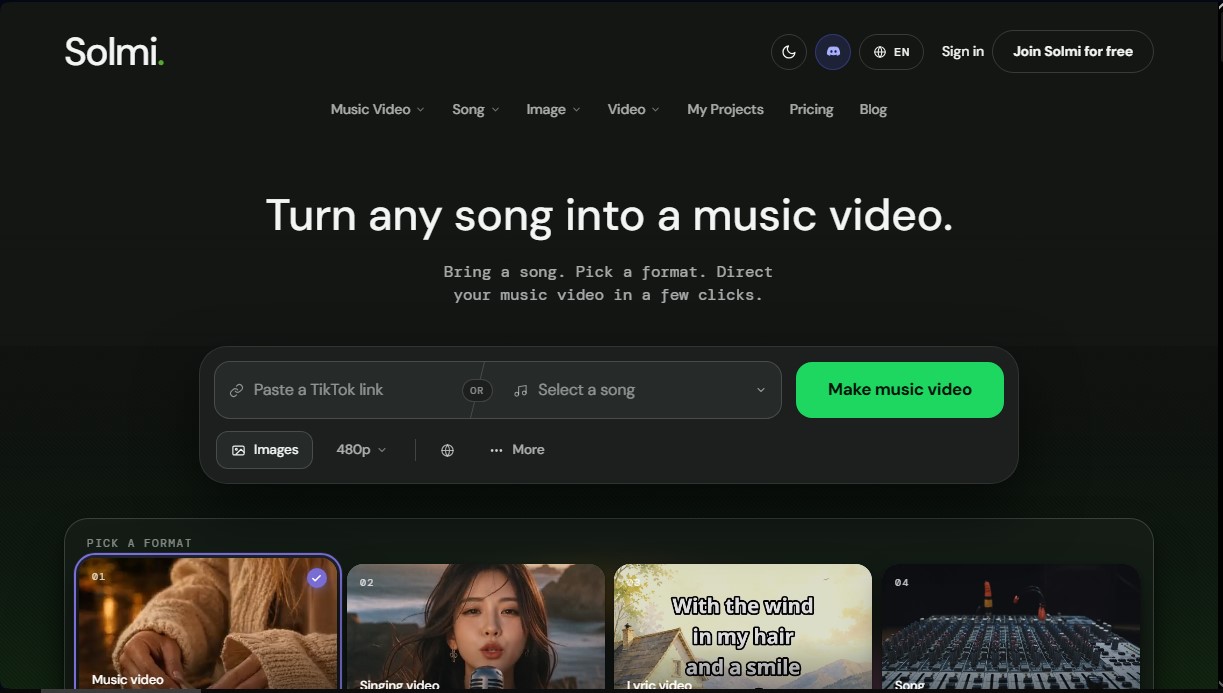
The system supports various input methods, allowing users to paste links from Suno, TikTok, or YouTube, as well as upload their own digital audio files or select tracks from an integrated library. Solmi offers four main output formats to suit different creative needs:
- Music video: focused on creating narrative and cinematic scenes.
- Singing video: specialized in performances with precise lip-syncing.
- Lyric video: designed to aesthetically display song lyrics over a visual background.
- Song: an option dedicated exclusively to audio generation or management.
The application's technology is based on a deep analysis of the soundtrack. Solmi's AI interprets the tempo, key, sections, and lyrics of the music to automatically synchronize cuts and transitions, ensuring the visual montage follows the actual rhythm of the composition. The workflow is structured into four functional stages: adding the music, style analysis, defining references or characters, and generating a storyboard prior to final rendering.
Key technical capabilities and practical benefits include:
- Support for multiple languages, processing lyrics in Spanish, English, French, Chinese, and others to adjust the editing.
- Exporting in resolutions up to 1080p with formats tailored for social media (9:16 vertical) or traditional screens (16:9 horizontal).
- Additional features for AI song generation from text, vocal removal, and cover creation.
- Quick snippet previews to validate the visual style before processing the full video, saving time in the workflow.
Solmi is a multi-platform solution accessible via web browser and native apps for mobile devices on iOS and Android. This allows users to manage projects, render content, and organize their personal libraries from both a computer and on the go. It is a key tool for those looking to optimize audiovisual production with varied aesthetics, ranging from 3D animation and anime styles to high-definition cinematic realism.
Solmi features and use cases
How to use Solmi
Solmi FAQ
What is Solmi and what exactly is it for?
It is a tool designed to automatically transform any song into a music video, a lyric video, or a lip-sync performance.
Is there a free version to try out Solmi?
Yes, the free plan offers 100 initial credits to generate 20-second previews in 480p quality with a watermark.
How long does it take to generate a full music video?
Previews take approximately two minutes, and the final video is usually ready in less than ten minutes after the storyboard is approved.
What types of audio files can I upload to Solmi?
You can upload your own files, choose songs from your library, or paste direct links from platforms like Suno, TikTok, and YouTube.
Do I need to own the rights to the song I use?
You must own the rights or licenses for the music you wish to publish, although you maintain full ownership of the videos created using the tool.
What resolutions and formats can I export my Solmi projects in?
The platform allows you to export in 16:9 landscape and 9:16 vertical formats with a resolution of up to 1080p on paid plans.
Can the tool understand song lyrics in Spanish?
Yes, the system analyzes the tempo and lyrics in several languages, including Spanish, so that the edits sync perfectly with the rhythm.
Can I use Solmi on my mobile phone?
Yes, there are official apps for iOS and Android that allow you to manage your credits and create videos from anywhere.
What happens if I need more credits without signing up for a monthly subscription?
You can purchase one-time credit packs that are valid for 12 months and do not require an active subscription.
Do videos created with paid plans include a watermark?
No, the Plus, Creator, and Pro plans allow you to export your creations without watermarks and in high definition.
Solmi pricing and plans
Free ($0/month)
100 starting credits for music videos (enough for one short 480p video).
Daily refill of up to 10 song credits.
480p video rendering with watermark.
AI song generation via text or lyrics.
Vocal removal and cover creation features.
MP3 downloads for personal use only.
Technical support within 3 business days.
Plus ($35/month or $29/month billed annually)
2,000 monthly credits (equivalent to approx. 3–7 one-minute videos or 400 AI songs).
High-definition video rendering (720p and 1080p).
Commercial use allowed and watermark removal.
AI song generation, vocal removal, and MP3 downloads.
Technical support within 3 business days.
Creator ($85/month or $70/month billed annually)
5,500 monthly credits (equivalent to approx. 9–15 one-minute videos or 1,100 AI songs).
High-definition video rendering (720p and 1080p).
Commercial use allowed and watermark removal.
AI song generation, vocal removal, and MP3 downloads.
Technical support within 3 business days.
Pro ($135/month or $112/month billed annually)
9,000 monthly credits (equivalent to approx. 15–25 one-minute videos or 1,800 AI songs).
High-definition video rendering (720p and 1080p).
Commercial use allowed and watermark removal.
AI song generation, vocal removal, and MP3 downloads.
Technical support within 3 business days.
Credit Add-ons (One-time payment starting at $30)
Additional credit packs with no subscription required.
Available options: 1,500 credits ($30), 3,200 credits ($60), 5,500 credits ($100), 10,000 credits ($180), 20,000 credits ($350), and 35,300 credits ($600).
Credits are valid for 12 months and do not auto-renew.
Solmi Screenshots
Solmi alternatives

Lumina by ByteDance
Create cinematic videos, images, and music clips with AI. Design shots, edit with precision, and generate professional scenes from storyboards.
EasyMusic.AI
Generate professional songs, lyrics, and music videos with AI. Edit tracks, isolate vocals, and create soundtracks with no musical experience required.

AI Music Video Generator
Generate cinematic music videos from songs or audio files. Features lip-syncing and various styles to create professional clips in minutes.