KiwiMotion AI
Share
Generate videos, images, voices, and avatars with AI. Features motion control, voice cloning, background removal, and professional file upscaling.
What is KiwiMotion AI?
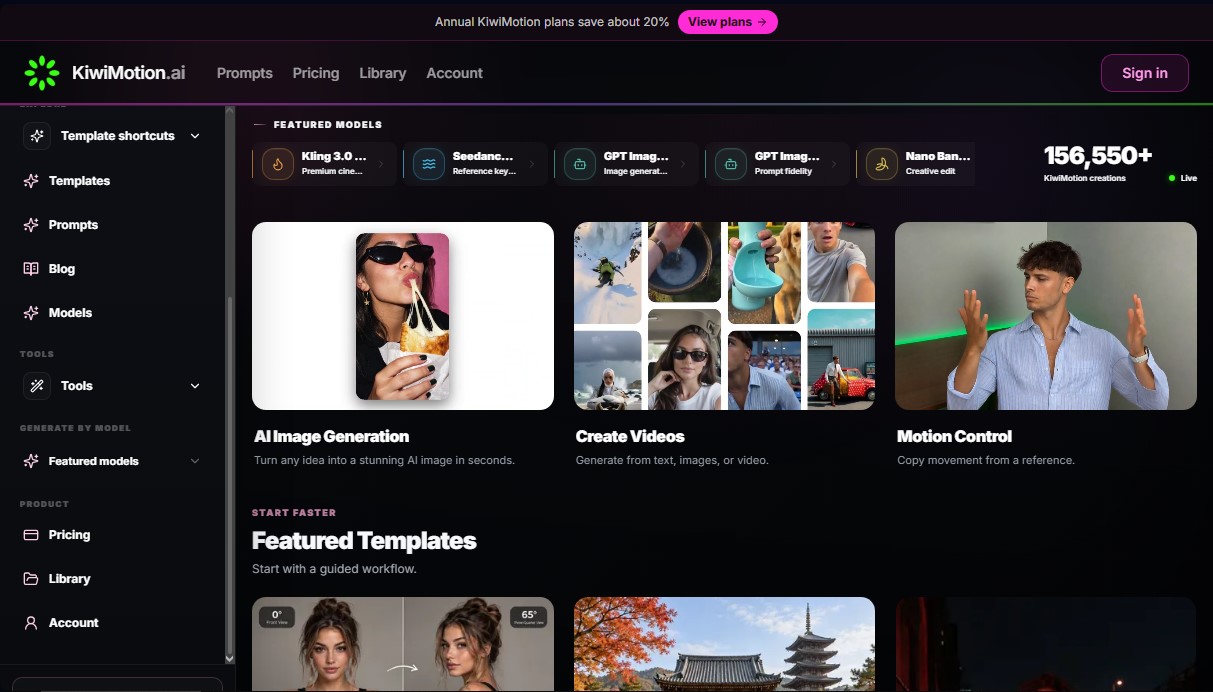
KiwiMotion AI is a multimodal artificial intelligence platform designed to centralize advanced digital content creation within a single workspace. This tool enables designers, video editors, and content creators to generate videos, images, voices, and avatars using next-generation models. Its focus is on delivering high-fidelity results, allowing users to transform text-based ideas or visual references into professional digital assets quickly and efficiently from a computer or any compatible device.
The technological core of KiwiMotion AI integrates specialized models such as Kling 3.0 Pro for cinematic results and Seedance 2.5 for precise control via keyframes. In the image domain, it utilizes GPT Image 2.5 and Seedream 5 Pro, which stand out for their ability to maintain prompt fidelity and perform complex edits. For portrait transformations, the tool employs the Nano Banana 2 model, specializing in creative style changes and identity edits with realistic or artistic results.
In AI video generation, the application offers several functional modalities:
- Text-to-Video: Creating full scenes from written descriptions.
- Image-to-Video: Animating static images to give them natural movement.
- Motion Control: Allows copying motion from an external reference and applying it to a new generation, facilitating visual consistency.
- Video Upscaling: Enhances file resolution up to 4K for use in high-quality projects.
For AI image creation, KiwiMotion AI stands out with its strict identity reference feature, which preserves the facial features and proportions of an original subject while changing the environment or style. Users can apply specific effects like Flare and Sunburst in the GPT Image 2.5 model, or use guided workflows to modify camera angles, automatically remove backgrounds, and perform artistic reconstructions, such as ink wash styles or voxel-type versions.
The platform also includes voice and audio capabilities, facilitating voice cloning and text-to-speech with natural intonations. This is complemented by the creation of talking avatars, which synchronize lip movement with generated audio, providing a comprehensive solution for producing presentations and social media content. Thanks to its prompt library and pre-configured templates, users can streamline their workflow and achieve professional results without needing deep technical knowledge in generative AI.
KiwiMotion AI features and use cases
How to use KiwiMotion AI
KiwiMotion AI FAQ
What creation tools does the KiwiMotion AI platform offer?
This all-in-one solution allows you to generate custom videos, images, voices, and avatars using multiple advanced artificial intelligence models.
How can I get a discount on my KiwiMotion subscription?
If you choose any of the annual billing plans, you will save approximately 20% compared to the cost of paying month-to-month.
Are credits for KiwiMotion AI annual plans delivered all at once?
No, your plan's credits are added to your account on a monthly basis, regardless of whether the subscription was paid in full upfront.
Is it possible to upscale the quality of generated images and videos?
Yes, the tool features upscaling functions that improve clarity and allow you to reach up to 4K resolution on compatible models.
What motion control options does KiwiMotion AI offer for videos?
The platform includes a motion control feature that allows you to copy movement from a reference and apply it precisely to your own creations.
Are watermarks included on content created with a paid plan?
No, exports made under any of the subscription plans are watermark-free and use professional video encoding.
Which specific models can I use to generate artistic portraits?
You can use the Nano Banana 2 model, which specializes in creative portrait transformations and applying various visual styles.
Can I create a video from a photo in KiwiMotion AI?
Yes, the tool allows you to generate audiovisual content from both text descriptions and reference images to guide the final result.
What additional editing utilities are included in the subscription?
In addition to the core generation features, you have tools to automatically remove backgrounds and change the camera angles of your images.
How can I contact KiwiMotion technical support?
You can resolve any questions or issues by sending an email to the company’s official support address.
KiwiMotion AI pricing and plans
Standard
Price: $24.99 per month (or $19.99 per month with annual billing of $239.88).
800 monthly credits.
Access to all generation modes.
Video output up to 4K on compatible models.
MP4 (H.264) encoding.
No watermark.
Premium
Price: $55.99 per month (or $44.99 per month with annual billing of $539.88).
2,200 monthly credits.
Access to all generation modes.
Video output up to 4K on compatible models.
MP4 (H.264) encoding.
No watermark.
Ultimate
Price: $111.99 per month (or $89.99 per month with annual billing of $1,079.88).
5,000 monthly credits.
Access to all generation modes.
Video output up to 4K on compatible models.
MP4 (H.264) encoding.
No watermark.
KiwiMotion AI Screenshots
KiwiMotion AI alternatives

Comik AI-Anime Character Creator
Design anime characters using text or images. Generate multi-view design sheets to ensure visual consistency across comics, manga, and animated videos.
AppGrowthKit
Generate AI screenshots and icons for the App Store and Google Play. Features 3D mockups, localization in 42 languages, and ASO audits to boost mobile rankings.
Burning Bridges AI
Create custom videos by inserting your photos into preset scenes. Swap the lead and audience while keeping the original choreography and audio.