
PanoCraft
Share
Generate 360° AI images from text or photos. Create walkable 3D worlds and virtual tours for gaming, architecture, and real estate.
What is PanoCraft?
PanoCraft is a web application specializing in high-resolution AI 360 image generation, designed to transform text descriptions or conventional photographs into immersive environments. Its primary function is the creation of full panoramas that cover the entire field of vision, ensuring a 2:1 equirectangular projection with perfect polar convergence and invisible seams, making it easy to use directly in VR headsets and graphics engines.
The tool operates using advanced artificial intelligence models that enable two main workflows. Through the text-to-pano feature, users generate immersive scenarios from a detailed prompt. Alternatively, the image-to-pano option allows users to upload one or more reference images; the AI then analyzes the lighting, color palette, and style to perform a full "outpainting," recreating everything outside the original frame, such as the sky or the ground.
One of PanoCraft's most notable technical capabilities is the ability to convert static panoramas into walkable 3D worlds. Using Gaussian Splatting (3DGS) technology, the platform processes the image to generate a three-dimensional environment that includes downloadable collision meshes in .glb format. This allows users to explore the space directly from their browser or integrate the content into development workflows in Unity, Unreal Engine, or Blender.
For managing immersive projects, the tool offers the following key features:
- Creation of interactive virtual tours by linking multiple scenes and inserting information points or hotspots.
- Generation of production-ready files in WebP, JPEG, and PNG formats with 2K resolution.
- Exporting assets for video game skyboxes and augmented reality environments.
- Direct access from a computer via a web interface, eliminating the need for specialized hardware for initial rendering.
PanoCraft is particularly useful for architectural visualization professionals, real estate agents who need to prototype unbuilt spaces, and developers looking to streamline creative R&D in simulation projects. By providing industry-standard files, the tool integrates naturally into any 3D design pipeline, allowing users to go from a text-based idea to an explorable environment in just minutes. Its focus on visual consistency and technical compatibility makes it a practical solution for generating high-quality immersive content without complex manual photo editing processes.
PanoCraft features and use cases
How to use PanoCraft
PanoCraft FAQ
What is PanoCraft and what exactly is it used for?
It is a web application that uses artificial intelligence to transform text descriptions or standard photos into high-resolution 360-degree panoramic images.
Can I generate a panorama in PanoCraft for free?
Yes, new users receive 50 free credits upon sign-up to try the generator with no commitment, no watermarks, and no credit card required.
How can I create a 360-degree image from a standard photo?
Simply upload one or more reference images to the generator, and the AI will complete the rest of the sphere while maintaining the original style, lighting, and color palette.
What are the 3D worlds that can be created on the platform?
These are navigable environments generated from a panorama that allow users to walk through the scene and download the file in a format compatible with 3D design software.
Does PanoCraft allow for the creation of virtual tours?
Yes, the tool includes a feature to link multiple generated scenes, add interactive hotspots, and publish a professional link to share the full experience.
What format are the final images delivered in?
Images are downloaded in standard 2:1 equirectangular format, ensuring compatibility with VR headsets, websites, and game engines like Unity or Unreal Engine.
Who legally owns the generated images?
Ownership of the creations belongs entirely to the user, and commercial use is permitted as long as you have an active subscription to any of the paid plans.
When are credits deducted from my account?
Credits are only consumed once the image or 3D world generation is successfully completed, and the exact cost is always displayed before starting the process.
PanoCraft pricing and plans
Free Plan
Price: 0 € (50 free credits upon sign-up).
360° panorama generation from text or images.
Access to the Pano Model 1.0 generator.
No watermarks on results.
No credit card required.
Starter
Price: $19 per month.
2,000 credits per month (equivalent to roughly 40 2K panoramas or 10 3D worlds).
360° generation via text, image, and multi-image.
Creation of walkable 3D worlds and virtual tours.
Commercial license included.
Pro
Price: $49 per month.
4,000 credits per month (equivalent to roughly 80 2K panoramas or 20 3D worlds).
360° generation via text, image, and multi-image.
Creation of walkable 3D worlds and virtual tours.
Commercial license included.
Max
Price: $99 per month.
9,000 credits per month (equivalent to roughly 180 2K panoramas or 45 3D worlds).
360° generation via text, image, and multi-image.
Creation of walkable 3D worlds and virtual tours.
Commercial license included.
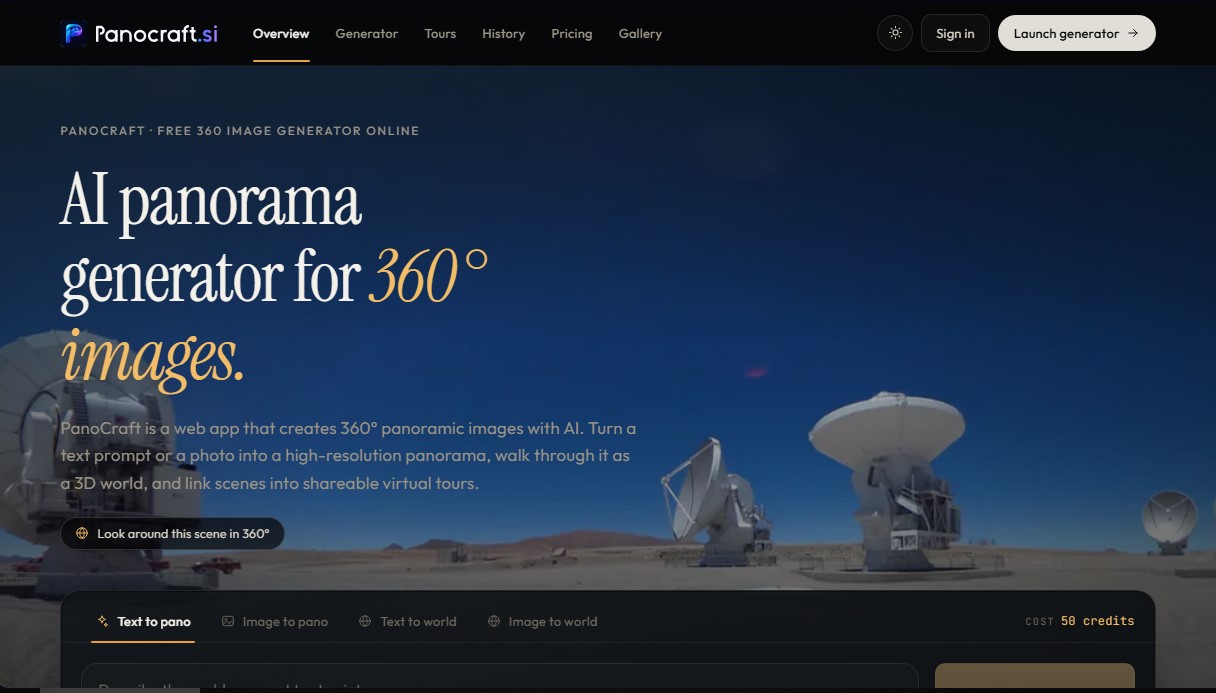
PanoCraft Screenshots
PanoCraft alternatives

InstantVisualizer
Visualize exterior paint colors with AI. Upload a photo to test real color schemes and see the final result with professional brand codes before painting your home.


DesignKitchen AI
Visualize kitchen remodels by uploading a photo. Test cabinet colors, countertops, and modern styles without altering the original structure or plumbing.