
InstantVisualizer
Share
Visualize exterior paint colors with AI. Upload a photo to test real color schemes and see the final result with professional brand codes before painting your home.
What is InstantVisualizer?
InstantVisualizer is a specialized AI-powered exterior paint visualization tool designed to streamline decision-making for facade renovation projects. Its primary function is to allow users to see exactly how their home will look after a color change, using real photographs and applying precise color schemes before purchasing physical samples. This application is geared toward both homeowners looking to update their property and interior designers, color consultants, and contractors who need to present realistic visual proposals to their clients.
The platform's operation is powered by Izzy, an AI designer that acts as an expert consultant. Upon uploading an image from a computer or mobile device, the technology automatically analyzes the architectural style—whether it is a Victorian, Craftsman, or Colonial home—and identifies paintable areas such as siding, trim, shutters, and the front door. Unlike other visualizers that require users to manually outline zones, InstantVisualizer detects materials and respects those that should not be painted, such as brick or stone, ensuring a cohesive and professional result.
Key technical capabilities and practical benefits of the tool include:
- Generation of three customized color schemes based on Classic, Tailored, or Bold styles.
- Exclusive use of real paint codes from leading brands such as Sherwin-Williams, Benjamin Moore, and Behr.
- Provision of critical technical data, including LRV (Light Reflectance Value) and sheen recommendations for each surface.
- The ability to make adjustments through simple text commands to change specific colors or find brand equivalents.
- Creation of interactive visual comparisons and detailed summaries for HOA (Homeowners Association) requests or technical quotes.
InstantVisualizer’s artificial intelligence eliminates uncertainty by suggesting palettes that actually work, even explaining the aesthetic risks of certain combinations. By integrating architectural design semantics, the tool ensures that the chosen colors are commercially accessible, providing the exact code and point of sale. It is an efficient solution for optimizing renovation workflows, allowing for the export of complete material lists that include the color name, HEX code, and suggested finish—which is highly useful for professional painting crews. Additionally, the platform guarantees user privacy by not using uploaded photos to train public models.
InstantVisualizer features and use cases
How to use InstantVisualizer
InstantVisualizer FAQ
What exactly is InstantVisualizer?
InstantVisualizer is an AI-powered tool that allows you to visualize how your home’s exterior would look painted with real colors before making any changes.
Can I use InstantVisualizer for free?
Yes, your first rendering is free and includes a watermark when you sign up using your email or Google account.
Which paint brands does this tool use?
The visualizer uses actual color codes from Sherwin-Williams, Benjamin Moore, and Behr to ensure you can purchase the exact paint you need.
Do I need to mark the areas I want to paint myself?
No, it’s not necessary. Our AI, named Izzy, automatically detects walls, trim, and doors to make the process easier for you.
How does InstantVisualizer guarantee the privacy of my photos?
Your images are private, remain in your account, and are never used to train AI models or shown publicly.
What kind of photo works best in the visualizer?
We recommend uploading a clear, unobstructed daytime photo taken from a straight-on perspective that shows the entire exterior of the house.
Can I use the results from InstantVisualizer for my HOA application?
Yes, paid plans allow you to export a professional summary including color codes and before-and-after images to submit for official approvals.
Is it possible to change the colors suggested by the AI?
You can ask Izzy for changes using simple text prompts to adjust shades or request a specific color for a particular area.
Does InstantVisualizer work on mobile phones?
Yes, the tool works directly in your mobile or desktop browser without the need to install any additional apps.
Can I use the renderings professionally with my clients?
The Designer plan includes a commercial license that allows you to use the images and color summaries in quotes, proposals, and your own marketing materials.
InstantVisualizer pricing and plans
Free
0 $
1 render.
10 messages with Izzy (AI assistant).
1K resolution.
Includes watermark.
Personal use only.
One-time pack
9,90 $ (one-time payment)
5 renders.
2K resolution.
No watermark.
Before & after comparison tool.
Color list with real paint codes.
One-page summary export.
Personal use only.
Designer monthly
29 $ per month
60 renders per month.
4K resolution.
No watermark.
Before & after comparison tool.
Color list with real paint codes.
One-page summary export.
Commercial license (use in quotes, proposals, and marketing).
Custom summaries with company name and contact info.
Designer yearly
19,90 $ per month (billed annually at 238,80 $)
720 renders per year (all credits available upfront).
4K resolution.
No watermark.
Before & after comparison tool.
Color list with real paint codes.
One-page summary export.
Commercial license (use in quotes, proposals, and marketing).
Custom summaries with company name and contact info.
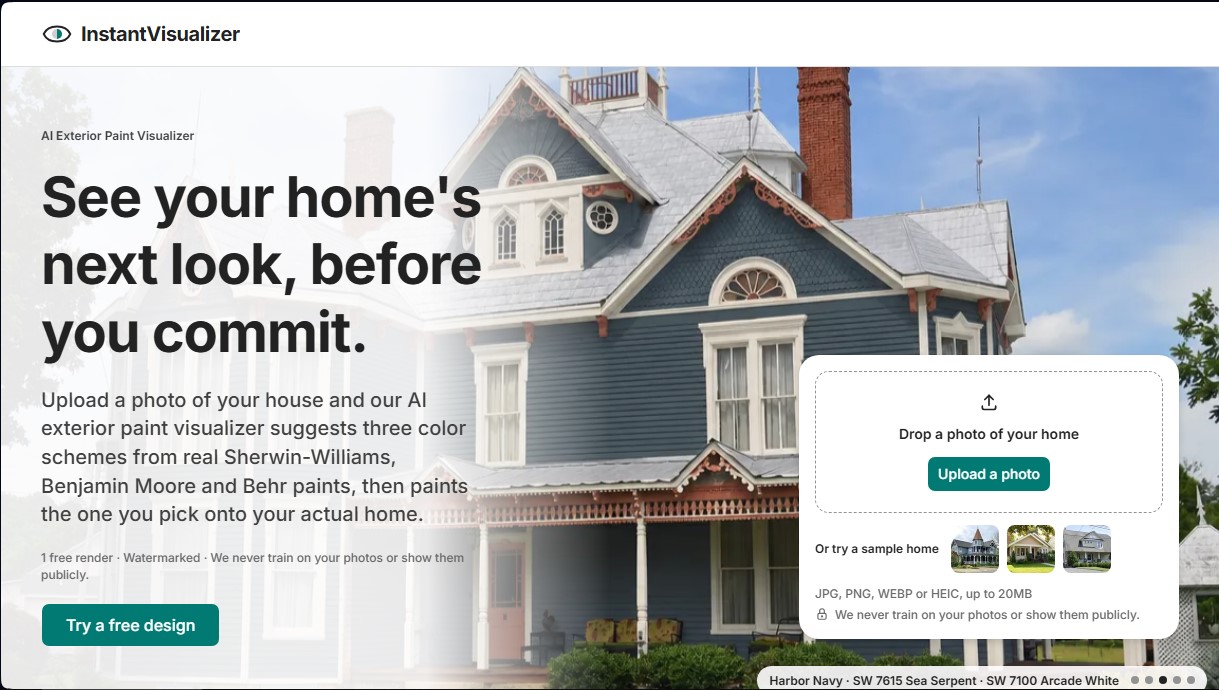
InstantVisualizer Screenshots
InstantVisualizer alternatives





DesignKitchen AI
Visualize kitchen remodels by uploading a photo. Test cabinet colors, countertops, and modern styles without altering the original structure or plumbing.