

DesignKitchen AI
Share
Visualize kitchen remodels by uploading a photo. Test cabinet colors, countertops, and modern styles without altering the original structure or plumbing.
What is DesignKitchen AI?
DesignKitchen AI is an advanced AI kitchen design generator and online remodel visualizer designed to transform spaces using real photos. This tool allows users to upload an image of their current kitchen and apply instant changes to finishes, materials, and architectural styles. Its primary purpose is to facilitate aesthetic and technical decision-making before any physical investment is made, providing an accurate visual representation of how different combinations of cabinetry and surfaces will look.
The standout technology behind DesignKitchen AI lies in its spatial structural alignment system. Unlike other AI image generators that create unrealistic floor plans, this model locks the coordinates of critical elements such as load-bearing walls, windows, sink drains, and gas lines. This ensures that design proposals are viable for real-world renovations and construction, avoiding budget surprises caused by unnecessary plumbing or electrical relocations.
Among its core capabilities is the kitchen cabinet visualizer, which includes precise calibration with official color codes from brands like Sherwin-Williams and Benjamin Moore. Users can test how specific shades look on shaker-style doors, flat panels, or fluted finishes under various lighting conditions. Additionally, the tool enables texture simulation for countertops and backsplashes, offering high-resolution renders for materials such as Calacatta quartz, marble, natural wood, and ceramic tile.
The application's key features and practical benefits include:
Original Layout Preservation: Maintains the location of appliances and service points to ensure the technical consistency of the project.
Targeted Edits: Allows for changes to specific elements—such as adding a custom range hood, wall-mounted faucets, or waterfall islands—without altering the rest of the room.
Small Space Optimization: Features a specialized model for small kitchen design and galley layouts, maximizing the sense of spaciousness and ergonomic flow.
Architectural Style Variety: Access to over 15 curated themes, including Modern Farmhouse, Japandi, Mid-Century Modern, and Scandinavian minimalism.
Professional Tool: Generates photorealistic proposals that help contractors, remodelers, and real estate agents align expectations with their clients and accelerate quote approvals.
The operation of DesignKitchen AI is intuitive and fast, designed for a desktop or mobile workflow. After uploading a clear photo of the kitchen, the user selects their desired style and specific materials. In approximately 30 seconds, the AI processes the information and generates visual proposals ready to download and share with renovation specialists. It is a comprehensive solution for homeowners, decorators, and real estate investors looking for an efficient way to visualize a home's potential.
DesignKitchen AI features and use cases
How to use DesignKitchen AI
DesignKitchen AI FAQ
What is DesignKitchen AI, and how does it work to help me design my kitchen?
It is an online tool that uses artificial intelligence to visualize instant renovations by uploading a photo of your current kitchen and applying new styles, colors, and materials.
Will DesignKitchen AI maintain my kitchen’s actual layout when generating a design?
Yes, our technology is designed to preserve the location of load-bearing walls, windows, drains, and gas lines, updating only the finishes and cabinetry.
Can I test specific paint brand colors on my cabinets?
Absolutely. The visualizer allows you to simulate official color codes from brands like Sherwin-Williams and Benjamin Moore to ensure an exact match before you buy the paint.
Is it possible to change just the countertop or the backsplash without modifying anything else?
Yes, you can use specific controls to test different stone textures, such as Calacatta marble or quartz, on only the surfaces you choose.
What kind of photo should I upload to DesignKitchen AI to get the best results?
Ideally, you should use a sharp photo taken in natural light from a corner or the entrance. It should clearly show the cabinets, countertops, and appliances.
Does DesignKitchen AI offer options for small or galley kitchens?
Our tool includes specialized models for optimizing small spaces, allowing you to visualize open shelving and light-reflecting finishes to maximize the sense of space.
How do credits and subscriptions work on the platform?
We offer monthly plans that provide a set number of credits for generating high-resolution images without watermarks, including commercial usage rights.
Can I download my design concepts to show them to my contractor?
Yes, you can download your designs in 4K quality to share directly with contractors or cabinet makers to ensure everyone is on the same page for the project.
How many credits does it cost to generate an image in DesignKitchen AI?
Each image generation typically uses two credits from your account, providing you with high-quality, photorealistic visualizations instantly.
DesignKitchen AI pricing and plans
Free Version
Start using the tool at no cost to test out the design features.
Starter Plan - 19,99 $ al mes
200 monthly credits (expire each month).
Equivalent to 100 Basic generations or 40 Pro generations.
4K quality exports.
Watermark-free downloads.
Full design permissions and commercial use rights.
Professional Plan - 49,99 $ al mes
600 monthly credits (expire each month).
Equivalent to 300 Basic generations or 120 Pro generations.
4K quality exports.
Watermark-free downloads.
Full design permissions and commercial use rights.
Priority processing.
Plan Enterprise - 99,99 $ al mes
1500 monthly credits (expire each month).
Equivalent to 750 Basic generations or 300 Pro generations.
4K quality exports.
Watermark-free downloads.
Full design permissions and commercial use rights.
Priority processing.
Credit Packs
Option to purchase additional credits without a monthly subscription.
Visit the official website for specific details and pricing on these packs.
Note: Annual subscription options are available at a 50 % discount off the monthly prices listed. Prices do not include VAT or local taxes.
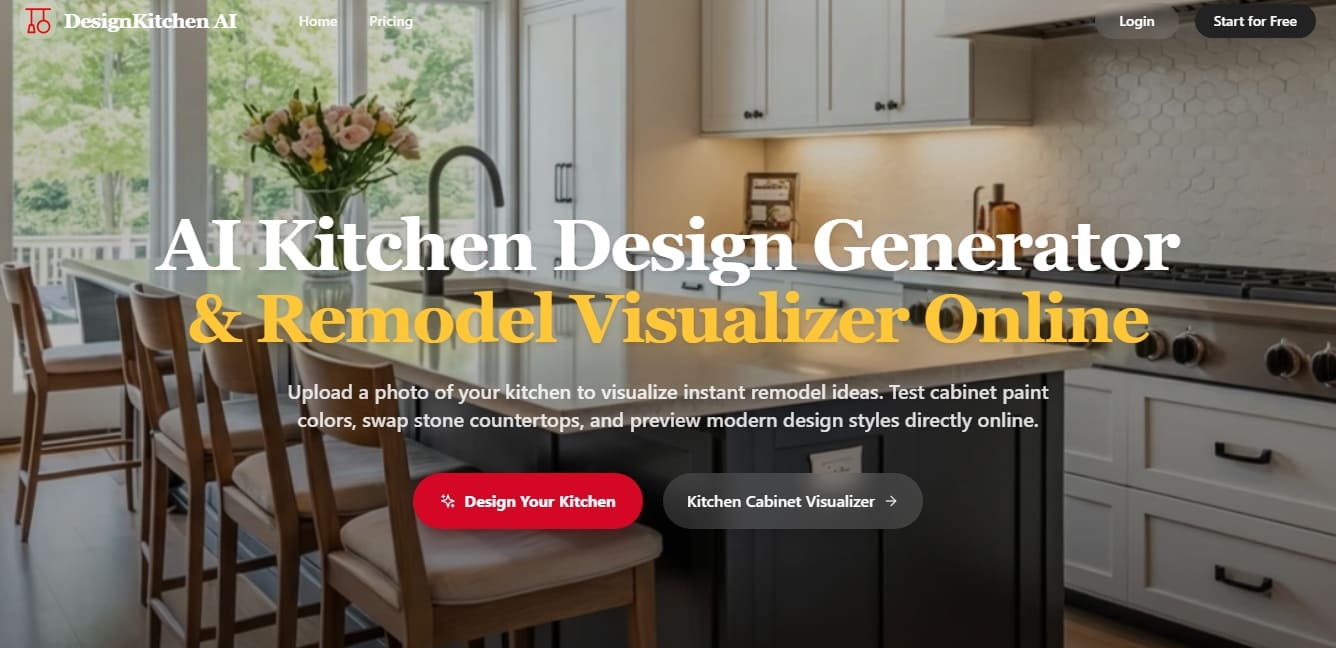
DesignKitchen AI Screenshots
DesignKitchen AI alternatives


Arcadium 3D
Design 3D homes and create photorealistic AI visualizations. Generate floor plans, decorate rooms, and share projects directly from your browser.

AI Room Design
Redesign interiors and exteriors from a photo. Swap decor styles, visualize kitchen or facade renovations, and easily generate technical floor plans.

Home Design AI
Redesign interiors, exteriors, and gardens with photos or sketches. Create floor plans, virtual home staging, and visualize realistic renovations before construction begins.