Share
Redesign interiors and exteriors from a photo. Swap decor styles, visualize kitchen or facade renovations, and easily generate technical floor plans.
What is AI Room Design?
AI Room Design is an advanced AI interior design platform designed to transform real photos of spaces into refreshed visual concepts. This tool allows homeowners and industry professionals to visualize aesthetic changes in a room before making any physical investment. Its primary function is to act as an AI rendering engine that processes images of rooms, facades, or floor plans to instantly apply new styles, materials, and furniture layouts via desktop or mobile device.
The app's operation is based on a simplified process: upload a clear image of the space in JPG, PNG, or WebP formats (up to 10 MB), select a predefined style or write a short text description of the desired changes, and generate the proposal. The technology utilizes state-of-the-art image generation models, such as GPT Image 2 and Nano Banana Pro, to interpret the room's structure and apply realistic textures. The system uses the original photo as an anchor, allowing users to explore variations in flooring, walls, and lighting while maintaining the essence of the space.
The tool is divided into five specialized utilities to cover different virtual remodeling needs:
- AI Interior Design: Optimized for transforming living rooms, bedrooms, and common areas by applying various decorative styles.
- AI Exterior Design: Focused on facade renovation, allowing users to test new materials, paint colors, and landscaping elements.
- AI Kitchen Design: A specific feature for visualizing changes to cabinets, countertops, backsplashes, and kitchen lighting systems.
- Floor Plan Maker: Designed to convert layout ideas into schematic plans that make it easier to understand flow and circulation.
- AI Home Design: A comprehensive workspace that unifies interior, exterior, and floor plan design into a single interface.
The platform offers a library of over 20 styles, including Japandi, Minimalism, Organic Modern, Industrial, Art Deco, and Scandinavian. Users can benefit from practical features such as the "before and after" comparison slider, private design history management, and the ability to download high-resolution images for professional presentations.
AI Room Design is especially useful for interior designers, architects, and real estate consultants who need to align expectations with their clients through concrete visual concepts. It is also an effective solution for individuals looking for AI decorating ideas for DIY projects or home renovations, allowing them to digitally validate color and material combinations before contacting a contractor. The system guarantees project privacy, ensuring that uploaded images and generated results are not published in public galleries without consent.
AI Room Design features and use cases
How to use AI Room Design
AI Room Design FAQ
What is AI Room Design and how can it help me with my home?
AI Room Design is an artificial intelligence tool that lets you transform any room by uploading a photo and choosing a style or describing the changes you want.
Does AI Room Design offer free credits for new users?
New verified accounts receive fifteen trial credits that expire fourteen days after they are issued so you can explore the platform.
What kind of photos should I upload for the best results?
You should use clear, well-lit images that show the entire room in JPG, PNG, or WebP formats, with a maximum file size of ten megabytes.
Can I use the generated designs for my construction projects?
The results are intended solely as a visual guide and must be validated by architects or qualified professionals before beginning any construction or renovation work.
Are my files and designs created in AI Room Design private?
Both your uploaded photos and generated designs are saved privately to your account and are not shared in the public inspiration gallery.
How many credits does each image generation use?
Each generated image costs five credits, which are reserved when you start the request and are officially charged once the result is saved.
Is it possible to download or re-edit a previously saved design?
Yes, all your work appears in the "My Designs" section, where you can download them or reload them into the editor to make new changes.
What happens to my credits if an image generation fails?
If the system confirms a generation error, the reserved credits are automatically released and returned to your available balance.
AI Room Design pricing and plans
Free Trial: 15 free credits for new verified accounts.
Credits expire 14 days after being issued.
Each image generation consumes 5 credits.
Starter: 19,90 $ per month (or 9,90 $ per month billed annually).
800 credits per month (expire at the end of the billing cycle).
Generate up to 2 images simultaneously.
No watermarks on paid results.
Includes commercial usage rights.
Pro: 39,90 $ per month (or 19,90 $ per month billed annually).
2,500 credits per month (expire at the end of the billing cycle).
Generate up to 4 images simultaneously.
4K quality image exports.
Priority queue processing.
No watermarks and commercial usage rights.
Max: 69,90 $ per month (or 34,90 $ per month billed annually).
5,000 credits per month (expire at the end of the billing cycle).
Generate up to 4 images simultaneously.
4K quality image exports.
Ultra-fast queue processing.
No watermarks and commercial usage rights.
Unlimited: 49,92 $ per month (one-time annual payment of 599 $).
Unlimited generations while the subscription is active.
Generate up to 4 images simultaneously.
4K quality image exports.
Ultra-fast queue processing.
No watermarks and commercial usage rights.
Credit Packs (one-time payment): Light (9,90 $ for 100 credits), Standard (19,90 $ for 500 credits), or Large (49,90 $ for 2,000 credits).
Credits from these packs never expire.
Generate up to 2 images simultaneously.
No watermarks and commercial usage rights.
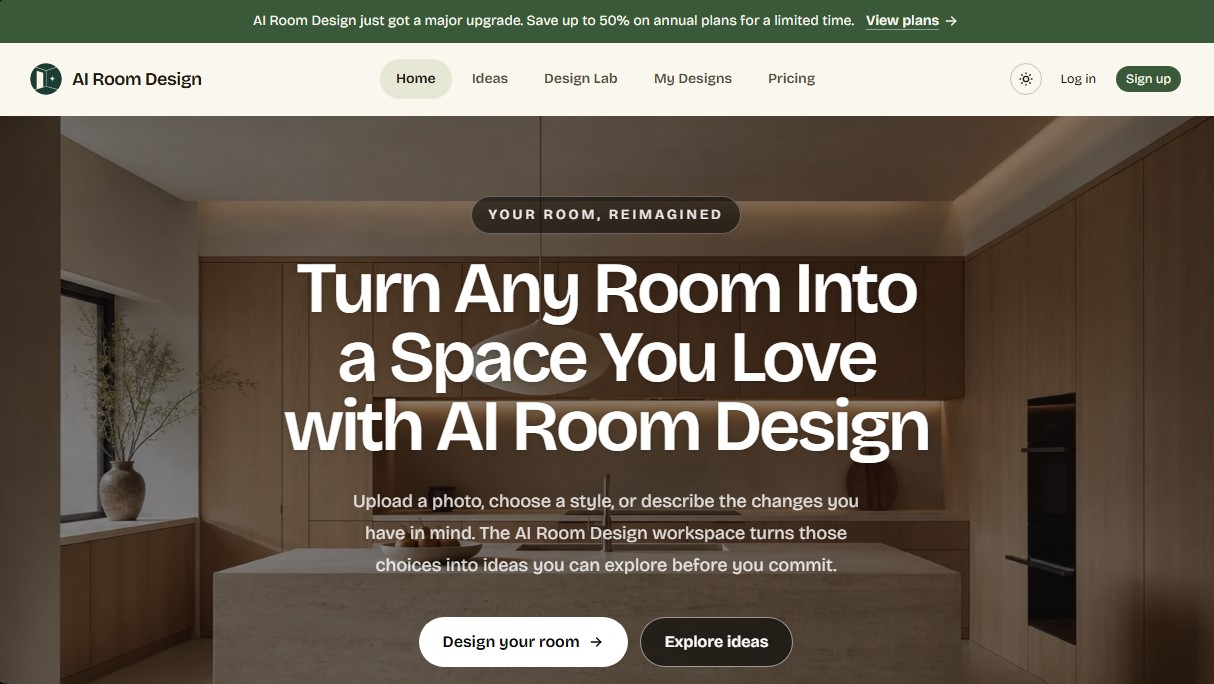
AI Room Design Screenshots
AI Room Design alternatives



InstantVisualizer
Visualize exterior paint colors with AI. Upload a photo to test real color schemes and see the final result with professional brand codes before painting your home.