

Roomvana
Share
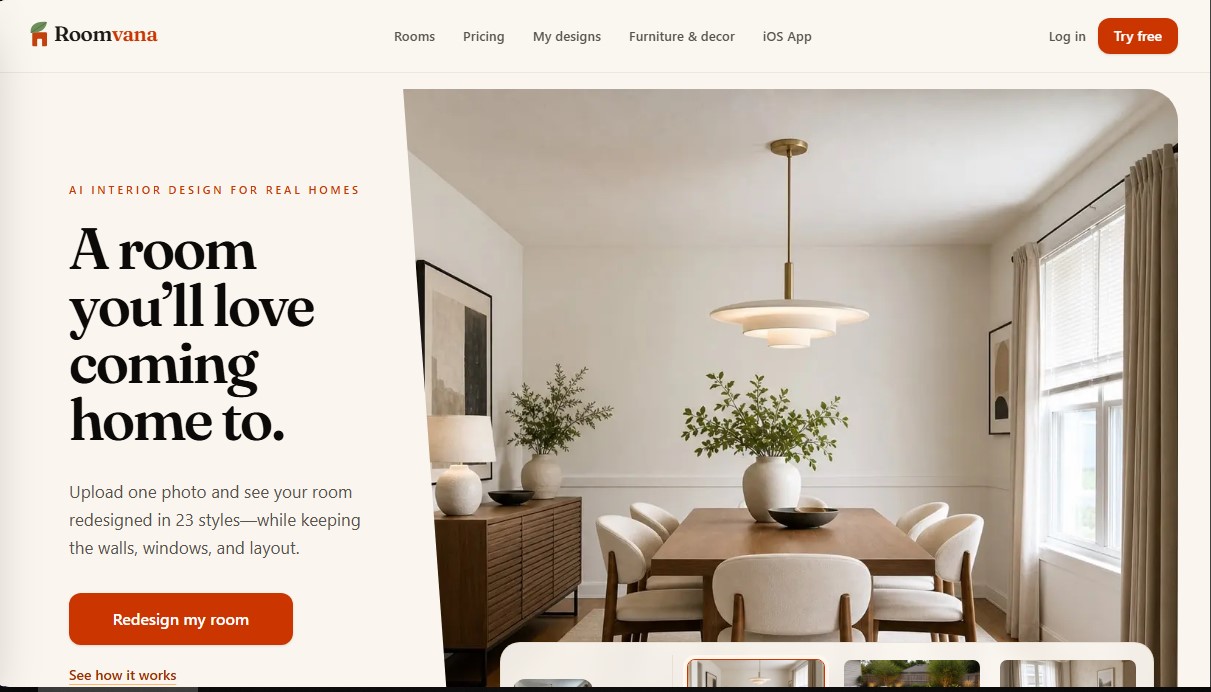
Redesign interiors and exteriors with a photo. Swap furniture, colors, and decor across 23 styles while keeping the structure. Ideal for visualizing renovations instantly.
What is Roomvana?
Roomvana is an AI-powered interior design application focused on transforming real spaces through image processing. Unlike other generic image generators, this tool specializes in redesigning while maintaining the structural integrity of the space, meaning it respects the exact placement of walls, windows, and doors. It is a functional solution for homeowners looking to renovate, real estate agents in need of virtual home staging solutions, and design professionals seeking rapid prototypes.
Roomvana’s operation is based on computer vision models that analyze a room's geometry from a photograph. Once the image is processed, users can apply up to 23 predefined decorative styles, including Scandinavian, Japandi, industrial, minimalist, and Modern Farmhouse. The platform's technology ensures that changes in furniture, colors, and textures realistically adapt to the perspective and lighting of the original room.
The core capabilities of this AI tool include:
- Interior Redesign: Completely change the aesthetic of living rooms, bedrooms, or kitchens by applying new furniture and decorative elements.
- Virtual Staging: Digitally furnish empty rooms, an essential feature for real estate marketing.
- Object Removal: The ability to clear a room of its current furniture to visualize an open space.
- Surface Modification: Test different wall paint colors, cabinet finishes, or flooring types individually.
- Exterior Design and Landscaping: Extends its functionality outside the home, allowing for the modification of facade cladding, roofing, entry doors, and garden or patio designs.
From a practical standpoint, Roomvana eliminates the need to create complex technical blueprints or manual mood boards. The workflow is straightforward: upload a photo from a computer or mobile device via its iOS app, select the desired style, and instantly generate the new version of the space. This facilitates decision-making before investing in renovations or purchasing furniture.
Regarding privacy and professional use, the platform ensures that uploaded images remain private and are not used to train global AI models. For advanced users, the tool allows designs to be exported in 4K resolution and offers commercial use rights, making it easy to create catalogs or real estate project presentations. By focusing on design based on real photos, the results provided by Roomvana serve as a precise visual guide for how a renovation would look without altering the property's basic architecture.
Roomvana features and use cases
How to use Roomvana
Roomvana FAQ
What is Roomvana and what is it used for?
It is an artificial intelligence tool that allows you to redesign the interior or exterior of your home by uploading a single photo while maintaining the original structure.
Can I try Roomvana for free?
Yes, you can upload a photo of your own room and see the results at no cost before deciding if you want to purchase credit packs.
Will Roomvana maintain the actual structure of my room?
Yes, the AI preserves the walls, windows, and general layout so that the final design is realistic and faithful to your current space.
Do purchased credits have an expiration date?
No, credits purchased through one-time payment packs never expire, and you can use them whenever you need without any rush.
What happens to the photos I upload to the platform?
Your images are private; they are not used to train AI models, and you can delete them from your gallery at any time.
How many decor styles does Roomvana offer?
There are twenty-three different styles available to choose from, including options such as Scandinavian, industrial, modern rustic, or minimalist.
Is a monthly subscription mandatory?
A subscription is not necessary, as you can opt for one-time payments through credit packs if you only want to complete a one-off project.
Can I improve the quality of the generated images?
Yes, you have the option to upscale any design to 4K resolution by using one additional credit per image.
What do I need to get started?
You only need to create a free account with your email to upload your first photo—no credit card required.
Roomvana pricing and plans
Free Plan
Price: 0 $
Access to test with your own photos.
Access to 23 design styles.
Before/after slider visualization.
Restrictions: Designs include a small watermark and are exported in standard resolution.
One Room (Credit Pack)
Price: 14,99 $ (one-time payment)
30 design credits.
No watermarks.
Commercial use license.
Credits never expire.
Custom instructions.
4K resolution upscaling option (consumes 1 credit per image).
Whole Home (Credit Pack)
Price: 29,99 $ (one-time payment)
100 design credits.
No watermarks.
Commercial use license.
Credits never expire.
Custom instructions.
4K resolution upscaling option (consumes 1 credit per image).
Renovation (Credit Pack)
Price: 59,99 $ (one-time payment)
300 design credits.
No watermarks.
Commercial use license.
Credits never expire.
Custom instructions.
4K resolution upscaling option (consumes 1 credit per image).
Monthly Membership
Price: 9,90 $/mo
Designed for professionals (designers or real estate agents).
Ongoing week-over-week design work.
4K resolution upscaling included.
No commitment, cancel anytime.
Annual Membership
Price: 5,00 $/mo (billed as 59,99 $ per year)
Ongoing design work for frequent professional use.
4K resolution upscaling included.
Savings compared to the monthly subscription.
Roomvana Screenshots
Roomvana alternatives


InstantVisualizer
Visualize exterior paint colors with AI. Upload a photo to test real color schemes and see the final result with professional brand codes before painting your home.


DesignKitchen AI
Visualize kitchen remodels by uploading a photo. Test cabinet colors, countertops, and modern styles without altering the original structure or plumbing.