

Share
Redesign interiors and exteriors from a photo. Change styles and furniture while preserving the original structure. Ideal for remodeling, staging, and real estate marketing.
What is Room AI?
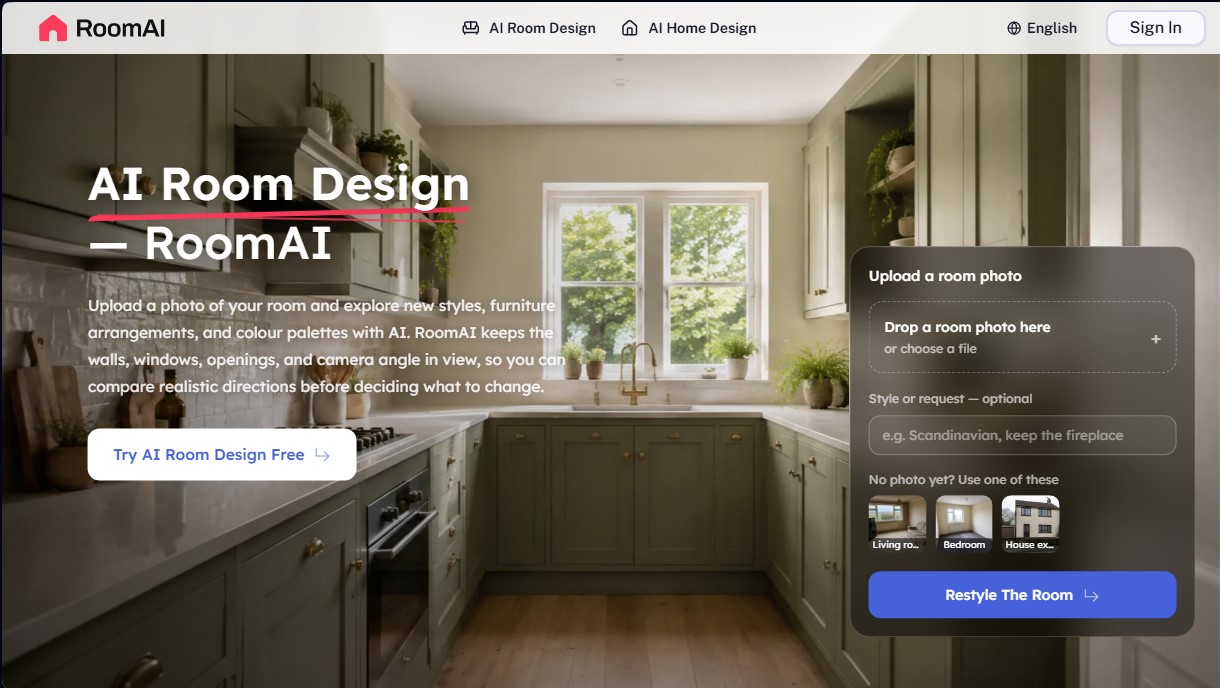
Room AI is a specialized AI interior design solution that transforms real rooms by processing photographs. Its standout feature is its absolute respect for spatial geometry, keeping the positions of walls, windows, ceilings, and camera angles unchanged. This tool focuses on providing realistic visualizations that serve as a foundation for renovations, real estate sales, or decoration projects, avoiding the structural distortions common in generic image generators.
The system uses computer vision algorithms and advanced models to interpret the structure of the uploaded photo. By working with a real image, Room AI identifies fixed elements such as radiators, wooden beams, outlets, or fireplaces, ensuring they remain in place after the transformation. The process is purely functional: the user uploads the file from their computer or mobile device, chooses from over 20 room presets, and selects from a library of 300 styles, such as Scandinavian, industrial, or contemporary.
The tool’s core capabilities include:
- Virtual Staging: Allows for the digital furnishing of empty rooms with realistic proportions and scales, making it easier to market properties.
- AI Empty Room: A technical clearing function that removes furniture and objects from an occupied room to show its open-concept potential before redesigning.
- AI Exterior Design: The ability to redesign facades, change siding, paint, or roofing without altering the building’s volume or the location of its openings.
- Landscaping and Terraces: A tool for designing gardens and patios while respecting the boundaries and structural elements of the original environment.
The utility of Room AI extends to real estate agents, interior designers, developers, and homeowners. It is especially valuable for generating fast renders during client meetings or for deciding on color palettes and materials before requesting quotes from contractors. By delivering results in less than a minute, it optimizes the workflow for professionals who need high-quality images for listings or project presentations without the cost and complexity of traditional 3D modeling. The platform ensures that proposals are visually consistent and technically recognizable within the actual photographed space, facilitating decision-making based on accurate visual data.
Room AI features and use cases
How to use Room AI
Room AI FAQ
What is Room AI and how can it help me with my design project?
It is an AI-powered tool that allows you to upload a photo of a room to explore new styles, furniture, and color palettes while maintaining the original structure.
Will Room AI change the position of my walls or windows?
No, the tool keeps the walls, windows, ceilings, and camera angle fixed to ensure the design is realistic and applicable to your current space.
Can I use Room AI if my room is already furnished?
Yes, you can redesign furnished rooms directly or use the "empty room" feature to remove existing furniture before applying a new style.
What kind of photos does Room AI recommend for the best design results?
Ideally, you should use a straight-on photo taken with a smartphone that shows as much of the room as possible with the lights turned on.
Is it possible to redesign exteriors and gardens with this tool?
Yes, it features specific options for changing facades, roofs, and outdoor flooring, as well as landscaping functions for gardens and patios.
Are Room AI images suitable for posting on real estate listings?
Yes, they are ideal for real estate marketing as long as you indicate that the images were digitally generated in accordance with local regulations.
How long does it take Room AI to generate a new design proposal?
The process usually takes between twenty seconds and one minute, allowing you to generate several style options simultaneously for comparison.
Do Room AI results replace an architect's technical blueprints?
No, this is an aesthetic visualization tool and does not generate dimensioned blueprints or replace technical advice regarding structures or load-bearing walls.
What happens to the photos I upload to the platform?
Your photos are used exclusively to generate designs and are never published, sold, or added to public galleries on the website.
Do the credits I purchase on Room AI expire?
One-time credit packs never expire, while credits included in subscriptions renew at the start of each billing cycle.
Room AI pricing and plans
Free Plan
Price: Free (includes 20 trial credits upon sign-up).
- 4 AI design generations.
- Personal and commercial use.
- No watermarks.
- 24/7 email support.
Starter Plan
Price: 19,99 $ per month (or 11,99 $/mo billed annually).
- 50 AI design generations.
- 25 Pro AI design generations.
- Full access to all AI design tools.
- Full-resolution downloads.
- Personal and commercial use.
- No watermarks.
- 24/7 email support.
Pro Plan
Price: 39,99 $ per month (or 23,99 $/mo billed annually).
- 200 AI design generations.
- 100 Pro AI design generations.
- Full access to all AI design tools.
- Full-resolution downloads.
- Personal and commercial use.
- No watermarks.
- 24/7 email support.
Studio Plan
Price: 79,99 $ per month (or 47,99 $/mo billed annually).
- 500 AI design generations.
- 250 Pro AI design generations.
- Full access to all AI design tools.
- Full-resolution downloads.
- Personal and commercial use.
- No watermarks.
- 24/7 email support.
Project Pack (One-time payment)
Price: 39,99 $.
- 80 AI design generations.
- 40 Pro AI design generations.
- Credits never expire.
- Full access to all tools and full-resolution downloads.
- Commercial use and no watermarks.
Listing Pack (One-time payment)
Price: 99,99 $.
- 240 AI design generations.
- 120 Pro AI design generations.
- Credits never expire.
- Full access to all tools and full-resolution downloads.
- Commercial use and no watermarks.
Portfolio Pack (One-time payment)
Price: 199,99 $.
- 560 AI design generations.
- 280 Pro AI design generations.
- Credits never expire.
- Full access to all tools and full-resolution downloads.
- Commercial use and no watermarks.
Room AI Screenshots
Room AI user reviews
Write a review
Checking your session...
Room AI Reviews
Loading reviews...
Room AI alternatives

Planner 5D
Planner 5D is home and interior design software for drawing 2D and 3D floor plans, furnishing rooms from a large catalog, rendering and using AI design tools.





InstantVisualizer
Visualize exterior paint colors with AI. Upload a photo to test real color schemes and see the final result with professional brand codes before painting your home.