

HausDraft
Share
Redesign interiors, exteriors, and gardens with AI from photos. Generate floor plans, estimate renovation budgets, and customize styles or materials in detail.
What is HausDraft?
HausDraft is an advanced AI interior design platform designed to transform residential spaces using photos, sketches, or floor plans. This comprehensive tool allows for the technical redesign of interior rooms, facades, and landscaping, offering a practical solution for homeowners, decorators, real estate agents, and contractors. Its primary function is to facilitate the visualization of aesthetic and structural changes, turning a standard image into a professional design proposal in just seconds.
The operation of HausDraft is based on an image processing system that analyzes the existing structure—such as walls, windows, and light entry—to apply new styles without altering the base architecture unless requested by the user. Unlike generic image generators, this tool uses a library of curated styles, including options like Japandi, Nordic, Industrial, and Mediterranean. The technology allows for detailed control over elements: users can upload specific material samples, such as a particular type of tile or wood, and the AI integrates them while respecting perspective, shadows, and realistic textures.
Key capabilities of HausDraft include:
- Exterior and Facade Redesign: Allows for modifying siding, roofs, and color schemes while maintaining the home's original dimensions and volume.
- AI Landscape Planning: Generates proposals for gardens, patios, and pools, optimizing land use and plant placement.
- Paint and Material Visualizer: A specific tool for testing wall colors or finishes on kitchen and bathroom cabinets with photorealistic precision.
- Virtual Staging: A feature geared toward the real estate sector to digitally furnish empty rooms, enhancing the visual appeal of listings.
- Technical Planning Tools: Includes a to-scale floor plan creator, moodboards, and a renovation cost estimator that breaks down materials and labor.
For industry professionals, HausDraft serves as a concept engine that streamlines client communication, allowing them to explore multiple visual directions before any physical work begins. Individual users find it to be a useful space planning tool that helps them make informed decisions about furniture layout or color palette selection. By integrating visual generation with practical data like budgets and floor plans, the app covers the entire design cycle, ensuring that the proposed ideas can be technically communicated to a contractor or builder.
HausDraft features and use cases
How to use HausDraft
HausDraft FAQ
What is HausDraft and what can I use it for?
HausDraft is an AI-powered design tool that allows you to redesign interiors, exteriors, gardens, and facades using either a photograph or a floor plan.
Can I try HausDraft for free before subscribing?
Yes, when you sign up, you receive six free credits—equivalent to three redesigned images—so you can test the quality of the results in your own space.
What kind of photo do I need to upload to get a good design?
A clear smartphone photo that shows most of the room or exterior is sufficient, preferably taken from a straight-on angle with good lighting.
Is it possible to keep my own furniture in the new HausDraft design?
Yes, the tool allows you to integrate your own specific pieces, colors, and materials to ensure the final result is consistent with what you already own or plan to buy.
Does HausDraft offer solutions for renters?
The platform includes a renter-friendly mode that only suggests changes to portable elements, such as furniture and decor, without modifying permanent structures.
What is the difference between the available paid plans?
The Lite plan is designed for individual single-room projects, while the Starter and Pro plans offer more credits, higher resolution, and commercial use rights.
Can HausDraft help me calculate my renovation budget?
The tool includes a cost estimator that breaks down materials and labor for your design by line item, which you can then present to a contractor.
Does the tool also allow for designing outdoor areas like pools or patios?
HausDraft features specific landscaping functions that let you add pools, pergolas, and various types of plants while respecting your property's actual boundaries.
Can I create floor plans and mood boards in addition to images?
Yes, the platform allows you to draw scaled floor plans and create professional mood boards with real furniture and finishes to better organize your design project.
How do credits work within the platform?
Each generated image consumes two credits from your account, and you can see the cost of each action before confirming it to help you manage your available balance.
HausDraft pricing and plans
Free
0 $
- 6 one-time free credits (equivalent to about 3 images).
- Access to interior, exterior, paint, and landscaping tools.
- Limited access to the Mood Board with watermarks.
- Personal use of generated images.
- No credit card required.
Lite
9,99 $/month
- 30 monthly rendering credits (approximately 15 images).
- Full Mood Board with no limits on items or colors and no watermarks.
- Ability to import your own product photos.
- Shareable links for projects with family or professionals.
Starter
29 $/month
- 232 monthly redesign credits (approximately 116 images).
- Access to all studios: interior, exterior, paint, and landscaping.
- Premium image models with 2K resolution.
- Commercial use rights (for real estate listings or client presentations).
- Include your own logo on finished designs.
Pro
69 $/month
- 552 monthly redesign credits (approximately 276 images).
- Includes all Starter plan features.
- Unlimited Mood Board saves.
- Designed for professionals managing multiple projects simultaneously.
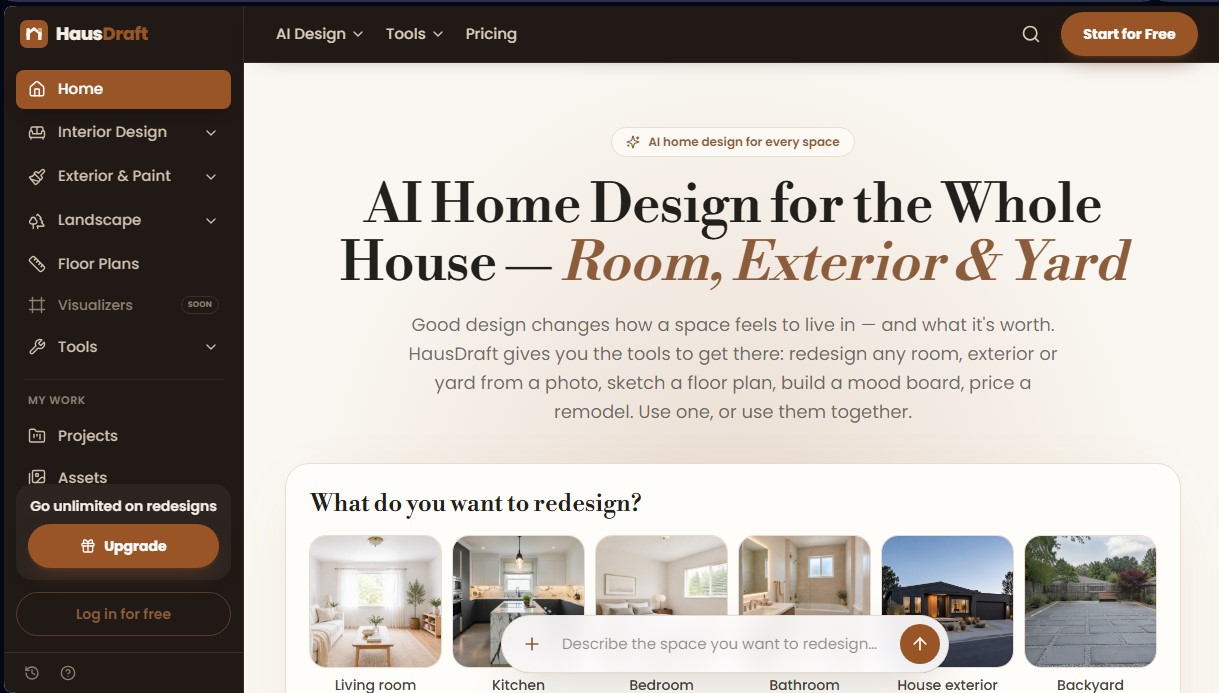
HausDraft Screenshots
HausDraft alternatives


DesignKitchen AI
Visualize kitchen remodels by uploading a photo. Test cabinet colors, countertops, and modern styles without altering the original structure or plumbing.

Arcadium 3D
Design 3D homes and create photorealistic AI visualizations. Generate floor plans, decorate rooms, and share projects directly from your browser.

AI Room Design
Redesign interiors and exteriors from a photo. Swap decor styles, visualize kitchen or facade renovations, and easily generate technical floor plans.