Share
AI font generator that turns text into visual art. Features hundreds of styles and effects to create logos, posters, and thumbnails in image format.
What is FontVibe?
FontVibe is a powerful AI font generator designed to transform any text into a complete and professional piece of visual art. Unlike conventional font managers, this tool does not provide installable files (such as .ttf or .otf); instead, it uses artificial intelligence to create finished images where the font, texture, lighting, and effects are seamlessly integrated. It is an advanced solution for content creators, designers, and marketing professionals seeking high-impact visual results without the need to master complex editing software.
The way FontVibe works is built around simplicity and customization. Users can interact with the platform in three ways: by describing their needs using a natural language prompt, selecting one of over 126 predefined styles, or uploading up to four reference images to guide the AI's aesthetic. The system processes the request and delivers several visual proposals within 20 to 40 seconds. One of its standout features is Vibe Edit, an AI image editing tool that allows users to retouch specific elements or remove parts of the design using a smart brush while keeping the rest of the composition intact.
The platform offers technical capabilities geared toward productivity and professional quality:
- A catalog of 391 AI fonts featuring neon, glitch, 3D, fire, metallic chrome, and cinematic styles.
- High-quality transparent PNG export, facilitating the integration of text into other designs without the need for manual cropping.
- Support for resolutions up to 4K and multiple configurable aspect ratios.
- Batch generation functionality to apply the same style to an extensive list of words or names simultaneously.
- A Unicode-based fancy font generator that allows you to copy and paste decorative text directly onto social media platforms like Instagram, TikTok, or Discord.
FontVibe is especially useful for creating YouTube thumbnails, Twitch banners, podcast covers, and promotional material for events. Its technology can interpret creative contexts to generate everything from cyberpunk aesthetics to elegant wedding invitations or themed Halloween posters. Since it runs directly in the browser, it works seamlessly on both desktop and mobile devices, offering the versatility to streamline workflows for graphic design and digital branding projects. It is a tool designed for those who need ready-to-use typographic art, optimizing production time through the strategic use of generative artificial intelligence.
FontVibe features and use cases
How to use FontVibe
FontVibe FAQ
What exactly is FontVibe?
It is an AI-powered generator that transforms your text into finished visual designs featuring texture, lighting, and artistic styles.
Can I download installable font files like TTF or OTF from FontVibe?
No, this tool generates images in PNG or JPG format with the design already applied, rather than font files to install on your computer.
Is it possible to use FontVibe for free?
Yes, you can start creating without signing up, and there is a free plan that offers two hundred monthly credits once you create your account.
Does FontVibe allow commercial use of the designs I create?
Yes, commercial use is permitted on all plans, including the free one, and it requires no attribution or royalty payments.
How can I get a transparent background for my creations?
When downloading your design, you must select the PNG format to get a transparent image that preserves only the text and its visual effects.
What kind of visual styles can I find on the platform?
You have access to over one hundred and twenty different styles, including neon, chrome, fire, glass, graffiti, and retro aesthetics.
How many AI fonts does FontVibe currently offer?
The catalog features three hundred and ninety-one AI fonts designed to automatically adapt to the words you type.
Do I need design knowledge to use the tool?
Not at all. You just need to describe what you need in a sentence or choose a preset style, and the AI will handle the entire creative process.
FontVibe pricing and plans
🌱 Free
Free forever.
200 credits per month (capped at 30 credits per day).
JPG and PNG file downloads.
Storage for up to 20 creations.
3 library slots.
Commercial use license included.
⚡ Starter
$3.99 (one-time payment).
400 one-time credits with no expiration date.
JPG and PNG file downloads.
Up to 3K image resolution.
Storage for up to 200 creations.
50 library slots.
🚀 Growth
$9.99 per month.
2,000 credits per month.
JPG and PNG file downloads.
High-quality image resolution up to 4K.
Storage for up to 1,000 creations.
500 library slots.
💎 Expert
$24.99 per month.
5,500 credits per month.
JPG and PNG file downloads.
High-quality image resolution up to 4K.
Unlimited creation storage.
Unlimited resource library.
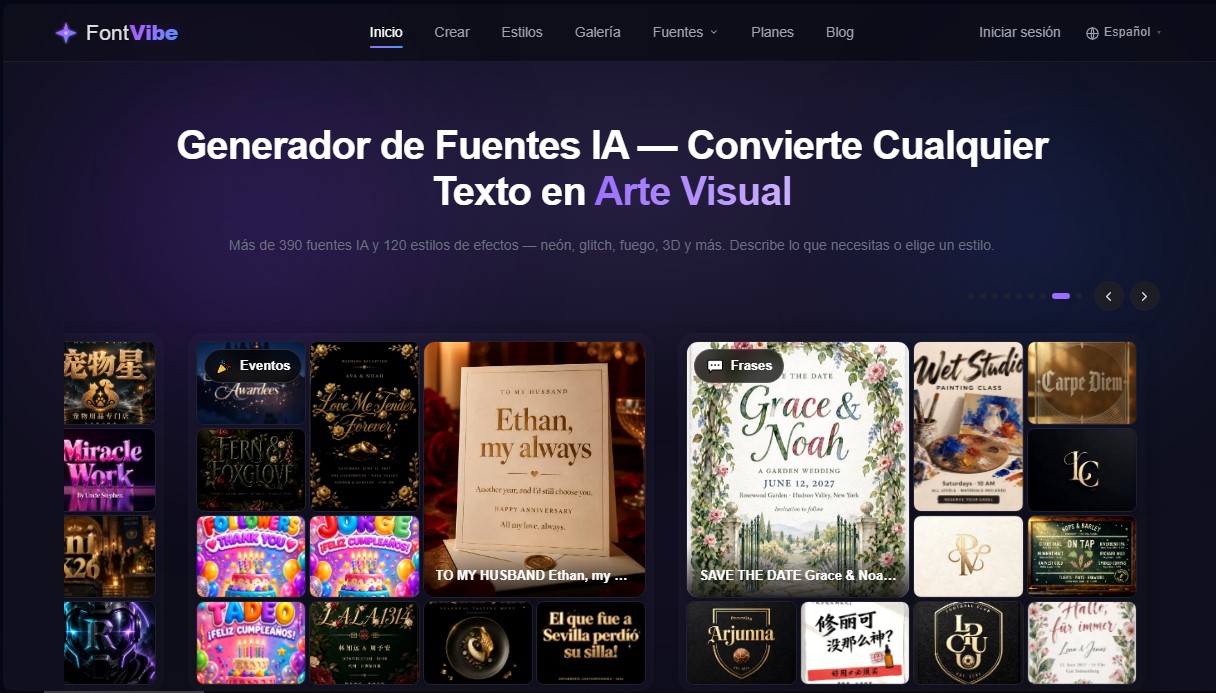
FontVibe Screenshots
FontVibe alternatives
AI Tattoo Studio
Design unique AI tattoos, edit details, and preview the result on your skin. Includes multiple styles and high-resolution downloads.


ImageToSTL.org
Convert JPG and PNG images into STL files for 3D printing using AI. Generate detailed 3D models ready for instant download.

Image to 3D
Convert 2D images and sketches into textured 3D models using AI. Export in GLB, STL, or USDZ for video games, 3D printing, and augmented reality.