

ImageToSTL.org
Share
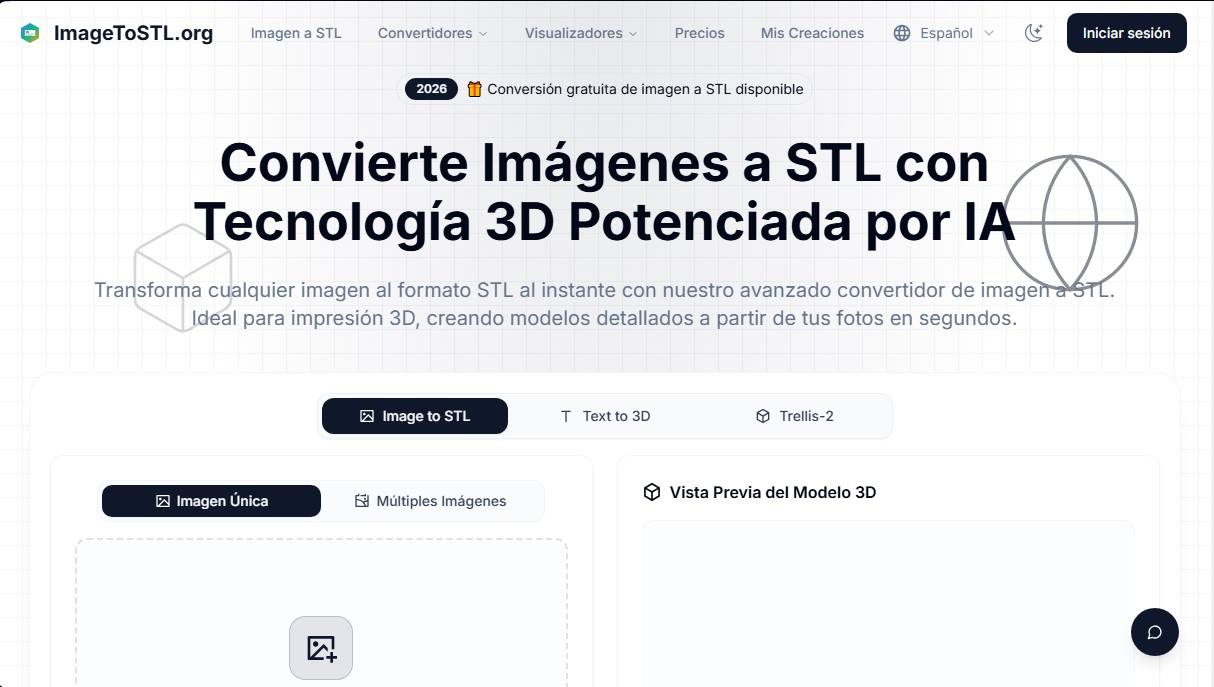
Convert JPG and PNG images into STL files for 3D printing using AI. Generate detailed 3D models ready for instant download.
What is ImageToSTL.org?
ImageToSTL.org is a platform specialized in converting 2D images to STL files using advanced artificial intelligence. This tool allows you to transform flat photos and graphics into detailed three-dimensional models, specifically optimized for 3D printing and visualization in digital environments. Unlike traditional methods based solely on heightmaps, this application utilizes neural networks and cutting-edge technology to analyze the depth, contours, and geometry of objects, achieving a more precise and fluid 3D reconstruction.
The operation of ImageToSTL.org is based on a structured process designed to be accessible from a computer or any web browser with cloud access. The user begins by uploading files in common formats such as JPG or PNG. Next, the AI image-to-STL engine processes the visual information to generate a three-dimensional mesh. Before the final download, the platform offers an integrated 3D model viewer that allows you to inspect the result and adjust critical parameters such as height, base thickness, and surface detail level.
Among its most notable technical capabilities and functional benefits are:
- AI-Powered Generation: It uses algorithms that recognize object boundaries and preserve fine details, avoiding the rough surfaces common in basic converters.
- Batch Processing: It allows for the simultaneous conversion of multiple images, streamlining the workflow for high-volume projects.
- Multi-Image Support: The technology can analyze different angles of the same reference to improve the accuracy of the 3D reconstruction.
- Manufacturing-Optimized Output: The generated files, in both STL and GLB formats, feature corrected mesh geometry and normals, ensuring compatibility with FDM and SLA 3D printers.
- Cloud Processing: Conversions are performed on high-performance servers, ensuring fast results without consuming local hardware resources.
This tool is highly useful for designers, engineers, content creators, and 3D printing enthusiasts who need to transform two-dimensional concepts into tangible objects without requiring deep knowledge of complex modeling software. ImageToSTL.org facilitates the creation of mechanical parts, architectural models, and custom designs from simple image captures. Additionally, the website's ecosystem allows for interconnection with other format converters such as OBJ, 3MF, or PLY, establishing itself as a versatile solution for managing three-dimensional digital assets.
ImageToSTL.org features and use cases
How to use ImageToSTL.org
ImageToSTL.org FAQ
What is ImageToSTL.org and what types of files can it create?
ImageToSTL.org is an online platform that uses artificial intelligence to transform 2D images into STL and GLB files ready for 3D printing.
What image formats can I upload to ImageToSTL.org for conversion?
The converter is compatible with the most common image formats, such as JPG and PNG, and supports file sizes up to 10 megabytes.
How long does the conversion process take on ImageToSTL.org?
Most images are processed in less than a minute, although the final time may vary depending on the complexity of the file and the chosen quality settings.
Is it possible to use multiple photos to generate a model on ImageToSTL.org?
Yes, the tool allows you to upload multiple images from different angles to achieve a much more precise and detailed 3D reconstruction of the object.
Do I need to install any special software to use ImageToSTL.org?
No installation is necessary since all processing is done in the cloud via high-performance servers accessible from any web browser.
Can I adjust my model's design before downloading it from ImageToSTL.org?
The platform offers options to customize the height, base thickness, and detail levels, allowing you to optimize the file for subsequent printing.
What sets ImageToSTL.org's technology apart from other traditional converters?
Unlike methods based on simple height maps, this tool's artificial intelligence recognizes contours and depth to create smoother, more detailed surfaces.
How does the payment and credit system work on ImageToSTL.org?
Users can choose between monthly or annual subscriptions or purchase individual credit packs that never expire to perform their conversions.
Does ImageToSTL.org offer a preview of the generated model?
The tool includes an integrated 3D viewer that allows you to inspect the conversion result from all angles before proceeding to download the final file.
Are files from ImageToSTL.org compatible with all 3D printers?
The generated files are optimized to be compatible with most printing technologies, such as FDM and SLA, and meet all necessary geometric standards.
ImageToSTL.org pricing and plans
Free Plan: Free.
Free image-to-STL conversion available (check website for specific credit limits).
Support for JPG and PNG formats.
10MB maximum file size per image.
Basic Plan: $12.90 per month (or $10/mo billed annually).
300 credits per month.
High-quality STL conversion.
3D model preview.
Standard processing speed.
Email support.
Advanced Plan: $16.90 per month (or $13/mo billed annually).
600 credits per month.
High-quality STL conversion.
3D model preview.
Priority processing speed.
Email support.
Professional Plan: $26.90 per month (or $21/mo billed annually).
1,000 credits per month.
High-quality STL conversion.
3D model preview.
Fastest processing speed.
Priority email support.
Basic Pack (Credits): $22.99 (one-time payment).
400 credits with no expiration date.
High-quality STL conversion and 3D preview.
Email support.
Advanced Pack (Credits): $99.99 (one-time payment).
1,800 credits with no expiration date.
High-quality STL conversion and 3D preview.
Email support.
Professional Pack (Credits): $230 (one-time payment).
4,000 credits with no expiration date.
High-quality STL conversion and 3D preview.
Email support.
ImageToSTL.org Screenshots
ImageToSTL.org alternatives

Image to 3D
Convert 2D images and sketches into textured 3D models using AI. Export in GLB, STL, or USDZ for video games, 3D printing, and augmented reality.


Meshy Image to 3D
Create detailed 3D models from photos and sketches in a minute. Get high-quality meshes and PBR textures for games or 3D printing without installing any software.