

Image to 3D
Share
Convert 2D images and sketches into textured 3D models using AI. Export in GLB, STL, or USDZ for video games, 3D printing, and augmented reality.
What is Image to 3D?
Image to 3D is an advanced artificial intelligence tool designed for converting 2D images into detailed, textured 3D models. Unlike traditional methods that require multiple shots or specialized hardware, this platform uses deep learning algorithms to generate three-dimensional assets from a single photograph, sketch, or piece of concept art. Its primary function is to streamline the creative workflow, allowing designers and developers to obtain high-fidelity geometries in just a few minutes from their computer.
The technical operation of ImageTo3D is based on the analysis of critical visual cues such as shading, edges, perspective, and occlusion. Thanks to this computer vision approach, the AI can infer the object's volume and depth to construct a coherent 3D mesh. Once the structure is generated, the system projects PBR textures and UV maps onto the surface, delivering a model with realistic materials ready for review or further editing.
The tool stands out for its versatility in file exporting, offering compatibility with industry standards. Users can download their assets in GLB format to preserve textures, or choose between STL, PLY, and USDZ according to their needs. This ensures seamless integration into game engines and professional design software such as Blender, Unity, and Unreal Engine.
Its practical applications span various professional sectors:
- Video game development: Instant creation of props and environment elements for rapid scene prototyping.
- Product design: Transformation of sketches and technical drawings into interactive concepts for industrial visualization.
- 3D printing and manufacturing: Generation of watertight STL files ready to be processed in slicers like Cura or PrusaSlicer.
- Augmented Reality (AR): Production of lightweight objects optimized for immersive experiences on mobile devices.
To maximize the quality of results in Image to 3D, it is recommended to use images with neutral backgrounds and clear lighting that highlights the main object. Although the AI is capable of interpreting drawings and concept art, optimal performance is achieved with sharp photographs of isolated objects. This technology removes entry barriers for users without manual modeling experience, allowing for the massive and efficient iteration of visual ideas. As an automated process based on a single view, it is a significantly faster alternative to conventional photogrammetry for creating modern digital assets.
Image to 3D features and use cases
How to use Image to 3D
Image to 3D FAQ
What is Image to 3D and how does it work?
It is an advanced tool that uses artificial intelligence to transform two-dimensional images, such as photos or sketches, into detailed, textured 3D models in just a few minutes.
What types of images provide the best results when using Image to 3D?
The best results are achieved with clear product photos, concept art, or characters that have proper lighting and a plain or uncluttered background.
What formats can I use to export the models generated with this tool?
You can download your creations in GLB format with textures included, as well as options like STL for 3D printing, PLY for point clouds, and USDZ for augmented reality experiences on Apple devices.
Can I use models created with Image to 3D for commercial purposes?
Yes, all models generated through credit packs or subscription plans include a commercial license for use in video games, advertising, or professional projects.
Is it possible to 3D print the files generated by the platform?
Yes, you can export your models in STL format, which is compatible with all major slicing software for physical manufacturing.
How long does the AI take to convert an image into a 3D model?
The process is extremely fast; most images are converted into fully textured 3D models within thirty to ninety seconds.
Do I need prior modeling knowledge to use Image to 3D?
No prior technical experience is required, as the platform is designed so that any user can generate 3D assets simply by uploading an image and downloading the result.
What makes Image to 3D different from traditional photogrammetry?
Unlike photogrammetry, which requires dozens of photos from multiple angles, our technology only needs a single image to predict the geometry and volume of the object.
Can I convert hand-drawn sketches or drawings with this tool?
Yes, the AI is capable of interpreting the visual structure of illustrations and digital drawings to generate a 3D mesh based on the linework and shading.
What is included in the Image to 3D free or trial plan?
Generating high-quality models requires significant processing power, so we offer various credit packs and monthly subscriptions tailored to the specific needs of each user.
Image to 3D pricing and plans
Starter (Credit Pack) - $9.90 (one-time payment)
800 credits (approx. 8 high-quality 3D generations).
Credits valid for 1 year.
Commercial license included.
Access to all AI models.
No subscription required.
Pro Standard (Credit Pack) - $29.90 (one-time payment)
3,000 credits (approx. 31 high-quality 3D generations).
Credits valid for 1 year.
Commercial license included.
Access to all AI models.
Priority customer support.
No subscription required.
Max Value (Credit Pack) - $69.90 (one-time payment)
8,000 credits (approx. 84 high-quality 3D generations).
Credits valid for 1 year.
Commercial license included.
Access to all AI models.
Priority customer support.
No subscription required.
Starter (Subscription) - $12.90/mo (or $9.90/mo billed annually)
1,600 credits per month.
Commercial license.
Access to all AI models and premium features.
Standard generation queue.
Advanced format exports.
Early access to new features.
Pro (Subscription) - $29.90/mo (or $23.90/mo billed annually)
4,000 credits per month.
Commercial license.
Access to all AI models and premium features.
Priority generation queue.
Advanced format exports.
Early access to new features.
Studio (Subscription) - $69.90/mo (or $49.90/mo billed annually)
10,000 credits per month.
Commercial license.
Access to all AI models and premium features.
VIP generation queue (fast track).
Advanced format exports.
Early access to new features.
Image to 3D Screenshots
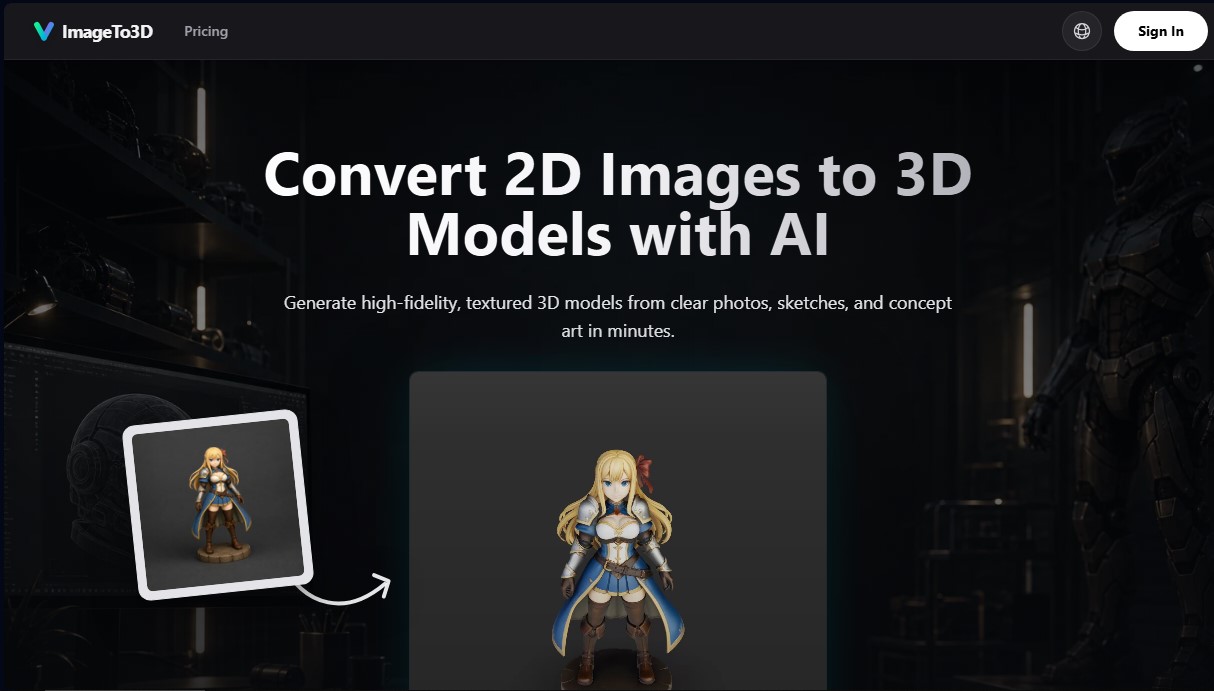
Image to 3D alternatives

ImageToSTL.org
Convert JPG and PNG images into STL files for 3D printing using AI. Generate detailed 3D models ready for instant download.

Meshy Image to 3D
Create detailed 3D models from photos and sketches in a minute. Get high-quality meshes and PBR textures for games or 3D printing without installing any software.