

Share
Generate professional, editable infographics from a single phrase. Customize every detail, use templates, and export your final design in high resolution.
What is Graphix?
Graphix is a generative artificial intelligence tool designed for the automated creation of professional infographics from text descriptions. Its primary function is to transform a simple phrase or a dataset into a structured visual design, eliminating the need to start from a blank canvas. This solution is geared toward marketing professionals, content creators, and educators who require quick and aesthetic data visualization without needing to master complex design software on their computers.
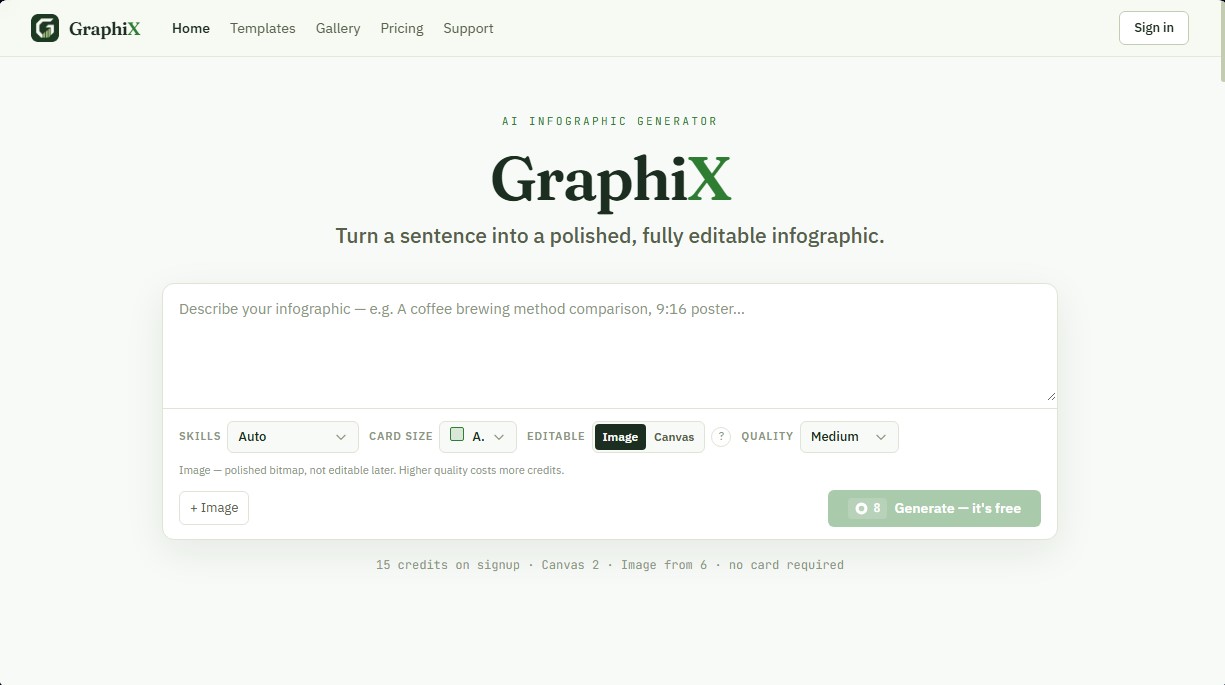
The operation of Graphix is based on an intelligent design agent that interprets the user's prompt to determine the most suitable structure, color palette, and graphics for the message. The system allows users to choose between two fundamental output modes: Editable Canvas (HTML) or Image (bitmap). While the image option generates a high-quality static file, canvas mode creates a living document where every component is fully customizable. The technology utilizes structure templates or blueprints to ensure the design is coherent and balanced, making it intuitive to edit the AI-generated content afterward.
Key capabilities of this tool include:
- AI Infographic Generation: Create posters, comparisons, timelines, or data reports simply by describing the topic and the desired tone.
- Comprehensive Element Editing: In canvas mode, users can individually select and modify text, colors, icons, and images. This is not a flat image, but a design with selectable layers.
- Format and Dimension Adjustment: Offers preconfigured aspect ratio options, such as 9:16 for mobile viewing, 16:9 for presentations, or 1:1 for social media.
- Specialized Design Skills: Specific "skills" can be assigned to the AI—such as data reports, step-by-step processes, conversion funnels, or comparisons—to guide the visual style.
- High-Resolution Export: Final designs can be downloaded in PNG format with 1x, 2x, or 3x resolution scales to ensure maximum clarity.
The versatility of Graphix allows it to be used in various contexts, from developing business KPIs to creating educational materials or medical infographics. By integrating web search capabilities, the tool acts as an AI-assisted design studio that streamlines the creative workflow. Users can start from a template gallery or upload reference images for the AI to replicate specific visual styles, making it ideal for maintaining a corporate visual identity simply and professionally.
Graphix features and use cases
How to use Graphix
Graphix FAQ
What is Graphix and how does it help create content?
It’s an AI tool that automatically turns a simple descriptive phrase into a complete, professional infographic.
What’s the difference between the editable format and the image format?
The editable format lets you modify every text box and icon individually on the canvas, whereas the image format generates a static visual file that cannot be changed later.
How does Graphix’s credit system work?
Each generation uses a specific number of credits; the editable format is more affordable than generating high-resolution images.
What elements can I modify once the infographic is generated?
If you are using editable mode, you can change any text, color, icon, or image by clicking directly on the element within the editor.
Can I choose the size or aspect ratio of my design in Graphix?
Yes, you can adjust the aspect ratio to fit social media, presentations, or posters before you start the generation process.
What export options are available?
You can export your final designs as PNGs with various resolution scales to ensure the image looks sharp on any platform or medium.
Can I use Graphix for free?
Yes, the tool provides fifteen free credits upon sign-up so new users can test out the generation and editing features.
What are "Skills" within the tool?
Skills help guide the visual style of your design toward specific formats like data reports, timelines, or comparisons.
Can I use templates to start a design?
Yes, you can browse Graphix’s template gallery and select a base to remix with your own text and data.
What happens to unused credits at the end of the month?
Monthly credits from paid plans do not roll over to the next period unless otherwise specified in your subscription terms.
Graphix pricing and plans
Free: 0 $
15 credits upon sign-up.
Access to all templates.
PNG exports.
Canvas editor.
Approx. limit of 1 image or 7 editable designs.
Pro: 19 $ per month
1,000 credits per month.
Everything in the Free plan.
Priority processing queue.
Watermark removal.
Roll over unused credits (up to 1 month).
Estimated capacity to generate 125 images or 500 editable designs.
Scale: 49 $ per month
3,000 credits per month.
Everything in the Pro plan.
Team-ready credit volume.
Priority support.
Estimated capacity to generate 375 images or 1,500 editable designs.
Additional Information on Credits:
Editable design (HTML): 2 credits.
Editable design + generated visuals: 4 credits.
Standard image: starting at 6 credits.
Advanced image: starting at 11 credits.
Web or image search: +2 additional credits.
Graphix Screenshots
Graphix alternatives

ImageToSTL.org
Convert JPG and PNG images into STL files for 3D printing using AI. Generate detailed 3D models ready for instant download.

Image to 3D
Convert 2D images and sketches into textured 3D models using AI. Export in GLB, STL, or USDZ for video games, 3D printing, and augmented reality.




CoverUpInk
Generate AI cover-up designs for old tattoos. Upload a photo of your skin to visualize new ideas and get sketches for your tattoo artist.