
Share
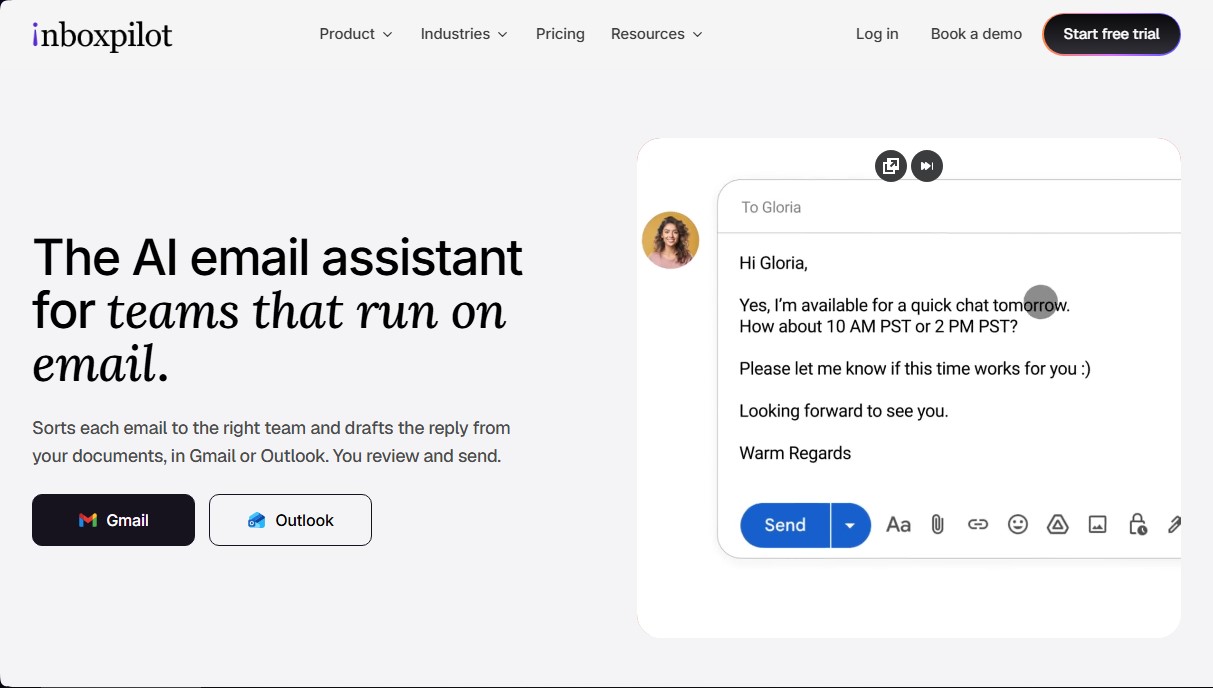
AI assistant that sorts emails and drafts automated replies in Gmail and Outlook based on your company’s documents and data.
What is inboxpilot?
inboxpilot is an AI email assistant specifically designed for teams managing a high volume of communications through Gmail and Outlook. Its primary function is to optimize the inbox through automatic message classification and the creation of response drafts based on the company's internal documentation. By integrating directly into the standard workflow, it allows users to oversee, edit, and send emails without needing to migrate data to an external platform.
The inboxpilot technology uses a grounding approach, which allows it to extract precise information from various connected data sources. The tool can read and process PDF files, websites, policy manuals, and third-party app databases. This ensures that AI-generated responses for inquiries regarding quotes, order statuses, or technical requirements are consistent and accurate, avoiding generic or incorrect replies.
Key capabilities and functional benefits include:
- Email Triage: Automatically classifies and labels incoming messages, organizing the inbox into categories such as quote requests, technical support, or billing.
- Smart Draft Generation: Drafts automated responses using real-time data from tools like Shopify, Stripe, Pipedrive, or Notion, allowing the team to simply review and hit send.
- Automation Workflows: Enables the setup of logic rules so that, for example, a received invoice is forwarded directly to accounting or a VIP client inquiry is assigned to a specific manager.
- Team Tool Integration: Capable of sending notifications and routing conversation threads to Slack channels or autonomously updating Google Sheets.
- Smart Routing: If the AI does not detect a clear answer in the knowledge base, it escalates the email thread to a human agent to ensure personalized attention.
In terms of security, inboxpilot complies with strict regulations such as GDPR and is SOC 2 Type II certified. A fundamental aspect is that user data is encrypted and not used to train public artificial intelligence models, guaranteeing the privacy of corporate information. This email automation tool is ideal for sectors like e-commerce, professional services, and logistics, where speed and precision in responding from a computer or work device are critical for operational efficiency.
inboxpilot features and use cases
How to use inboxpilot
inboxpilot FAQ
What exactly is inboxpilot, and how does it help my customer support team?
It's an AI assistant that organizes your emails and drafts suggested responses using your own documents and databases.
Is inboxpilot compatible with Gmail and Outlook?
Yes, the tool works directly within Gmail and Outlook so you don't have to switch platforms or deal with data migrations.
Where does inboxpilot get the information to draft responses?
The system uses your price lists, PDFs, website, and data from connected tools like Shopify, Notion, or Pipedrive to generate accurate responses.
Is my data secure when using the tool?
Your data is protected with end-to-end encryption and is GDPR and SOC 2 compliant. Additionally, your data is never used to train public models.
Can inboxpilot handle customer order status inquiries?
Yes, the tool can automatically look up order information in Shopify and draft a response providing shipping and delivery dates.
Do I need to review the drafts before the emails are sent?
The system generates a draft for you to review and send manually, although advanced plans allow you to set up automated responses for specific workflows.
What tools can I integrate with my inboxpilot account?
You can connect the tool with services like Slack, Shopify, Stripe, Notion, Pipedrive, Google Sheets, and various webhooks to centralize your information.
Is there a free trial available to test the service?
You can try any plan for free for seven days and cancel your subscription at any time if the product doesn't meet your needs.
How does inboxpilot organize incoming emails?
The tool automatically categorizes and tags each email to separate, for example, quote requests from order or billing inquiries.
Is it difficult to set up workflows on the platform?
Not at all. You can create simple rules so the AI knows exactly how to respond or who to assign the thread to based on the content of the message.
inboxpilot pricing and plans
Free Trial
Available for 7 days to test the platform's features with no commitment.
Starter Plan
Price: $39/month ($32/month billed annually).
Automated email classification and labeling.
AI drafting with a custom tone of voice.
Knowledge base to ground responses.
1 email workflow.
Case grouping across different threads.
Tool integrations.
Limit: Additional inboxes for $15/month each.
Growth Plan
Price: $99/month ($82/month billed annually).
Includes all Starter plan features.
Automated responses.
Shopify and Stripe data lookups.
Integration with Notion, Pipedrive, and WhatsApp.
Unlimited email workflows.
Business Plan
Price: $249/month ($207/month billed annually).
Includes all Growth plan features.
Initial setup handled by the platform team.
Priority support.
Custom integrations.
Limit: Includes 3 connected inboxes.
Scale Plan
Price: $499/month ($415/month billed annually).
Includes all Business plan features.
Team onboarding session.
Self-hosted deployment option.
Limit: Includes 10 connected inboxes. For a higher number, contact the sales team.
inboxpilot Screenshots
inboxpilot alternatives

Agentkit: AI Automations
Automate customer support on Instagram, WhatsApp, and the web with AI agents trained on your content to answer questions and capture leads 24/7.


ProductBridge
AI platform for support and feedback management. Resolve chats, merge duplicate suggestions, and prioritize the product roadmap based on real customer impact.



Delos Workers
Autonomous AI employees with unique identities for sales, marketing, and support. They work proactively 24/7, fully integrated into your tools.