

Share
AI script editor with version control to polish dialogue, manage scene changes, collaborate in real time, and export projects to professional formats.
What is Inkwell?
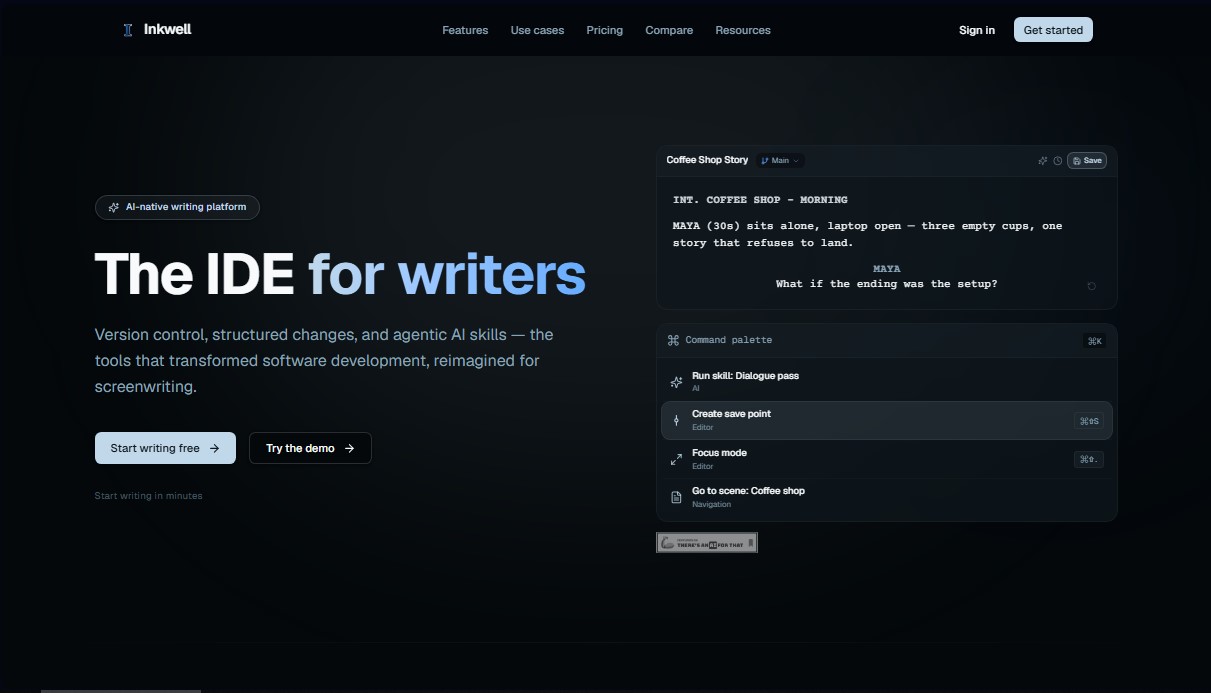
Inkwell is an AI-native writing platform designed as an Integrated Development Environment (IDE) for screenwriters and long-form content authors. Unlike conventional word processors, this tool treats text as an organized data structure, allowing software engineering concepts—such as version control and structured changes—to be applied to the creative process. Its primary function is to optimize the workflow for creating screenplays, TV pilots, and technical documents through a technical and functional approach.
The application’s architecture is divided into two main products: Plot, specialized in scripts with a rigid structure, and Canvas, a block-based editor for novels and research notes. Inkwell’s technology stands out for its scene-aware editor, capable of automatically recognizing up to 16 types of script elements (dialogue, sluglines, transitions, etc.). This enables agile document navigation and ensures content is organized semantically.
One of the tool's greatest practical benefits is its use of agentic AI capabilities. Rather than a generic chat that generates isolated blocks of text, Inkwell’s AI acts as a co-author that proposes changes directly within the draft. Users can execute specific functions such as:
- Dialogue Pass: Optimizes character lines while maintaining the context of the scene.
- Continuity Control: Identifies potential consistency errors in the narrative.
- Granular Suggestions: Each AI proposal can be accepted or rejected individually, ensuring the author maintains total control over the manuscript.
For project management, the tool implements a save point system that replaces the accumulation of duplicate files on your computer. Additionally, it allows for the creation of draft lines to explore parallel versions or alternate endings without fragmenting the original project. In professional environments, the platform facilitates real-time collaboration and offers advanced production tools, such as script locking, breakdown reports, and the use of WGA revision colors.
Inkwell ensures work portability through the import and export of FDX (Final Draft), Fountain, and PDF files. It is a robust solution for screenwriters, novelists, and production teams requiring a structured, secure writing environment powered by state-of-the-art artificial intelligence models.
Inkwell features and use cases
How to use Inkwell
Inkwell FAQ
What exactly is Inkwell, and what is it used for?
Inkwell is an AI-native writing platform designed for screenwriters that integrates version control and structured editing tools for film and television.
Who legally owns the content I create in Inkwell?
You retain full ownership of all your scripts and documents; the platform does not claim any rights to your work or lock your files into proprietary formats.
Will Inkwell’s AI change my text without my permission?
No. AI features provide suggestions that appear as pending changes, and you decide which ones to accept or reject individually.
Can I import my current scripts from Final Draft into Inkwell?
Yes, you can import and export Final Draft FDX files, and work with PDF and Fountain formats to maintain industry compatibility.
What advantages does Inkwell’s save point system offer over traditional saving?
This system allows you to create named snapshots of specific moments in your draft, preventing the clutter of duplicate files and confusing filenames on your computer.
Is it possible to use my own AI API keys in Inkwell?
Yes, the tool allows you to configure your own third-party provider keys in the settings to run writing features using your personal account.
What does the free version of Inkwell include for new users?
The free plan offers access to the professional editor with all script element types, basic save points, and twenty monthly AI skill uses.
How does Inkwell help manage different versions of the same scene?
The platform uses "draft lines," which allow you to maintain parallel versions of a single scene without needing to copy and paste text into separate documents.
What types of script elements does the Inkwell editor automatically recognize?
The editor recognizes up to sixteen types of elements, including scene headings, dialogue, parentheticals, and transitions, allowing you to navigate between them using the Tab key.
Does Inkwell offer specific tools for a project’s production phase?
Yes, advanced plans include script locking features, industry-standard revision colors, and breakdown report generation for the production team.
Inkwell pricing and plans
Free
$0 per month
- Script editor with all 16 element types.
- Save points with recent version history.
- 2-draft line limit per script.
- 20 AI skill passes per month.
- Export to PDF and Fountain formats.
- Community support.
Writer
$19 per month
- Includes everything in the Free plan.
- 10-draft line limit per script.
- Capacity for 10 projects (5x more than the Free plan).
- 200 AI skill passes per month.
- 10x daily tab-completions.
- Full version control with semantic comparison.
- Export to PDF, FDX (Final Draft), and Fountain.
- Worktrees and custom skills.
- Production reports, including breakdowns and cast lists.
Pro
$39 per month
- Includes everything in the Writer plan.
- Access to the most advanced AI models (Sonnet and Opus).
- 5x higher AI quotas than the Writer plan.
- Custom AI skills.
- Production script locking and industry-standard revision colors.
- Collaboration for up to 5 people per project.
- Early access to Canvas (long-form document editor).
- Team workspaces and priority support.
Team
$39 per user per month
- Includes everything in the Pro plan.
- Real-time collaboration.
- Team workspaces and shared draft lines.
- Shared skill library.
- Workspace activity audit logs.
- Shared AI credits and priority support.
- Admin controls and role-based permissions.
- Free view-only seats for producers and executives.
- Higher limits on projects, draft lines, and AI.
Enterprise
Custom pricing (contact us via the official website)
- Single Sign-On (SSO) and custom deployment.
- API access and custom model configuration.
- Service Level Agreement (SLA) and dedicated support.
Inkwell Screenshots
Inkwell alternatives

PropellaDocs
Automate business proposals and technical documents for IT consultants with AI. Create professional drafts and solution designs in minutes from notes or emails.





ReferenceChecker.ai
Verify academic citations and DOIs against scientific databases. Detect errors or fake references and correct bibliographies in multiple professional formats.