Share
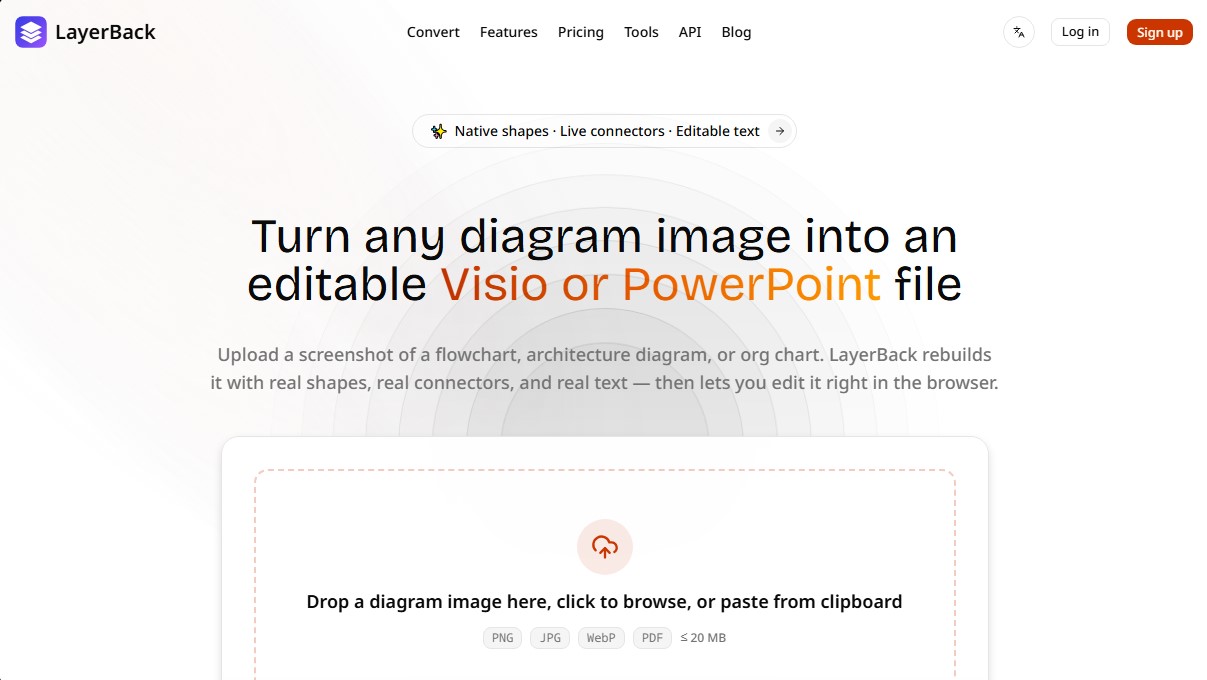
Convert diagram images into editable Visio, PowerPoint, or draw.io files. Reconstruct shapes, connectors, and native text ready for editing and customization.
What is LayerBack?
LayerBack is an advanced artificial intelligence tool specializing in converting diagram images into editable files. Unlike conventional converters that are limited to embedding a screenshot within a document, this solution reconstructs every element individually. Its primary function is to allow any screenshot of a flowchart, architecture diagram, or organizational chart to be transformed into a native working document for professional applications like Microsoft Visio or PowerPoint.
The way LayerBack works is based on a system that analyzes diagrams much like a human would. It uses recognition algorithms to identify native shapes, icons, and colors, reconstructing them as independent vector objects. One of its greatest technological advantages is the creation of live connectors, meaning arrows remain linked to shapes even if they are moved or adjusted within the final file on your computer.
Its core capabilities and practical benefits include:
- Native shape reconstruction: Rectangles, diamonds, containers, and other elements are converted into objects that you can resize, recolor, and style.
- Fully editable text: All labels and tags from the original image are transformed into real text, allowing you to modify the content directly.
- Multi-format compatibility: The tool generates files in VSDX, PPTX, draw.io, and SVG formats from a single upload.
- Integrated online editor: Allows for quick adjustments in the browser before downloading the final file, facilitating an immediate design review.
- Support for various diagrams: It is highly effective at processing UML diagrams, network topologies, entity-relationship (ER) diagrams, and complex organizational charts.
This solution is especially useful for engineers, systems architects, and HR managers who need to update legacy technical documentation or modify designs from static images without having to redraw them from scratch. LayerBack supports file uploads in PNG, JPG, WebP, and PDF formats with a limit of up to 20 MB per file.
For technical profiles, the platform offers a REST API that allows for the integration of diagram conversion into automated workflows or batch migrations. Additionally, it features an MCP server for AI agents, enabling tools like Claude or Cursor to programmatically transform images into editable files. The conversion process is fast, typically completing within 30 to 60 seconds while maintaining the structural integrity of the original diagram.
LayerBack features and use cases
How to use LayerBack
LayerBack FAQ
What exactly is LayerBack?
It is a tool that converts diagram images into editable Visio or PowerPoint files by natively reconstructing shapes, connectors, and text.
Are the files generated by LayerBack actually editable?
Yes, the tool creates real objects and editable text instead of simply inserting the image into a container, allowing you to modify any element in Visio or PowerPoint.
What image formats can I upload to the platform?
You can upload screenshots or files in PNG, JPG, WebP, and PDF formats with a maximum size of twenty megabytes per file.
How long does LayerBack take to process a diagram?
The reconstruction process typically takes between thirty and sixty seconds, depending on the complexity and the number of elements in the original diagram.
Is it possible to try LayerBack for free?
Yes, new users receive twenty free credits upon signing up, which allow for two full conversions without needing to enter any credit card information.
What happens if a conversion does not complete successfully?
If a conversion fails for any technical reason, the system detects the error and automatically refunds the credits used to your account.
Does LayerBack have an API for developers?
Yes, there is a REST API available that allows you to integrate diagram conversion into third-party applications, automation workflows, or AI agents.
What types of diagrams does the tool recognize?
The system is capable of processing flowcharts, system architectures, organizational charts, UML diagrams, entity-relationship diagrams, and network topologies.
LayerBack pricing and plans
Free Plan
0 $
- 20 free credits upon sign-up (equivalent to 2 conversions).
- Access to all output formats (VSDX, PPTX, draw.io, SVG).
- Online editor and conversion history.
- Limit of 2 simultaneous conversions.
Pro Plan
20 $ per month (10 $ per month billed annually)
- 1,000 credits per month (equivalent to 100 conversions).
- All output formats and online editor included.
- Limit of 5 simultaneous conversions.
- API access.
- Automatic credit refunds for failed conversions.
- Email support.
Plus Plan
40 $ per month (20 $ per month billed annually)
- 3,000 credits per month (equivalent to 300 conversions).
- All output formats and online editor included.
- Limit of 10 simultaneous conversions.
- API access.
- Automatic credit refunds for failed conversions.
- Priority support.
Max Plan
80 $ per month (40 $ per month billed annually)
- 10,000 credits per month (equivalent to 1,000 conversions).
- All output formats and online editor included.
- Limit of 20 simultaneous conversions.
- API access with higher rate limits.
- Automatic credit refunds for failed conversions.
- Priority support.
- Early access to new features.
LayerBack Screenshots
LayerBack alternatives

ImageToSTL.org
Convert JPG and PNG images into STL files for 3D printing using AI. Generate detailed 3D models ready for instant download.

image2slides
Convert screenshots and photos into editable PowerPoint slides. Extract text and graphics to modify and export them in PPTX format.
The Face Analysis
Analyze facial symmetry, proportions, and features with AI. Works privately in-browser with no uploads or registration to identify eye and nose shapes.