
Share
Turn voice recordings into structured text like emails, notes, or messages. This AI organizes your thoughts and automatically drafts professional content.
What is Letterly?
Letterly is an AI tool designed to instantly transform speech into polished, structured text. Unlike conventional transcription apps, this solution uses advanced language models to process unstructured thoughts and convert them into coherent messages, notes, or emails. It is available as a native app for iOS, Android, macOS, and on the web, enabling full synchronization between your computer and mobile device.
The way Letterly works is by capturing the user's voice and letting the AI handle the technical and creative writing. The system automatically recognizes more than 90 languages, even allowing for seamless voice translation into any other language. The technology goes beyond word-for-word transcription, interpreting context and intent to generate final content that can be adapted to various predefined styles and formats.
Its editing and transformation capabilities include over 25 rewriting options tailored to different functional needs:
- Structured text: Automatic content organization using paragraphs, bulleted lists, and clear headings.
- Professional communication: Creation of formal emails and text messages with a tone suitable for the workplace.
- Social media: Generation of engaging posts for platforms like X (Twitter), articles, or scripts for digital content.
- Task management: Conversion of quick voice notes into to-do lists, shopping plans, or organized reminders.
- Advanced customization: The option to create custom rewriting styles through specific prompts, allowing the AI to adapt the text exactly to the user's specific needs at any moment.
This tool is incredibly useful for professionals who need to capture ideas on the go, content creators looking to streamline their workflow, and users who practice audio journaling to organize their daily reflections without typing. Features like locked-screen recording and offline mode make it easy to use in any situation, allowing you to record voice notes even during flights or in areas without cell service.
To optimize productivity, Letterly includes organizational features using tags and allows you to send generated notes directly to productivity ecosystems like Notion or Google Docs via Zapier integrations or custom webhooks. Access is instant thanks to its dedicated widget, which lets you start recording with a single tap, ensuring that no relevant idea is lost because you didn't have time to write it down manually.
Letterly features and use cases
How to use Letterly
Letterly FAQ
What exactly is Letterly, and how does it work?
It is an AI-powered app that transforms your voice notes into polished, structured text, such as emails or social media posts.
What platforms is Letterly available on?
You can use the tool on iOS and Android devices, and there is also a web version and a dedicated app for macOS.
Does Letterly automatically recognize my language?
Yes, the system can identify over 90 different languages without requiring any manual setup.
Can I use the Letterly app without an internet connection?
The app allows for offline recording, ensuring you never lose an idea even when you don't have internet access.
What kind of text formats can Letterly generate from my voice?
It offers more than 25 rewriting options, including formal emails, messages for friends, to-do lists, and social media posts.
Can I connect Letterly with other productivity tools?
Yes, you can send your notes directly to apps like Notion or Google Docs using Zapier integrations or webhooks.
Does Letterly allow me to organize my saved notes?
The tool includes a tagging system so you can easily categorize and organize all your texts.
Letterly pricing and plans
Free Version
- Get started for free and transform spoken thoughts into polished text.
- Access voice capture and AI-powered conversion into various formats (notes, emails, messages).
Paid Plans
- Specific pricing or subscription plan details are not available in the provided information. Please visit the official website for up-to-date rates and additional premium features, such as Zapier integration, offline recording, or access to more than 25 rewriting options.
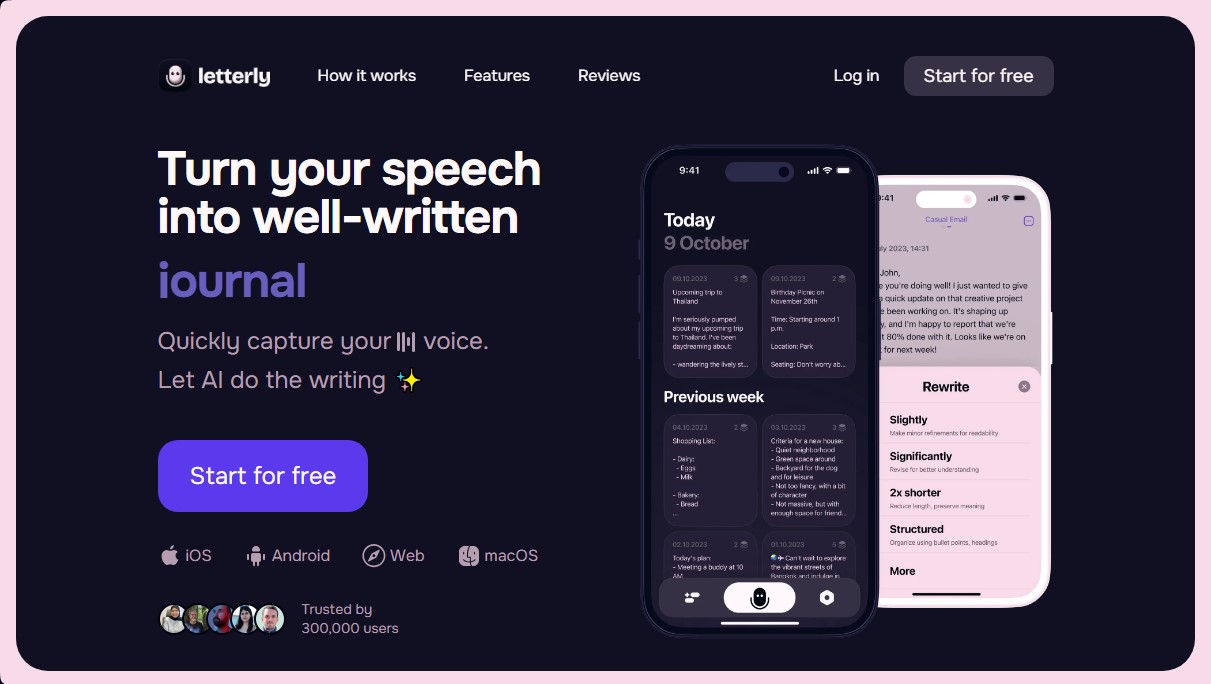
Letterly Screenshots
Letterly alternatives
PropellaDocs
Automate business proposals and technical documents for IT consultants with AI. Create professional drafts and solution designs in minutes from notes or emails.





ReferenceChecker.ai
Verify academic citations and DOIs against scientific databases. Detect errors or fake references and correct bibliographies in multiple professional formats.