Share
Lindy
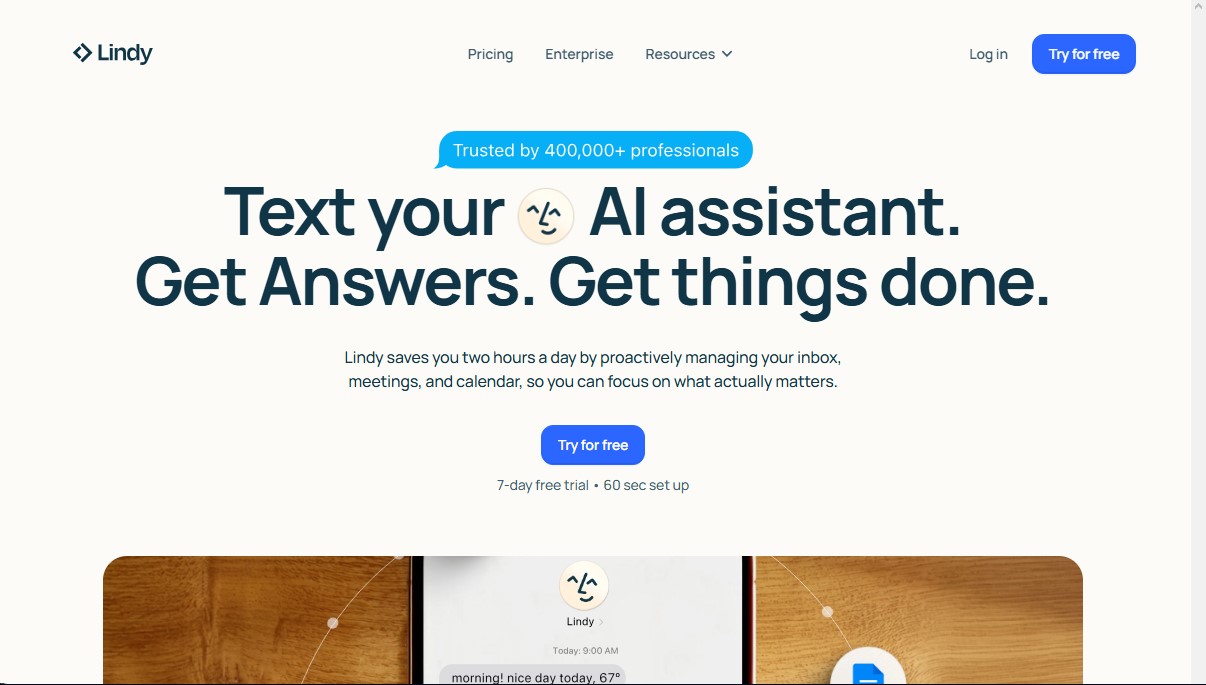
AI assistant that manages your email and calendar via text. Proactively automates meetings and admin tasks to save you time every day.
General Information about Lindy
Lindy is an AI assistant designed to act as a personal productivity copilot accessible directly from your mobile device. Unlike conventional chatbots, this tool integrates into your daily workflow through messaging apps like iMessage or SMS, allowing professionals to manage their tasks using natural language without needing to open multiple apps or be at a computer.
Its operation is based on a proactive approach, meaning it doesn't just react to requests but anticipates needs. Lindy uses advanced natural language processing technology to understand complex instructions and execute them by connecting with hundreds of third-party tools. By linking with apps like Gmail, Slack, Google Calendar, or Notion, the assistant can read context, cross-reference information, and perform actions autonomously.
Key capabilities and practical benefits include:
- Automated email management: The assistant monitors your inbox, prioritizes important messages, and drafts replies following the user's personal tone and style.
- Calendar and meeting organization: It intelligently manages your schedule, finding available slots, sending invitations, and handling the back-and-forth messaging to set up appointments.
- Meeting assistance: It can record sessions, take notes, generate summaries, and automatically extract action items.
- CRM and task updates: It allows you to update customer records or create new tasks in project management tools via a simple text message.
- Continuous learning: Thanks to its adaptive memory capabilities, the system learns from user corrections and preferences, adjusting its behavior over time to become more precise.
Lindy’s architecture is built on enterprise-grade security principles. It complies with international regulations such as GDPR, HIPAA, and SOC 2, ensuring that sensitive data is encrypted. A fundamental aspect of its privacy policy is that user information is never sold or used to train external language models.
This tool is particularly useful for executives and professionals with heavy administrative workloads who need to reclaim time in their workday. By centralizing communication and planning management into a 24/7 chat interface, Lindy eliminates multitasking friction and allows users to focus on strategic work, delegating digital bureaucracy to an efficient and secure AI assistant. Setup is fast, allowing you to start delegating tasks in just seconds; it works seamlessly on both iOS devices and any phone capable of receiving SMS.
Features and Use Cases of Lindy
How Lindy Works
Frequently Asked Questions about Lindy
What is Lindy, and how can it help me with my work?
Lindy is an AI personal assistant that manages your email, calendar, and meetings via text message to save you time.
How long does it take to set up Lindy?
The setup process is extremely fast, and you can have your assistant ready to go in just sixty seconds.
Does Lindy offer a free trial?
Yes, you can enjoy a seven-day free trial with full access to all Pro features to see how it boosts your productivity.
How much does the monthly subscription cost?
The Pro plan costs $49.99 per month and includes automated inbox management and 24/7 support.
Is it safe to share my professional data with Lindy?
Security is a top priority, which is why we use enterprise-grade encryption and comply with strict regulations such as GDPR, HIPAA, and SOC 2.
Does the tool work on Android devices?
Yes, although the interface is optimized for iMessage on Apple devices, any Android user can use the assistant via standard SMS text messages.
Will the assistant send emails without my supervision?
No, you always maintain full control because the assistant creates drafts for you to review and approve before they are actually sent.
Which apps can Lindy integrate with?
It integrates with hundreds of popular tools like Gmail, Outlook, Google Calendar, Slack, and Notion to manage your tasks from one central hub.
How does the assistant learn my personal writing style?
The AI analyzes how you’ve written previous emails and messages to adjust its drafts to your tone of voice and specific priorities over time.
What is the difference between the Pro and Enterprise plans?
The Pro plan is designed for individual professionals, while the Enterprise plan offers advanced security controls and dedicated support for entire teams.
Lindy Pricing
7-day free trial
- Full access to all Pro plan features.
- Quick 60-second setup.
- Available for iMessage and SMS-enabled devices.
Pro Plan: $49.99/mo
- 24/7 AI assistant available via iMessage or SMS.
- Automated inbox management.
- Email drafting in your personal tone of voice.
- Meeting scheduling, preparation, and follow-up.
- Meeting recording and automated note-taking.
- Continuous learning of your style and priorities.
- Hundreds of app integrations (Gmail, Slack, Calendar, Notion, etc.).
Enterprise Plan: Contact sales for pricing
- Includes all Pro plan features.
- Single Sign-On (SSO).
- SCIM user management.
- Audit logs.
- Dedicated support.
- Onboarding services and team training.
Lindy Screenshots