Share
Optimize your LinkedIn presence with AI. Generate personalized posts and images, securely schedule content, and analyze metrics to boost your reach.
What is MediaPilot?
MediaPilot is an advanced AI-powered LinkedIn growth solution designed to optimize digital presence with minimal manual effort. This tool acts as a comprehensive assistant that transforms documents, links, and specific insights into ready-to-share posts, allowing users to maintain consistent visibility on the professional network. It is specifically geared toward business founders, marketing teams, and professionals looking to efficiently boost their personal brand.
MediaPilot operates on a learning model that absorbs the user’s tone of voice and topics of interest from the initial setup. It uses natural language processing technology to analyze profiles and historical results, suggesting topics that resonate with the audience. Unlike other tools, it integrates through the official LinkedIn API, ensuring account security by not requiring passwords or browser extensions. The workflow is divided into three key steps: selecting a topic through smart suggestions, reviewing generated text and images, and automated scheduling for peak impact times.
Among its core capabilities are:
- Smart Content Generator: Creates high-quality drafts based on a single line of text, an external link, or a specific business milestone.
- Image Studio: Automatically generates AI images (cinematic, minimalist, or illustrative styles) and integrates brand logos to maintain visual consistency.
- Content Sprint: Enables the bulk creation of 5 to 20 posts in a single session, facilitating monthly editorial calendar planning.
- Post Planner: Includes a drag-and-drop scheduling system that identifies the best times to post based on audience activity.
- Predictive Analytics: The system analyzes impressions, reactions, and clicks to provide feedback to the AI, improving topic suggestions for future posts.
- Comment Management: Uses AI suggestions to respond to the audience quickly, boosting the engagement rate.
The primary advantage of MediaPilot is the ability to scale a LinkedIn content strategy while reducing management time to about 20 minutes per week. By learning from real-world results, the tool adjusts its approach to maximize visibility without the user having to perform constant manual audits. Additionally, it offers technical flexibility by being able to run from external interfaces like Claude or ChatGPT, integrating perfectly into the workflow of any professional using their computer to manage their professional network. It is a robust tool for those who need to automate LinkedIn while maintaining an authentic and professional style.
MediaPilot features and use cases
How to use MediaPilot
MediaPilot FAQ
What is MediaPilot and how does it help me on LinkedIn?
It is an AI tool that generates, designs, and schedules relevant content so you can gain more visibility with much less effort.
Is it safe to use MediaPilot for my professional profile?
Yes, it is completely safe because it uses LinkedIn's official API and does not require you to share your password or install browser extensions.
How does MediaPilot make my posts sound like me?
The tool learns your tone and preferred topics of interest so that every generated draft reflects your personal style from the very beginning.
How do MediaPilot credits work?
Each text generation consumes one credit, and creating an image consumes three credits, according to your monthly plan limits.
Can I generate images for my posts with this tool?
Yes, MediaPilot automatically creates visuals in various styles, such as photos or illustrations, and even allows you to add your brand logo.
What is MediaPilot's Content Sprint feature?
It is an advanced option that allows you to draft between five and twenty posts at once so you can quickly plan an entire month of content.
Is there a free trial available?
Yes, you can enjoy a seven-day free trial on any of the plans to explore the features before deciding on a subscription.
Is it possible to cancel my subscription at any time?
You can unsubscribe with a single click from your account settings, and you will not be charged if you cancel before the trial period ends.
Does MediaPilot provide data on my post performance?
Yes, the platform includes an analytics dashboard where you can check impressions, reactions, and clicks to see which content is performing best.
How do I schedule content with MediaPilot?
The tool includes a planner where you can drag and drop your posts to be published automatically at the optimal times.
MediaPilot pricing and plans
A 7-day free trial is available on all plans to test the generation and scheduling features.
Starter
9,90 $ per month (or 8,25 $ per month billed annually).
100 monthly credits (1 credit per text generation and 3 per image).
Official LinkedIn API (no password required).
Dashboard and basic analytics.
AI post generation and recommendations.
Post scheduler and stock images.
Limit of 1 connected social account and 1 user.
Growth
29,90 $ per month (or 24,92 $ per month billed annually).
400 monthly credits.
"Content Sprint" feature to create 5 to 20 posts at once.
Branded image overlays.
Priority support.
Limit of 3 connected social accounts and 3 users.
Scale
69,90 $ per month (or 58,25 $ per month billed annually).
1,000 monthly credits.
Advanced performance analytics.
Automated LinkedIn invites.
Dedicated support.
Limit of 5 connected social accounts and 5 users.
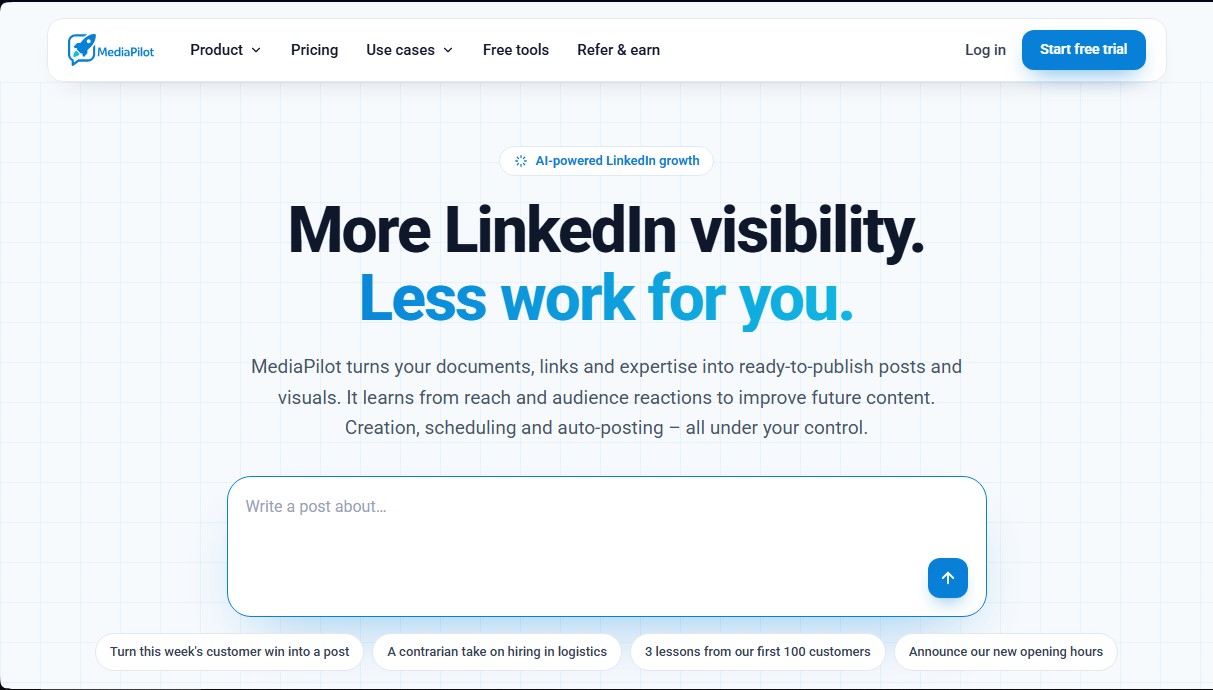
MediaPilot Screenshots
MediaPilot alternatives

Amplify AI
Automatically generate and post daily TikTok and Instagram videos with AI creators. Create viral content for your brand and manage multiple accounts without filming.


Zeemo | AI Short Drama Generator
Generate short AI dramas with consistent characters across episodes. Integrate script, voice, and video on a single canvas to produce professional, coherent series.

TwitterAPIs
Pay-as-you-go API to extract Twitter and X data without a developer account. Fetch tweets, profiles, and threads with support for AI agents and MCP servers.