
Share
Generate AI thumbnails for YouTube and Shorts from links or prompts. Include your face or create faceless versions in widescreen or vertical formats.
What is WThumb?
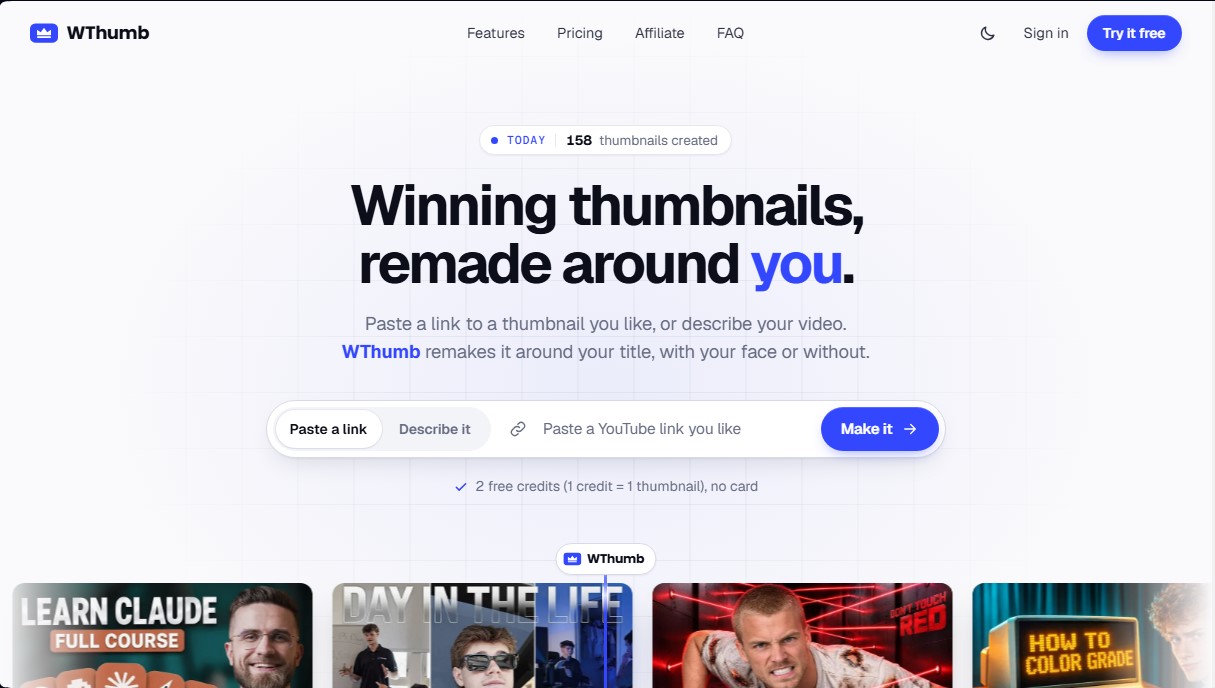
WThumb is an AI tool specialized in creating high-performance YouTube thumbnails and Shorts. Its primary goal is to help content creators design visually striking covers without requiring technical graphic design skills or mastery of complex software. Unlike traditional layer-based editors, this application uses generative models to recreate successful styles or generate compositions from scratch based on text descriptions.
The way WThumb works is based on a flexible input system designed for efficiency. Users can paste a YouTube link for a thumbnail they wish to emulate, allowing the AI to use it as a design reference by interpreting the visual hierarchy, the arrangement of elements, and the energy of the original image. It is also possible to upload your own image or simply describe the video content via text so the tool can design an original proposal.
Key features include:
- Recreating winning styles: Allows any video on the platform to be used as a "visual brief," adapting the design to the user's specific title and theme.
- Person management: Users can set up a visual identity with their own photos to appear automatically in their thumbnails.
- Faceless generation: Offers the option to create compositions without faces, coherently reconstructing the framing if the creator prefers not to appear on camera.
- Optimized formats: Generates versions in 16:9 for YouTube and 9:16 for Shorts, tailoring the composition specifically for each frame rather than performing a simple crop.
- Natural language editing: If the result requires adjustments, changes can be requested by writing simple instructions, eliminating the need to manipulate canvases or drawing tools.
To optimize decision-making, WThumb integrates a library featuring thousands of designs from popular channels, ranked by an outlier score. This metric indicates a thumbnail's success relative to a channel’s typical view counts, making it easy to identify which visual trends are performing best in niches such as gaming, tech, business, or lifestyle.
This AI thumbnail generator delivers files in Full HD+ resolution (2048 × 1152 pixels), ensuring superior sharpness on both mobile and desktop screens. By excluding watermarks and offering a credit-based workflow, it positions itself as a practical solution for creators looking to boost their click-through rate (CTR) and professionalize their channel through automation. WThumb's technology focuses on content semantics, allowing any changes or revisions to be handled through a brief text interaction in the virtual studio.
WThumb features and use cases
How to use WThumb
WThumb FAQ
What is WThumb and how exactly does it work?
WThumb is an AI-powered thumbnail generator that creates designs based on a YouTube link, a reference image, or a text description of your video.
Do I have to show my face in the thumbnails created with WThumb?
No, it's not necessary. You can select the "faceless" option, and the tool will adjust the framing so the design looks great without including anyone.
What is the resolution of the images generated by the tool?
Thumbnails are delivered in high definition with a resolution of 2048 x 1152 pixels for landscape format and 1152 x 2048 pixels for vertical format.
Can I edit the result if I want to change a specific detail?
Yes, just click the pencil icon and describe the changes you want in simple terms, and the tool will generate a new, revised version.
Does WThumb support the YouTube Shorts format?
Yes, you can choose between 16:9 widescreen or 9:16 vertical format to ensure important elements aren't cropped when you publish.
How many free credits do I get when I sign up?
Every new account receives two free credits to generate two thumbnails without having to enter any credit card information.
Do I need graphic design skills to use the platform?
No technical knowledge is required. There are no layers or complex tools; the entire process is based on a quick interaction with the studio assistant.
What happens to my credits if a thumbnail fails to generate?
If the system detects an error during the design process, the credit is automatically returned to your balance so you don't lose a single use.
What languages can I use for my thumbnail instructions?
You can write your thumbnail text and design instructions in any language, as the AI is capable of understanding them all.
Are the thumbnails I design on my account private?
Yes, all generated images and uploaded files are private and only visible to the account owner.
WThumb pricing and plans
Free
Price: $0
- 2 free credits for new accounts (1 credit = 1 thumbnail).
- No credit card required.
Starter
Price: $12/month (or $9/month billed annually at $108).
- 30 monthly credits.
- 1 person (saved profile to appear in thumbnails).
- Faceless generation available.
- Choice of 16:9 and 9:16 aspect ratios for every creation.
- Full HD+ output with no watermarks.
- Editing via simple text prompts.
- Private thumbnails saved to your account.
- Email support (12-hour response time).
Creator
Price: $28/month (or $21/month billed annually at $252).
- 120 monthly credits.
- 2 people (saved profiles).
- Faceless generation available.
- Choice of 16:9 and 9:16 aspect ratios for every creation.
- Full HD+ output with no watermarks.
- Editing via simple text prompts.
- Private thumbnails saved to your account.
- Email support (12-hour response time).
Studio
Price: $56/month (or $42/month billed annually at $504).
- 300 monthly credits.
- 5 people (saved profiles).
- Faceless generation available.
- Choice of 16:9 and 9:16 aspect ratios for every creation.
- Full HD+ output with no watermarks.
- Editing via simple text prompts.
- Private thumbnails saved to your account.
- Priority email support (1-hour response time).
WThumb Screenshots
WThumb alternatives


TubeGen AI
Automate viral video creation for YouTube and social media. Generate scripts, voiceovers, images, and thumbnails with AI to monetize your channels.

CueTheScene
Create full YouTube videos in minutes. Automatically generate scripts, voiceovers, stock footage, subtitles, and thumbnails. Perfect for documentaries and faceless channels.