Thumbs AI
Share
Thumbs AI
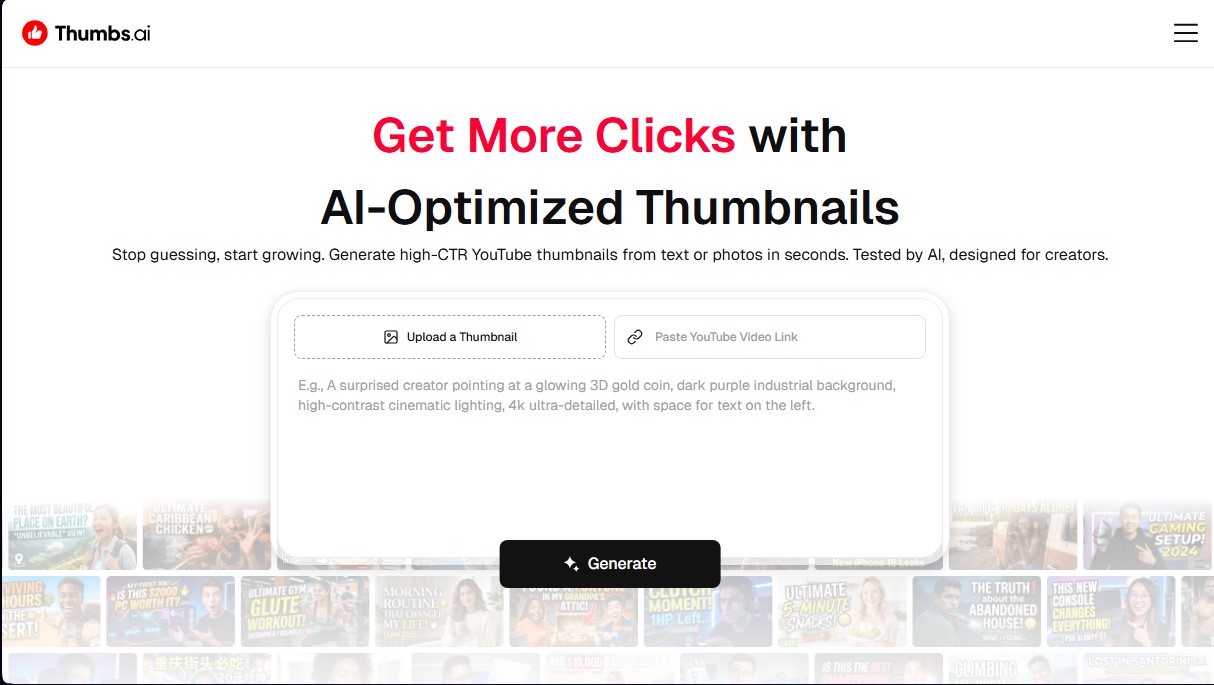
Generate YouTube thumbnails optimized for CTR. Create designs from text or photos, clone channel styles, and predict success with AI.
General Information about Thumbs AI
Thumbs AI is an advanced artificial intelligence platform specifically designed to create and optimize YouTube thumbnails with the goal of maximizing CTR (Click-Through Rate). This tool allows content creators to generate visually stunning covers from text descriptions or existing images, eliminating the need for complex design software on a computer. Its primary focus is to automatically transform ideas into viral-potential designs that follow current algorithmic trends.
The operation of Thumbs AI is based on generative models that interpret detailed prompts to create images in 4K quality. Users can opt for the Text to Thumbnail system, where they describe a scene, or use Image to Thumbnail to redesign a screenshot or a previous layout. The app's technology allows for integrating key elements, such as the creator's thumbnail face, into high-impact scenarios through AI Face Swap features, maintaining visual brand consistency in every delivery.
One of the most notable capabilities is Style Cloning, which analyzes the visual DNA of successful channels or specific URLs to replicate their aesthetic. Additionally, it features the Expression Lab, a facial expression enhancer that uses AI to adjust levels of surprise, joy, or suspense on faces, ensuring the thumbnail's emotional weight is optimal. It also includes a library of over 20 global effects, such as Glow Halo and 3D Pop-Out, to enhance the professional finish of the file.
To boost video performance, Thumbs AI incorporates a CTR Rater, an analysis tool that scores the thumbnail's probability of success before it is uploaded. The system allows for A/B Test Batching, generating more than 10 simultaneous variations so the user can compare different compositions. Likewise, the thumbnail preview makes it easy to visualize how the design will look on devices like mobile, ensuring that text and key elements are legible at any size.
Its main features include:
- Automatic generation via text prompts or direct YouTube links.
- Style cloning to replicate the visual strategy of leading creators.
- Hyper-realistic facial expression editor to increase emotional impact.
- AI thumbnail analyzer to predict performance and engagement.
- Library of viral templates and professional design effects (neon, 3D, glitch).
- Resizing and download tools for Instagram Reels and TikTok.
This suite is ideal for content creators, social media managers, and marketing specialists looking for an efficient AI video thumbnail generator. Thanks to its thumbnail text generator and high-resolution upscaling, the tool ensures professional results without requiring technical graphic design skills.
Features and Use Cases of Thumbs AI
How Thumbs AI Works
Frequently Asked Questions about Thumbs AI
What exactly is Thumbs AI, and how does it help my channel?
It's an AI-powered thumbnail generator designed to create high-performing designs that boost click-through rates by analyzing what is currently working best on YouTube.
Can I use Thumbs AI for free?
Yes, you can start with a free version that includes trial credits so you can generate your first thumbnails and explore the tool's basic features.
Will there be watermarks on images created with Thumbs AI?
The free version includes a small watermark, but by subscribing to any premium plan, you can download your designs completely watermark-free and in high resolution.
How does the style cloning option work in Thumbs AI?
This feature allows you to upload a reference image or analyze a specific channel so the AI can replicate the lighting, colors, and composition used by the most viral creators.
Do I need prior graphic design experience to use the tool?
No technical knowledge is necessary. The editor is very intuitive and allows you to create professional thumbnails simply by typing a prompt or uploading a photo.
Can I use Thumbs AI to create content for other social media platforms?
Yes. In addition to YouTube, the platform allows you to adapt your designs and download specific thumbnails for TikTok and Instagram Reels while maintaining a consistent brand image.
What is the CTR analyzer included in Thumbs AI?
It is a feature that evaluates your thumbnail before you upload it to predict its potential success based on visual patterns that typically attract more clicks from users.
Can I change my facial expressions in photos using Thumbs AI?
Yes, the tool features an "expression lab" that allows you to realistically transform a standard selfie into an image featuring reactions like surprise, joy, or suspense.
What is the resolution of the downloaded thumbnails?
All designs generated with the tool's paid plans are exported in professional 4K quality to ensure they look perfect on any device.
Is it possible to generate thumbnails in Thumbs AI using a video link?
Yes, you can paste a YouTube video link directly, and the AI will process the content to suggest the best possible designs for you.
Thumbs AI Pricing
Free Plan - 0 €/month
6 trial credits (approx. 3 thumbnails).
Thumbnail generation from text or images.
Watermarked downloads.
Access to face generation and style/reference cloning.
AI tools, templates, and YouTube thumbnail downloader.
Premium Plan - 19 €/month (or 13 €/month billed annually)
100 monthly credits (up to 50 thumbnails).
2 credits per generation.
Unused credits roll over to the next month.
High quality and watermark-free.
Access to all templates and AI tools.
Style cloning and thumbnail downloader.
Ultimate Plan - 69 €/month (or 48 €/month billed annually)
500 monthly credits (up to 250 thumbnails).
Includes all Premium plan features.
Commercial and YouTube usage rights.
Priority processing queue.
Access to the advanced quality model.
Master Plan - 199 €/month (or 139 €/month billed annually)
2,000 monthly credits (up to 1,000 thumbnails).
Includes all Ultimate plan features.
Priority processing queue.
Early access to all upcoming features.
Thumbs AI Screenshots