Share
AI studio for professional images and videos. Generate content from text, upscale to 4K, edit photos, remove backgrounds, and transform artistic styles.
What is lunalisa?
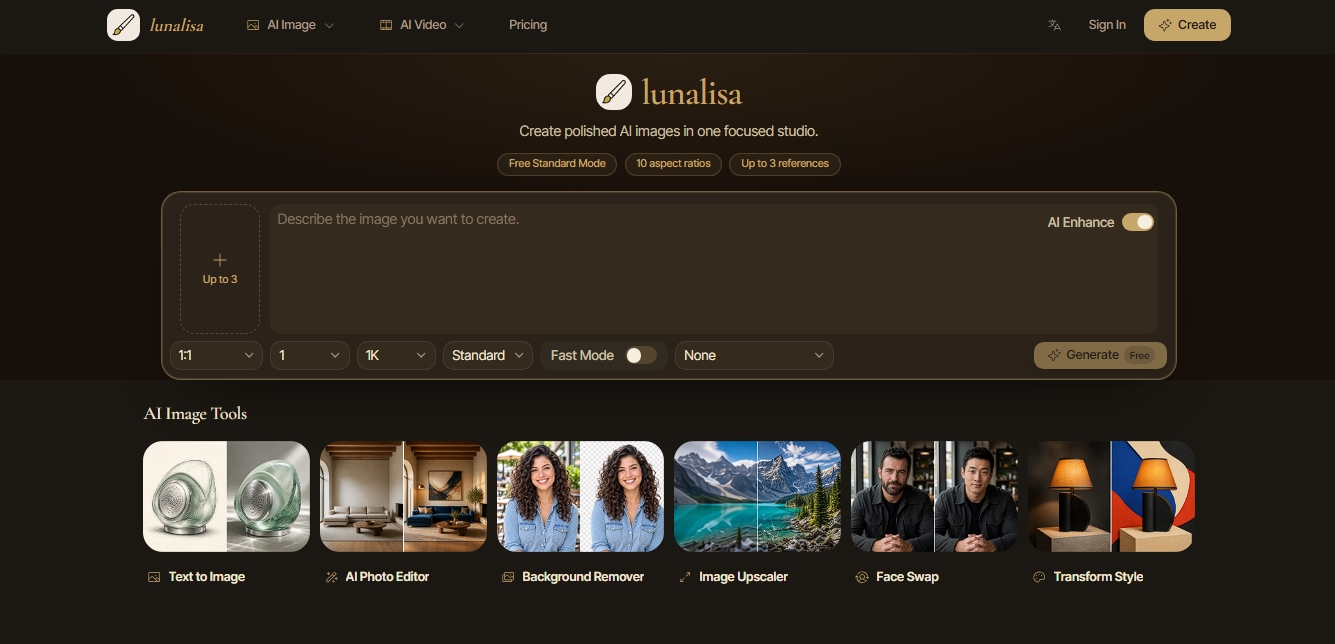
lunalisa is a visual creation studio focused on generating images and videos using artificial intelligence. This platform allows users to transform ideas into polished visual assets through a workspace optimized for precision and creative control. It positions itself as a comprehensive solution for professionals seeking high-quality results without the complexity of cluttered interfaces, enabling an agile and deliberate transition from concept to final image on any compatible computer or device.
lunalisa's core functionality is built on text-to-image generation. Users can define the subject, material, lighting, and style within a single, focused writing interface. One of its most powerful capabilities is the use of up to three reference images per prompt, allowing for high-precision guidance over composition, materials, or aesthetics. The system offers impressive technical versatility with 10 different aspect ratios, ranging from a 1:1 square format to an ultra-wide 21:9.
Beyond basic generation, the tool integrates a suite of advanced editing and post-processing features:
AI Photo Editor: Enables complex edits, such as changing furniture or lighting in existing scenes via AI.
Background Remover: A precise background removal tool designed for portraits and product photography.
Image Upscaler: An image scaler that transforms low-resolution photos into sharp, detailed files.
Face Swap: A tool for swapping faces while maintaining visual consistency.
Transform Style: A feature to convert real photographs into various artistic styles, such as paper-cut illustrations or sketches.
Regarding its technology, lunalisa utilizes advanced models like GPT Image 2 and GPT Image 2 VIP. The workflow is designed to match the creator's pace, allowing users to switch between Standard Mode for quick 1K resolution previews and Fast Mode, which supports 2K and 4K resolutions. The platform facilitates experimentation through batch comparison, generating up to four visual directions simultaneously so users can evaluate the visual language at a glance. Additionally, it includes reusable style starters (cinematic, editorial, surrealist, minimalist) that streamline professional production.
This tool is particularly useful for creative professionals such as product designers, art directors, photographers, and illustrators. Its ability to generate advertising content, concept art, and social media visuals makes it a versatile resource for content production. By offering total control over composition and style, lunalisa is ideal for both rapid exploration phases and projects requiring a high-end, magazine-quality finish.
lunalisa features and use cases
How to use lunalisa
lunalisa FAQ
What is lunalisa and what is it used for?
It is an AI studio designed to create professional images, edit photos, remove backgrounds, and precisely transform visual styles.
Do I need to create an account to use lunalisa?
You can generate 1K resolution images for free without registering, but you must log in to use credits, access higher resolutions, or use reference images.
How many reference images can I upload to lunalisa?
The system allows you to attach up to three of your own images to guide the generator regarding composition, materials, or your desired visual style.
How does the credit system work for different resolutions?
Standard mode consumes five credits, while fast mode requires ten credits for 1K, twenty for 2K, and thirty for maximum 4K quality.
What image formats are available on the platform?
There are ten different aspect ratios available, ranging from the standard square format to 21:9 ultrawide options.
Can I use the generated images for commercial purposes?
Yes, paid plans include rights for commercial projects, subject to current legislation and the terms of the model providers.
Is there a discount for an annual subscription to lunalisa?
The annual plan offers a 16.7% savings compared to monthly billing, which is equivalent to receiving two months of service for free each year.
What editing tools does the studio offer besides image generation?
The platform includes features for upscaling images to high resolution, face swapping, background removal, and transforming product photos into illustrations.
lunalisa pricing and plans
Free (0 $/mo)
Curated local preview renderer.
One image per run.
Image downloads.
30 welcome credits upon account creation.
1K image generation in standard mode without login required.
Lite (19 $/mo)
300 generation credits.
Up to four results per run.
High-quality rendering.
Commercial usage rights.
Save 16.7% with the annual plan (pay for 10 months instead of 12).
Pro (29 $/mo)
800 generation credits.
Up to four results per run.
High-quality rendering.
Commercial usage rights.
Save 16.7% with the annual plan (pay for 10 months instead of 12).
Ultra (59 $/mo)
2,000 generation credits.
Ultra-quality rendering.
API key access.
Priority support.
Save 16.7% with the annual plan (pay for 10 months instead of 12).
Restrictions and credit consumption:
1K Standard Mode: 5 credits per image.
1K Fast Mode: 10 credits per image.
2K Fast Mode: 20 credits per image.
4K Fast Mode: 30 credits per image.
Limit of up to 3 reference images per request.
Choose from 10 different aspect ratios.
lunalisa Screenshots
lunalisa alternatives

ColorCraft
Create Amazon KDP books. Generate coloring pages, stories, puzzles, and print-ready full covers, plus promotional mockups in a single workflow.


Tesla Wrap Generator
Tesla Wrap Generator uses AI to paint designs onto the official UV template of each Tesla model for Paint Shop, with a 3D preview before you download.