

Share
AI studio for generating anime and manga-style images and video. Transform photos into illustrations, design characters, create comics, and animate static scenes.
What is Maxsa AI?
Maxsa AI is a creative studio specializing in AI-driven visual content generation, with an exclusive focus on the world of anime, manga, and cartoons. This platform allows users to transform text prompts or reference images into detailed illustrations and animated video clips. Its primary function is to centralize design tools so that artists, storytellers, and hobbyists can produce high-quality graphic material without needing advanced technical skills in drawing or professional animation, all from their computer or mobile device.
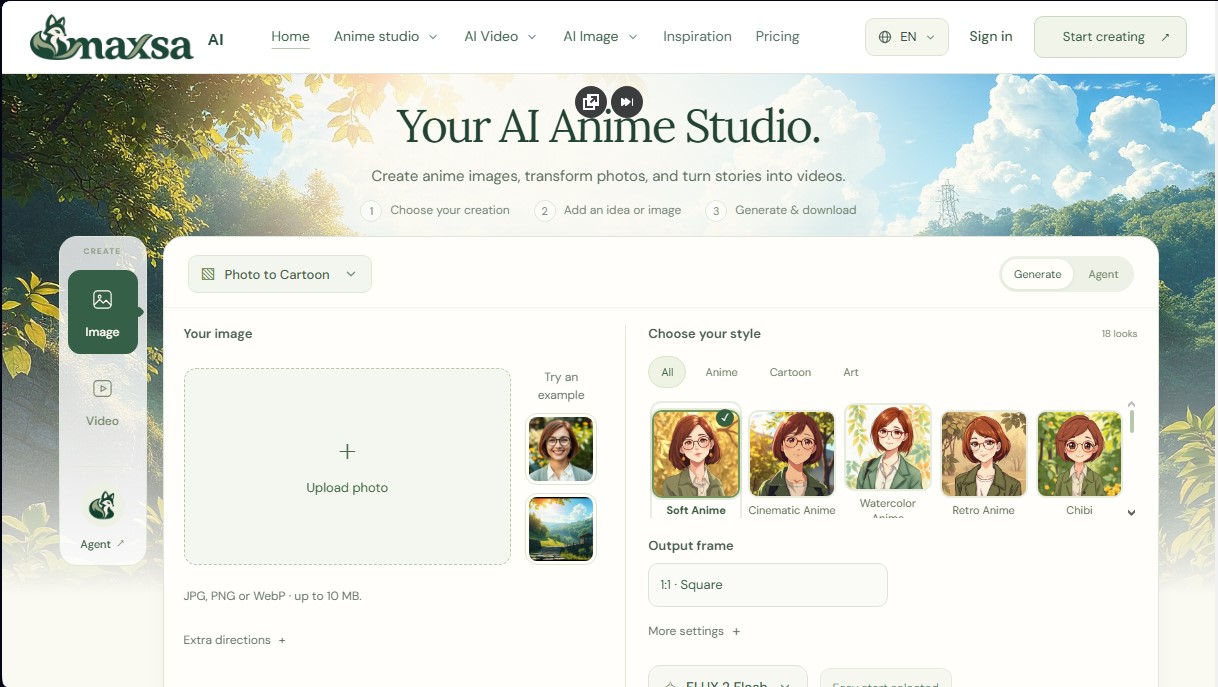
The workflow of Maxsa AI is based on an intuitive three-step process: selecting the type of creation, providing the base idea or image, and generating the final content. The tool integrates advanced AI models for image creation, such as FLUX.2 Flash, Nano Banana 2, GPT Image 2, and Seedream 5 Pro. For video production, it utilizes technologies like Kling 3 Pro, Veo 3.1, Seedance 2.5, and Wan 3. These technologies allow for the processing of specific styles ranging from traditional cel-shaded to claymation, pixel art, or 3D cartoon styles.
Among its core capabilities, the Photo to Cartoon feature stands out, allowing users to upload a photo in JPG, PNG, or WebP format to convert it into an animated version using over 18 different styles, such as retro anime, chibi, watercolor, or pencil sketch. Additionally, it features a comic panel design system where users can configure the layout of panels and the reading direction to structure complete visual narratives. Users can also generate expression sheets and full-body portraits for original character development.
In the video realm, Maxsa AI offers text-to-video and image-to-video tools capable of animating static illustrations by adding camera movements or environmental gestures. One of its most innovative features is the Agent, an AI assistant that acts as a creative director; this component plans shots based on a narrative description, organizes scenes, and automatically assembles multi-shot silent videos upon user confirmation.
The practical benefits of this platform include:
- Creating detailed scenarios and backgrounds for visual projects and light novels.
- Instantly transforming real-life portraits into manga-style avatars.
- Rapid prototyping of storyboards and visual concepts for stories and comics.
- Animating specific elements in illustrations, such as the movement of wind or clouds, to generate dynamic content.
The tool is accessible via the web and allows for the adjustment of parameters like the output frame (aspect ratio) and generation complexity. Results are directly downloadable and managed through a credit system, optimizing resource use according to the needs of each creative project. It is a comprehensive solution for those looking to generate AI anime art in a structured and functional way.
Maxsa AI features and use cases
How to use Maxsa AI
Maxsa AI FAQ
What is Maxsa AI, and what can I create with it?
Maxsa AI is an artificial intelligence studio specializing in anime and manga that lets you generate original images, transform real photos into drawings, and create video clips from stories.
Do I need any prior drawing or animation experience?
No drawing skills are required because the tool generates content based on your text descriptions or by using reference images and predefined examples.
Can I turn my own photos into anime characters with Maxsa AI?
Yes, the Photo to Cartoon feature allows you to upload JPG, PNG, or WebP files up to 10 MB and transform them using 18 different artistic styles.
How do the credit system and free trial work?
Each generation consumes a specific number of credits, and new verified users receive 50 welcome credits that expire after 30 days.
Can I use Maxsa AI creations for commercial purposes?
Commercial use depends on the specific terms of the model used and the rights to the materials provided; we recommend reviewing the content rights section for more details.
What should I do if a generation gets stuck or fails?
If a task fails, the reserved credits are automatically returned to your account. In the case of a persistent error, you can contact technical support and provide the task ID.
Where can I find and download my results?
Creations can be downloaded directly from their result card, and users with paid plans can access their cloud-saved history after logging in.
How can I contact the Maxsa AI support team?
For billing inquiries or access issues, please email [email protected] with the email address associated with your account and a description of the problem.
Maxsa AI pricing and plans
Free Trial: 0 $
50 welcome credits for verified accounts.
No subscription required.
Credits valid for 30 days.
Results are temporary and must be downloaded within 24 hours.
Starter: $12 per month (or $9.60 per month billed annually)
1,500 monthly credits (no rollover).
Anime, manga, and cartoon creation.
Photo-to-anime transformation.
Image generation (up to 750/mo) and video generation (up to 125 short clips/mo).
AI agent-assisted storytelling.
Watermark-free downloads.
1 concurrent generation limit.
Creator: $29 per month (or $23.20 per month billed annually)
3,600 monthly credits (no rollover).
Includes all Starter plan features.
2 concurrent generations limit.
Increased variations for every idea.
Tools for character creation, comics, and storyboarding.
Capacity to generate up to 1,800 images or 300 short videos per month.
Studio: $59 per month (or $47.20 per month billed annually)
7,500 monthly credits (no rollover).
Includes all Creator plan features.
4 concurrent generations limit.
Maximum creative allowance for images, clips, and agent-assisted stories.
Capacity to generate up to 3,750 images or 625 short videos per month.
Extra Pack: $5 (one-time payment)
600 additional credits.
No active subscription required.
Valid for 12 months from purchase.
Maxsa AI Screenshots
Maxsa AI alternatives


NeotypeLab
NeotypeLab uses AI to plan paint schemes for Gunpla, mecha girls and Zoids, with real hobby paint codes, a spraying sequence, a shopping list and an HD preview.

AlreadyRan
AlreadyRan brings dozens of AI image, video and audio models into one web studio with a single credit balance and the cost shown before every generation.


Vidverse AI
Vidverse AI brings several AI video, image and voice models into one web and mobile app, so you can turn text or photos into clips, images and voiceovers.

Comik AI-Anime Character Creator
Design anime characters using text or images. Generate multi-view design sheets to ensure visual consistency across comics, manga, and animated videos.