Monkey AI Image Generator
Share
All-in-one tool for cinematic images and videos. Edit text, remove objects, swap faces, and create ads or consistent characters.
What is Monkey AI Image Generator?
Monkey AI is an advanced AI image editing and video generation platform designed to centralize the market's most powerful models into a single workspace. This tool enables content creators, designers, and marketing teams to transform ideas into high-quality visual assets, ranging from professional photography to cinematic productions in 4K resolution. Its environment is optimized for desktop and other devices, facilitating a professional and accessible workflow.
Monkey AI operates by integrating multiple leading AI engines. Key highlights include Seedance 2.5 for creating video clips with native audio, Kling O3 Pro for complex movements and extreme realism, and GPT Image 2 for precision image generation and editing. This architecture allows users to choose the model that best fits their project, whether through Text-to-Video (T2V) or Image-to-Video (I2V) techniques.
Its most notable functional capabilities include:
- Smart Asset Editing: Includes tools for unwanted object removal with automatic background fill (inpainting) and a Face Swap system that realistically merges expressions and lighting.
- In-Image Text Editing: The AI automatically recognizes text layers in posters or images, allowing users to edit them like a text document while preserving the original style.
- StoryFilm Video Production: A pipeline that uses GPT to generate scripts and storyboards, subsequently converting them into video clips with cinematic camera movements.
- Consistent Character Creation: Enables the definition of an AI influencer or an IP character, maintaining their physical traits and style consistently across multiple scenes and environments.
- AD Click Generation: Optimizes e-commerce marketing by automatically creating advertising materials tailored for various social networks from a simple product photo.
The tool also offers access to a library of over 300 artistic styles (such as cyberpunk or impressionism) and a database of creative assets for inspiration. Thanks to its focus on visual consistency and the automation of complex processes, Monkey AI positions itself as a comprehensive solution for managing campaigns, creating social content, and prototyping visual projects with multi-reference control. It is an ideal choice for users seeking professional-grade results without relying on traditional manual design tools.
Monkey AI Image Generator features and use cases
How to use Monkey AI Image Generator
Monkey AI Image Generator FAQ
What is Monkey AI and what are its primary features?
Monkey AI is a creative platform that uses artificial intelligence to generate and edit professional-grade images and videos, featuring tools for smart cropping, face swapping, and filmmaking.
Can I try Monkey AI for free?
Yes, the tool allows you to start creating for free so you can explore its features before deciding on a subscription plan.
Which content generation models are available on Monkey AI?
The platform integrates industry-leading models such as Seedance 2.5 for cinematic video, Kling O3 Pro for advanced realism, and NanoBanana Pro for images.
Does Monkey AI allow me to edit text that is already embedded in an image?
Yes. The text editing feature intelligently recognizes layers, allowing you to modify words while preserving the original style and image integrity.
What is the StoryFilm feature in Monkey AI?
StoryFilm is a workflow where you write a story in natural language, and the AI automatically generates the script, storyboards, and the final cinematic video.
How can I keep a character's appearance consistent across different scenes in Monkey AI?
Thanks to the Consistent Creation feature, the tool extracts facial features and proportions from a reference image to maintain the same character look across any setting or style.
What is the difference between the Monkey AI Pro and Max subscription plans?
The Pro plan offers 700 monthly credits and access to standard models, while the Max plan increases the capacity to 1,500 credits and includes high-priority processing and professional team tools.
Can I remove unwanted objects from a photo with Monkey AI?
Yes. The smart removal feature allows you to erase any distracting elements with a simple brushstroke while the AI automatically fills in the background.
What file types can I upload to the Monkey AI platform?
The tool is compatible with common image formats such as JPG, PNG, and WebP, supporting files with resolutions up to 32 megapixels.
Does Monkey AI offer specific tools for advertising and e-commerce?
Yes, the AD Click feature allows you to upload product images to automatically generate advertising materials tailored for different platforms and social media networks.
Monkey AI Image Generator pricing and plans
Free Plan
Start creating for free to test the tool's capabilities. Please consult the official website for specific credit limits and features included in this version.
Pro Plan
Price: $19.99 per month (or $13.99 per month billed annually).
- 700 credits per month (8,400 credits per year).
- 150 image limit.
- Advanced AI image generation and professional editing tools.
- Priority processing and priority support.
- Commercial license included.
- Mojo Assistant (AI Agent) with 200 conversations per day.
- Access to standard models (NanoBanana Pro, GPT Image 2, Seedream V5, etc.) and Pro models (Seedance 2.0 Text-to-Video and Image-to-Video).
Max Plan
Price: $39.99 per month (or $27.99 per month billed annually).
- 1,500 credits per month (18,000 credits per year).
- 400 image limit.
- Highest priority processing and dedicated support.
- Includes all advanced features and batch processing.
- Full commercial license.
- Mojo Assistant (AI Agent) with unlimited conversations.
- Full access to all standard and Pro models (Seedance 2.0, Kling O3 Pro, MiniMax Audio, etc.).
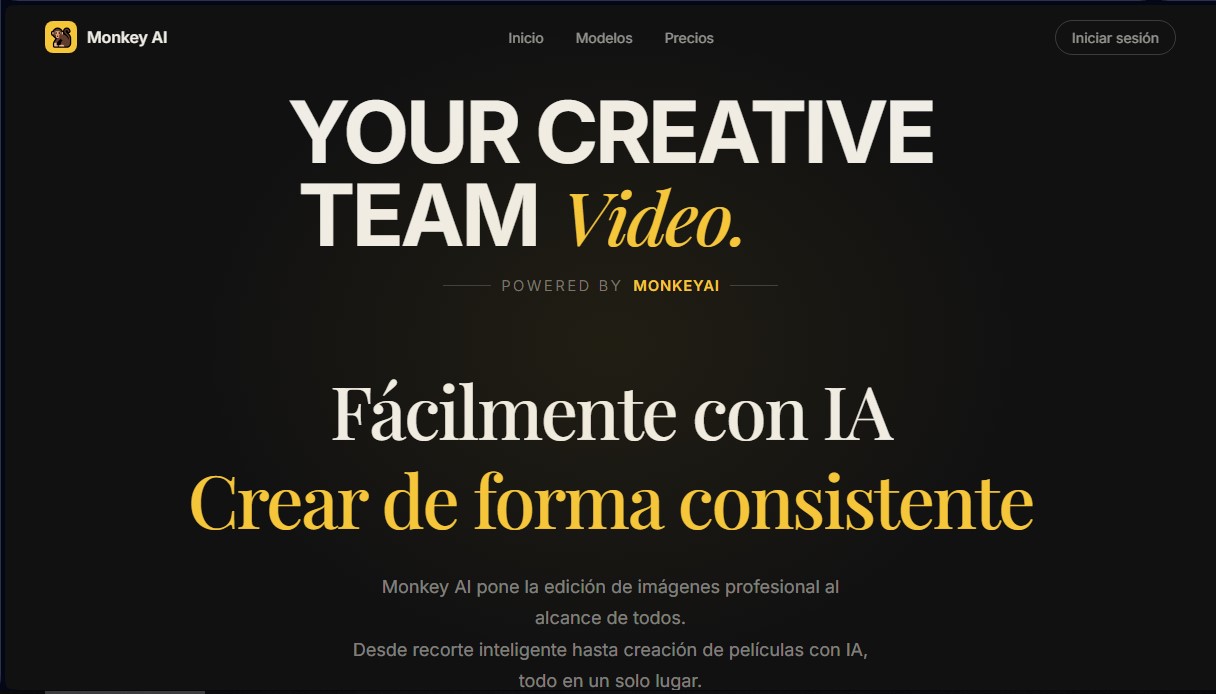
Monkey AI Image Generator Screenshots
Monkey AI Image Generator alternatives

ColorCraft
Create Amazon KDP books. Generate coloring pages, stories, puzzles, and print-ready full covers, plus promotional mockups in a single workflow.

Tesla Wrap Generator
Tesla Wrap Generator uses AI to paint designs onto the official UV template of each Tesla model for Paint Shop, with a 3D preview before you download.