Share
Generate cinematic AI videos with full camera and motion control. Direct paths and poses with professional precision. Ready for commercial use.
What is Moonvalley?
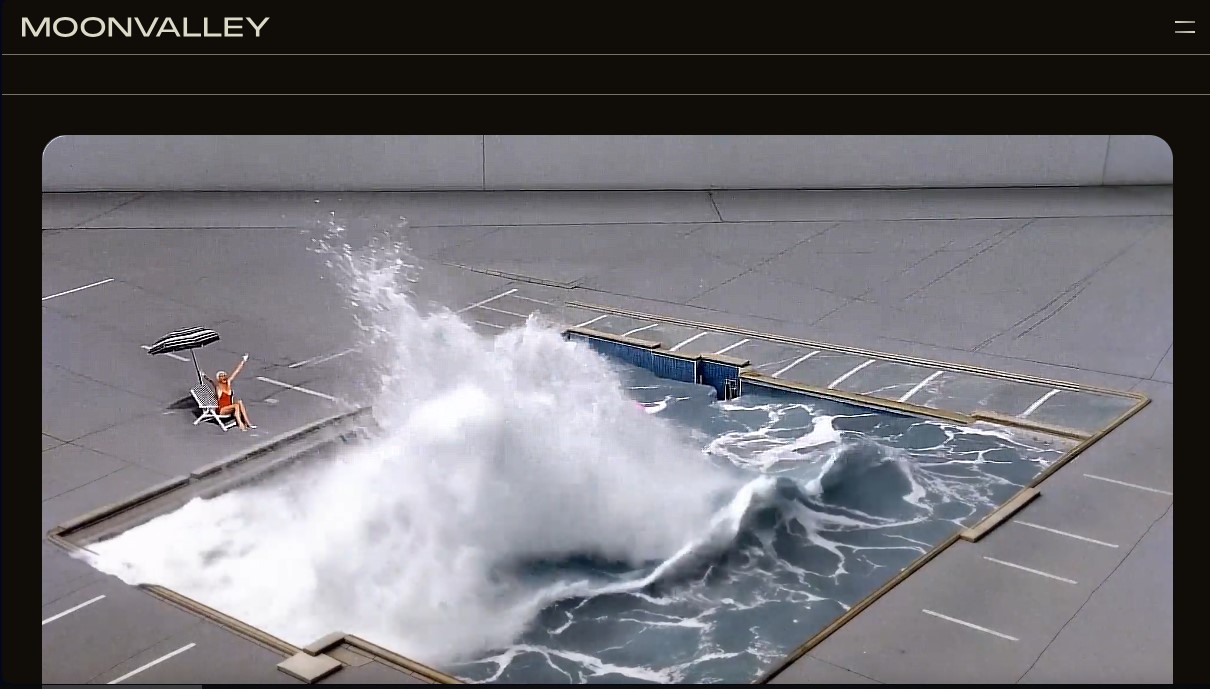
Moonvalley is an advanced AI video generation platform designed specifically for filmmakers, editors, and content creators who require total control over visual production. Through its proprietary Marey model, the tool allows users to transform text or images into high-fidelity cinematic pieces, ensuring the output is commercially safe since it was trained exclusively on licensed data. Its primary focus is to eliminate the guesswork from synthetic generation by offering technical precision tools that respond to specific user inputs.
Moonvalley’s operation is based on exhaustive control over every frame. Unlike other models, its technology enables superior prompt adherence, interpreting complex instructions with accuracy and maintaining visual consistency. The AI engine integrates natural physics principles, which adds weight, inertia, and realistic movement to on-screen objects, avoiding visual artifacts and achieving organic fluidity in every scene.
Among its most notable functional capabilities for professional workflows are:
- Pose Transfer: Allows users to guide a subject's movement and intent using reference images or performance inputs, ensuring expressive and precise results.
- Camera Control: Transforms any 2D scene into a 3D environment, allowing the user to direct cinematic camera movements as if they were on a real film set.
- Motion Transfer: Captures movement from a reference video to apply it to new subjects or scenes, maintaining the original rhythm and energy.
- Trajectory Control: Facilitates object displacement by simply drawing its path on the interface, without the need for complicated prompts or multiple attempts.
The tool's visual quality stands out for its attention to detail, capturing fine textures and rich contrasts that support professional post-production and color grading processes. Additionally, Moonvalley uses an advanced lighting system that responds with cinematic logic, maintaining the continuity of shadows and light throughout the entire sequence. Thanks to its composable layers, users can overlay styles, movements, and camera directions independently, building complex scenes in a structured way from their computer.
This solution is ideal for professionals seeking AI tools for filmmakers that deliver predictable, high-resolution results. By focusing on motion precision and the legal safety of generated content, it positions itself as a robust option for creating advertising content, cinematic previsualizations, and high-impact narrative pieces.
Moonvalley features and use cases
How to use Moonvalley
Moonvalley FAQ
What is Moonvalley, and what can you do with its Marey technology?
Moonvalley is an AI video generation platform that uses the Marey model to provide precise cinematic control and professional-grade results.
Is it safe to use content generated with Moonvalley for commercial projects?
Yes, the tool was trained exclusively on licensed data, ensuring that all generated content is commercially safe and ethical.
What does Moonvalley’s camera control feature do?
This feature allows you to transform a 2D image into a 3D environment, letting you direct cinematic camera movements as if you were on a real set.
How does the tool's path control work?
Path control allows you to move objects naturally by drawing the path they should follow, eliminating the need for text prompts or multiple retries.
Can I transfer motion from a reference video to a new subject?
Yes, using motion transfer, you can capture the energy and rhythm of any reference video and apply them to new scenes while maintaining original fluidity.
What pricing options does Moonvalley currently offer?
We offer Standard, Plus, and Pro plans with different monthly credit limits, as well as a custom Enterprise plan tailored to specific business needs.
What is the visual quality of videos created with Moonvalley?
Videos reach 1080p resolution with stunning detail, including realistic textures, studio lighting, and natural object physics.
Is it possible to control character poses in Moonvalley?
Yes, you can use reference images to guide the position and intent of your subjects, achieving expressive and precise results in every shot.
Moonvalley pricing and plans
STANDARD
$14.99 per month
- Video generation in 1080p resolution.
- Access to AI trained on fully licensed and commercially safe data.
- 100 monthly credits.
- Limit of up to 10 videos.
PLUS
$34.99 per month
- Higher generation volume with additional credits.
- 250 monthly credits.
- Limit of up to 25 videos.
PRO
$149.99 per month
- Ideal for scaling content creation across teams.
- 1,000 monthly credits.
- Limit of up to 100 videos.
ENTERPRISE
Custom Pricing (Contact Sales)
- Tailored plan adapted to specific business needs.
- Dedicated support and advanced features.
- Limit of up to 100 videos.
Moonvalley Screenshots
Moonvalley user reviews
Write a review
Checking your session...
Moonvalley Reviews
Loading reviews...
Moonvalley alternatives


Influverse AI
Influverse AI generates images, reels and UGC ads featuring AI characters or your products, then schedules them to Instagram, TikTok, YouTube and more.