
Share
Automate your SaaS support and sales with an AI that answers questions, qualifies leads, makes calls, and books demos from your documentation for a flat fee.
What is Myra?
Myra is an advanced AI employee solution designed to comprehensively manage the front office for SaaS companies and digital businesses. Its primary goal is to automate user interaction from first contact to conversion, allowing founders and developers to focus on product creation. This tool acts as a unified system that replaces the need for multiple independent services for chat, contact forms, appointment schedulers, and calling systems.
Myra's technology allows for rapid implementation by automatically analyzing a website's URL. In just a few seconds, the AI processes documentation, product guides, and public information to accurately answer technical or commercial inquiries. Integration is done via a simple script compatible with platforms like WordPress, Shopify, and modern web apps, performing efficiently on both desktop and mobile devices.
Among its most notable capabilities are:
- Automated Customer Support: Provides instant responses in over 50 languages, automatically detecting the user's language and providing technical support based on actual company documentation.
- Lead Capture and Qualification: The system identifies high-intent visitors, collects their data, and syncs the information with the user's CRM in real-time using custom fields.
- Proactive Sales Management: Unlike traditional chatbots, this AI tool can make outbound voice calls to contact hot leads and close deals immediately.
- Demo Booking: Syncs calendars to schedule sales meetings or product demonstrations without human intervention, facilitating MRR (monthly recurring revenue) growth.
Myra's approach focuses on operational efficiency, eliminating the complexity of connecting different tools via third-party software. By centralizing support, lead generation, and voice communication into a single intelligent assistant, companies can provide a consistent and professional user experience 24/7. Additionally, the system includes a dashboard to manage multiple assistants, access detailed analytics, and oversee a shared inbox, ensuring a seamless handoff to a human agent if necessary. It is an ideal choice for SaaS builders and developers looking to scale their customer service and sales processes without the friction of managing multiple subscriptions or billing models based on resolution volume.
Myra features and use cases
How to use Myra
Myra FAQ
What is Myra, and what are its primary functions for my SaaS?
It is an AI employee that answers questions based on your documentation, qualifies leads, makes voice calls, and books product demos.
How does Myra differ from competitors like Intercom or Zendesk?
The main difference is that Myra offers flat-rate monthly pricing with no additional fees per resolution, helping you avoid unpleasant surprises on your bill at the end of the month.
How long does it take to get Myra up and running on my website?
The process is very fast since the tool learns from your URL in seconds, and you only need to insert a single line of code to activate it.
Can Myra answer technical questions or questions about my product's API?
Yes, the system analyzes your guides and official documentation to provide accurate answers and can hand the conversation off to a human if it detects a complex query.
How many languages can Myra use to communicate with customers?
The platform automatically detects the visitor's language and can respond fluently in more than fifty different languages.
How does Myra help with lead generation and management?
It identifies visitor intent, saves their data to your CRM, scores them based on interest, and can even call them to book a meeting.
Can I integrate my team's calendar so Myra can book demos?
Yes, the tool syncs with your calendar to schedule appointments directly during the conversation without any manual intervention.
What happens if Myra can't find the answer to a specific question?
In those cases, the system immediately transfers the session to a human agent on your team to ensure the customer receives the information they need.
Myra pricing and plans
Free Trial
Price: Free for 7 days.
Access to automation features to test the tool before subscribing.
Flat Rate Plan
Price: Please consult the official website (a user account is required to view specific pricing).
Instant automated responses based on your website's documentation.
Lead capture and qualification with intent scoring.
AI-powered outbound voice calls to contact qualified leads.
Integrated demo booking directly into your calendar.
Full data synchronization with CRM tools.
Multilingual support in 50+ languages with automatic detection.
No additional costs for query resolution or number of seats/users.
Installation via a single-line script or official plugins (WordPress, Shopify).
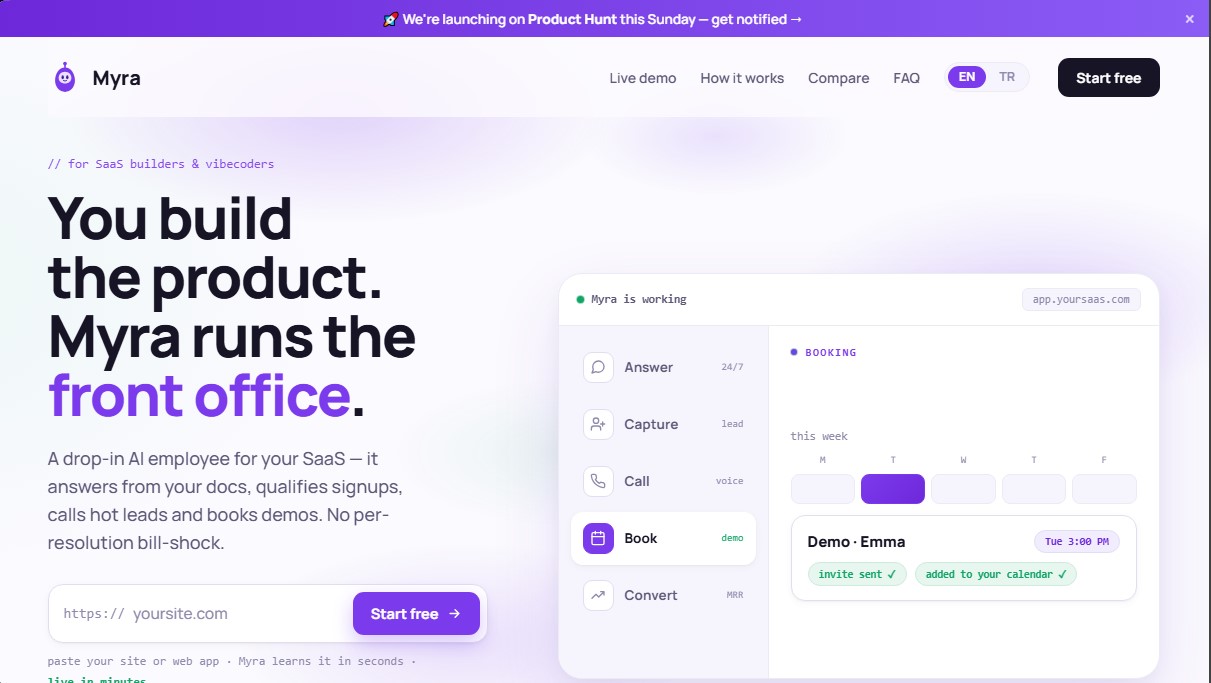
Myra Screenshots
Myra user reviews
Write a review
Checking your session...
Myra Reviews
Loading reviews...
Myra alternatives



Ami by AiSDR
AI agent automating sales prospecting. Generate lead lists, launch email and LinkedIn campaigns, manage replies, and optimize your market strategy.


Base.com AI for e-commerce
Optimize your online store with AI to list on marketplaces, create multilingual descriptions, edit product photos, and automate customer support at scale.