Share
Generate interactive courses with digital humans from a single prompt. Includes professional slides, narration, and content-driven voice responses.
What is PersonWise?
PersonWise is an advanced technological solution designed as an AI-powered digital human course creation engine. This tool allows you to transform a simple idea or a single line of text into a complete and functional training program, drastically streamlining production times in the field of interactive e-learning. Its primary focus is to eliminate the technical barriers of content creation, enabling any user to generate structured lessons without needing design or video editing skills.
The functionality of PersonWise is based on the end-to-end automation of the educational workflow. Starting from a specific topic entered by the user, the AI handles the research, structures the syllabus, designs the slides, and generates the corresponding voiceover. The result is a multi-page course with a professional-quality design that includes outlines, diagrams, and visual content optimized for knowledge retention. The entire generation process is fast, delivering a complete course in approximately 15 minutes while allowing for manual edits at every step.
The platform's standout feature is the integration of a digital instructor with whom students can interact dynamically. Unlike traditional video formats, PersonWise leverages natural language processing and speech synthesis to enable a real-time voice Q&A system. Students can interrupt the lesson at any time to ask questions, and the AI will provide coherent responses based strictly on the course content.
Key capabilities and practical benefits include:
- Automated content generation: Create detailed outlines, text, and lessons from a single descriptive phrase.
- Conversational learning interface: Courses are not static recordings but live experiences where the digital human acts as a personal tutor.
- Assessments and tracking: Includes tools to generate exams and automatically measure student progress.
- Team and corporate management: Assign courses to specific users, track completion rates, and export learning records for corporate environments.
- Specialized library: Access to pre-generated courses in fields such as technology, business, marketing, and science.
This tool is ideal for content creators, subject matter experts, and training departments looking to scale their educational production. PersonWise facilitates the creation of modern learning experiences accessible from any computer, offering a visually appealing and highly interactive format that enhances end-user engagement.
PersonWise features and use cases
How to use PersonWise
PersonWise FAQ
What exactly is PersonWise and what is it used for?
It’s an AI-powered course creation engine that generates professionally designed pages and an interactive digital instructor from just a single text prompt.
How long does it take to generate a full course with PersonWise?
The entire process—including research, slide design, and narration—typically takes about fifteen minutes, and every step is fully user-editable.
Can I try the tool for free before I subscribe?
Yes, there is a free plan that allows you to create three demo courses of up to five slides each, with all voice and Q&A features included.
How does the interaction with the digital instructor work during courses?
Learners can hit the play button and interrupt the instructor at any time to ask voice-based questions, which are answered in real time based on the course content.
What features does PersonWise offer for team and corporate management?
The Team plan allows you to assign courses to specific seats, track learner progress, and export proof of completed learning.
How many courses can I create per month with the Creator plan?
The Creator plan allows you to generate five courses per month with full access to the editing workflow and public content sharing options.
Is there a money-back guarantee if I’m not satisfied with my subscription?
PersonWise offers a 14-day money-back guarantee after your initial subscription if the service doesn’t meet your expectations.
Can I edit the content once the AI has generated the course?
Yes, every step of the creation process is editable, allowing you to adjust everything from the initial outline to the final slide design and the information presented.
PersonWise pricing and plans
Free
$0 per month.
- 3 demo courses (up to 5 slides per course).
- High-quality slides on every page.
- Voice Q&A feature included.
- Demo courses never expire.
Creator
$49 per month.
- 5 courses per month (with a relaxed queue).
- Clean public sharing option.
- Full editing cycle for the creator.
- Email support.
Pro
$129 per month.
- 20 courses per month.
- Instant generation with no wait times.
- Priority rendering.
- Early access to new features.
Max
$299 per month.
- 60 courses per month.
- Instant generation with no wait times.
- Priority rendering.
- Dedicated capacity.
Team
$499 per month.
- 50 courses per month (shared team pool).
- Includes all Pro plan features.
- Graded assessments with passing rules.
- 5 seats included with role management and assignments.
- Completion tracking and learning evidence.
- Priority support.
Enterprise
Custom pricing (see official website).
- Tailored course volume and seat count.
- Structured delivery, tracking, and completion evidence at scale.
- Dedicated onboarding and priority support.
- Security review, billing, and procurement support.
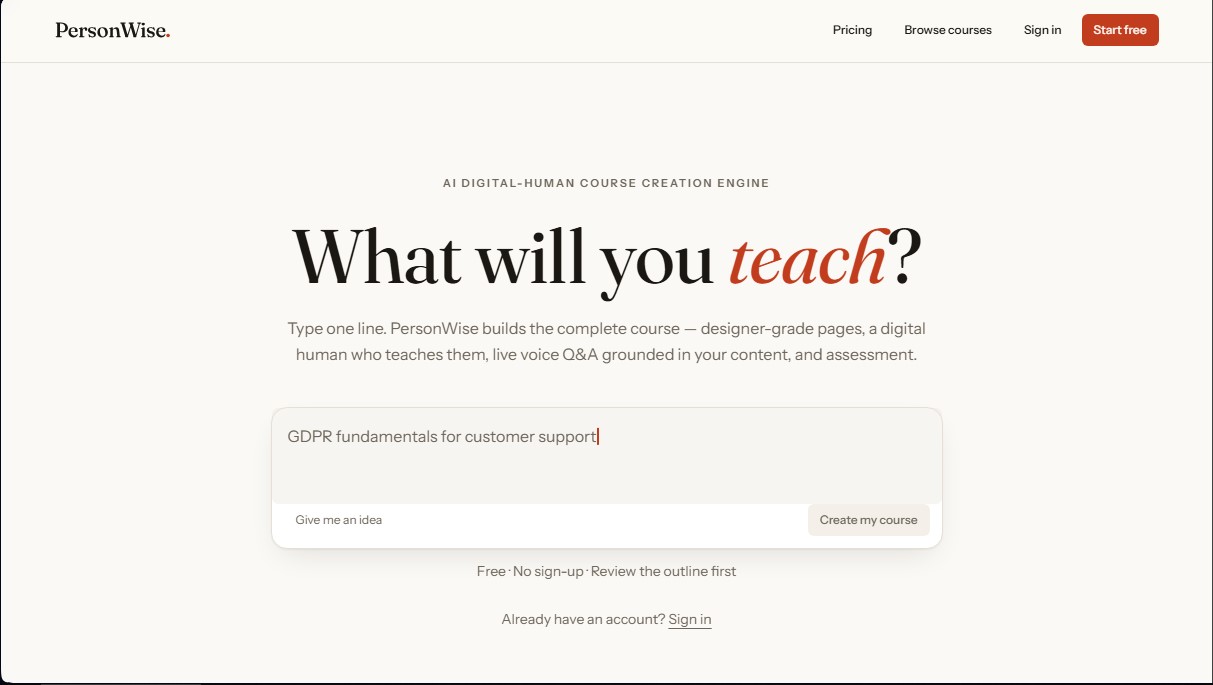
PersonWise Screenshots
PersonWise alternatives

KnowLens.ai
KnowLens.ai uses AI to create infographics, visual summaries, posters, carousels and short explainer videos from a topic, notes or plain text.

PortuguesePal
Practice Brazilian or European Portuguese with an AI tutor. Improve your fluency and pronunciation with real conversations and instant corrections.

Conversations by ForeverLearning AI
Practice realistic AI conversations in simulated environments. Choose scenarios, interact in groups, and get insights to improve your communication skills.


GermanTutor.ai
AI German tutor for real conversations, pronunciation, and grammar correction. Improve speaking fluency and prepare for official exams at all levels.