Planable
Share
Planable
Collaboratively plan and schedule social media content. Features AI copywriting, approval workflows, and analytics in a single visual calendar.
General Information about Planable
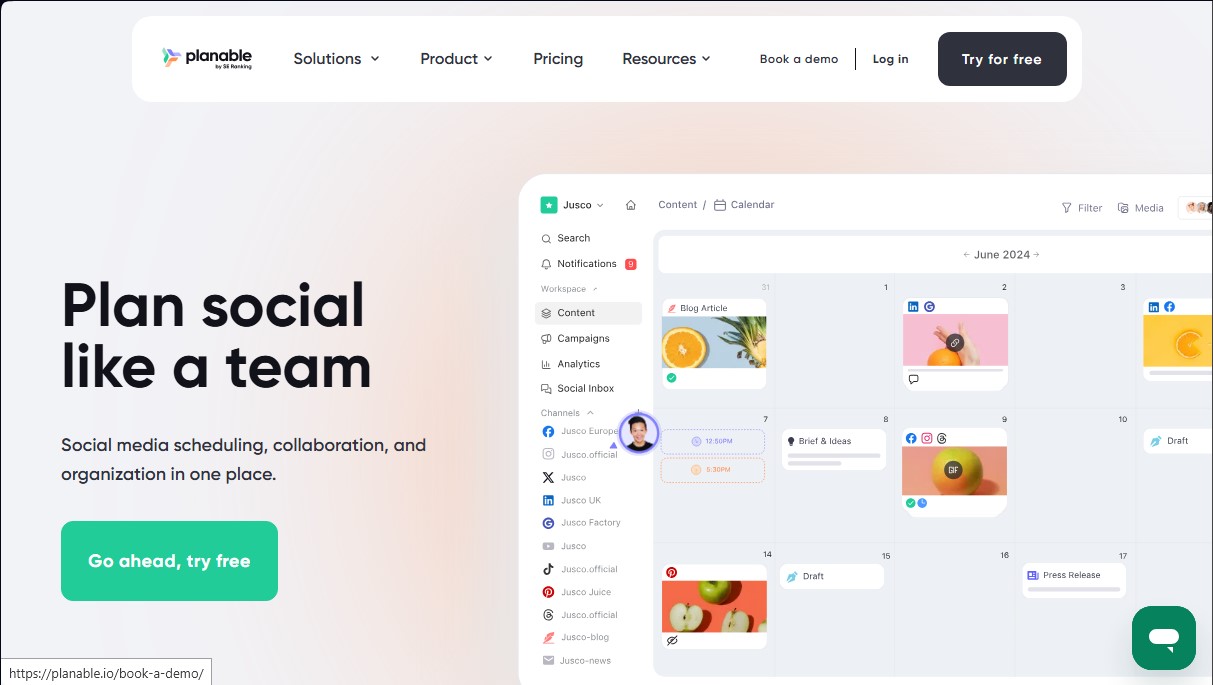
Planable is a social media management platform designed to centralize content creation, planning, and approval in a single collaborative environment. This tool allows you to manage posts for nine social networks, plus blogs and newsletters, eliminating the need to switch between multiple applications. Its primary focus is optimizing the workflow between creative teams and clients, ensuring that every piece of content is reviewed and validated before its final publication.
The tool integrates advanced artificial intelligence capabilities to accelerate content production. Through its AI assistant, users can generate captions using custom prompts, extract descriptive text from images or videos, and rewrite drafts to adapt them to different styles or character limits. Additionally, the system uses AI technology to suggest hashtags and propose new post ideas based on historical account performance, facilitating a consistent, data-driven content strategy.
Key technical and operational features include:
- Interactive visual calendar: Organize content using a drag-and-drop system to adjust publication dates quickly.
- Custom approval workflows: Configure specific permissions so clients or managers can validate, comment on, or request changes directly on the post.
- Instagram grid view: Simplifies aesthetic profile planning through a feed preview.
- Multi-platform synchronization: Create a base post and make specific adjustments for each social network simultaneously.
- Media library and editing: Store visual assets in a centralized repository with direct integration for Canva and internal image editors.
For agencies and multi-location businesses, Planable offers independent workspaces to ensure organization by brand. The comment management system allows for internal conversations or discussions with external collaborators right next to the content, avoiding scattered email threads. It also includes a unified inbox to manage community interaction, allowing you to reply to comments using AI-generated drafts and prioritize conversations based on detected sentiment.
The platform is rounded out by a social analytics module that generates visual reports on content performance and audience demographics. Access through its mobile app allows content managers to review and schedule posts from anywhere, maintaining total control over the editorial calendar. Thanks to its version history, users can track changes made by the team and revert them if necessary, ensuring the integrity of the digital strategy from their computer.
Features and Use Cases of Planable
How Planable Works
Frequently Asked Questions about Planable
What are the main features Planable offers for social media management?
Planable allows you to create, plan, collaborate on, approve, and schedule content across multiple platforms from a single dashboard.
How many social networks can be managed with Planable?
The tool is compatible with nine different social networks and also supports content creation for blogs and newsletters.
How does Planable streamline the client review process?
It allows you to set up custom approval workflows where clients can leave comments, provide suggestions, and give their visual sign-off.
Does Planable include AI tools?
Yes, it features AI capabilities to generate captions, suggest hashtags, rewrite copy, and brainstorm new post ideas.
Can images and videos be edited within the tool?
The platform includes an integrated media editor and a direct connection to Canva for easily importing your designs.
Is it possible to visually organize an Instagram profile in Planable?
The tool offers a grid view that lets you drag and drop posts to plan your account’s aesthetic.
What notification options does Planable provide for teams?
You can receive updates on posts and comments via email, push notifications, or through the Slack app.
Is there a free option to try Planable?
A free plan is available that allows you to manage a total of 50 posts with all core features included.
Planable Pricing
Free Plan: 0 $
- 50 total posts.
- Access to core features to test the experience.
- Restrictions: Does not allow posting to X (Twitter), nor does it include analytics or engagement tools.
Basic Plan: 39 $ per month per workspace (33 $ with annual billing)
- 1 workspace.
- 60 posts per month per workspace.
- Unlimited users.
- Connect up to 4 social pages per workspace.
- 2 types of approval workflows.
- Feed and Calendar views.
- Limit of 3 campaigns per workspace.
- Optional add-ons: Analytics (14 $/mo) and Social Inbox (9 $/mo).
Pro Plan: 59 $ per month per workspace (49 $ with annual billing)
- 1 workspace.
- 150 posts per month per workspace.
- Unlimited users.
- Connect up to 10 social pages per workspace.
- 3 types of approval workflows.
- Feed, Calendar, and Grid views.
- Limit of 10 campaigns per workspace.
- Optional add-ons: Analytics (14 $/mo) and Social Inbox (9 $/mo).
Enterprise Plan: Custom pricing (contact us via the official website)
- Unlimited posts.
- Multi-level approval workflows.
- All views available: Feed, Calendar, Grid, and List.
- Unlimited campaigns.
- SSO integration and dedicated account manager.
- Bank transfer payment option.
- Analytics and Social Inbox add-ons available upon request.
Planable Screenshots