
Runbear
Share
Integrate AI agents into Slack, Teams, and Discord to automate tasks and answer questions. They connect to your tools and internal data to streamline team workflows.
What is Runbear?
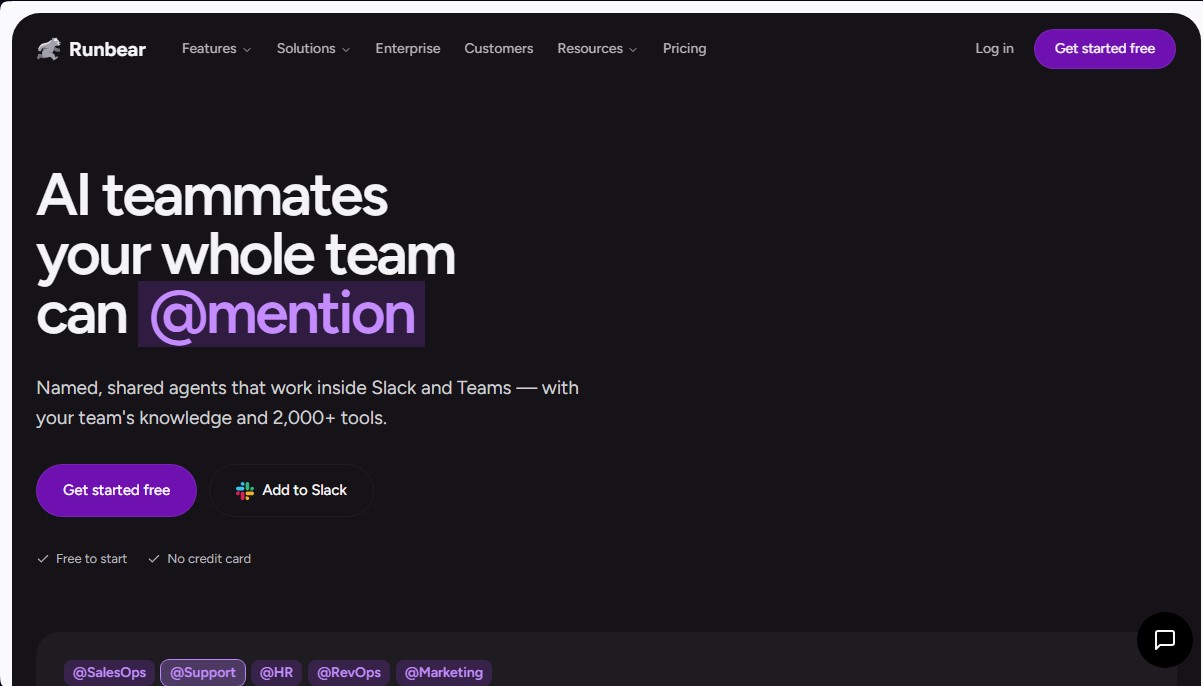
Runbear is a platform designed to integrate AI teammates directly into collaboration environments like Slack, Microsoft Teams, and Discord. Unlike generic bots, this tool allows you to create shared AI agents with specific names and roles—such as @Support, @SalesOps, or @HR—that interact with team members via direct mentions. Its primary function is to automate complex workflows using internal company knowledge and connections to over 2,000 external tools.
Runbear's technology is powered by advanced language models, including Claude, GPT, and Gemini, allowing administrators to choose the engine that best fits each agent's needs. The system uses a no-code AI approach, making it easy for any team lead to set up an agent in minutes by describing its task in natural language. Additionally, the platform stands out for its proactive capabilities: agents don't just answer questions; they can monitor channels, emails, or meetings to execute automatic actions when they detect relevant events.
These are some of the practical capabilities and benefits of Runbear:
- Shared knowledge management: Agents access and process information from sources like Notion, Google Drive, Confluence, and SharePoint to resolve inquiries with precise context.
- Tool action execution: The AI can create and update records in applications like HubSpot, Salesforce, Zendesk, or Linear without the user ever having to leave their chat app.
- User authentication: When using shared agents, the tool respects the individual permissions of each team member when interacting with third-party data.
- Critical workflow automation: It can detect churn risks by analyzing keywords in support channels, drafting response outlines, and immediately alerting account managers.
- Multi-channel deployment: A single agent configuration can work simultaneously across different platforms, maintaining consistent instructions and work history.
The tool is especially useful for operations, sales, and customer service departments looking to reduce administrative overhead. On the technical side, Runbear is compatible with the MCP (Model Context Protocol), allowing for advanced configurations from environments like Claude Code or Cursor. Regarding security, the platform is SOC 2 Type II certified and offers options for HIPAA compliance, ensuring that corporate data is handled under strict encryption and privacy standards. By centralizing operations on the computer or mobile device the team already uses, it eliminates the friction of switching between multiple tabs to complete routine tasks.
Runbear features and use cases
How to use Runbear
Runbear FAQ
What exactly is Runbear and how does it work?
Runbear is a platform that allows you to create AI teammates that work directly in Slack or Microsoft Teams using your company’s internal knowledge.
How long does it take to set up a Runbear agent?
Setup is very fast and usually takes about ten minutes, as it only requires describing the agent’s role in natural language and connecting the necessary tools.
Can Runbear be used on Microsoft Teams in addition to Slack?
Yes, the same agents can be deployed on both Slack and Microsoft Teams, allowing all teams to share the same instructions and integrations.
Is there a fee for each user who uses the tool?
No, the pricing model is usage-based via credits rather than per-seat, so one subscription covers the entire team interacting with the agents.
How many external tools can an agent integrate with?
Agents can read data and perform actions across more than two thousand different tools, including popular applications like HubSpot, Salesforce, Zendesk, and Notion.
Is it safe to share confidential company data with Runbear?
The platform is SOC 2 Type II certified and uses data encryption both at rest and in transit to ensure the maximum security of corporate information.
How do team members interact with the agents in the chat?
Users can mention the agent using an @-mention in any shared channel or send direct messages to request specific tasks.
What happens if the support agent is unsure of an answer?
In those cases, the agent creates a draft with the available context and tags a human teammate to review the information before it is posted.
Runbear pricing and plans
Free Version
Price: 0 $ (No credit card required).
Start building and testing your first AI agent.
Team Plan
Price: 99 $ per month.
Slack and Microsoft Teams channels.
Shared agents with per-user authentication.
Includes 20,000 monthly credits for model usage.
Up to 5 admins (builders) to manage agents.
No per-user cost (unlimited team seats).
Business Plan
Price: 399 $ per month.
Includes all Team plan features.
Bring your own provider key (BYOK).
Advanced controls and integrations.
Includes 100,000 monthly credits.
Up to 10 admins (builders) to manage agents.
Access to audit logs.
Enterprise Plan
Price: Custom (inquire via official website).
Custom credit volume based on your needs.
SSO and SCIM support.
Signed Data Processing Agreement (DPA).
Dedicated Customer Success Manager (CSM).
SOC 2 Type II and HIPAA compliance (BAA upon request).
Runbear Screenshots
Runbear user reviews
Write a review
Checking your session...
Runbear Reviews
Loading reviews...
Runbear alternatives

HannahDream
Chat with virtual partners for adults with customizable memory. Build romantic bonds, evolve your relationship, and generate realistic photos with no explicit content.

SayLingo.ai
Practice 30 languages with AI tutors. Improve your pronunciation and grammar through real conversations, guided lessons, and official exam preparation.
JapanesePal
Practice Japanese conversation with an AI tutor. Improve your fluency and pronunciation for travel, work, or culture with instant corrections.