

Share
AI trip planner that generates detailed itineraries in seconds. Includes routes, real places, schedules, and custom maps tailored to your pace, preferences, and budget.
What is Plantripr?
Plantripr is an AI travel planner designed to generate detailed day-by-day itineraries in seconds. This tool is geared toward travelers looking to optimize their time without sacrificing personalization, allowing them to create complete plans even without prior registration. Its primary function is to transform a basic destination idea into a structured plan that includes real locations, opening hours, and logical transportation routes.
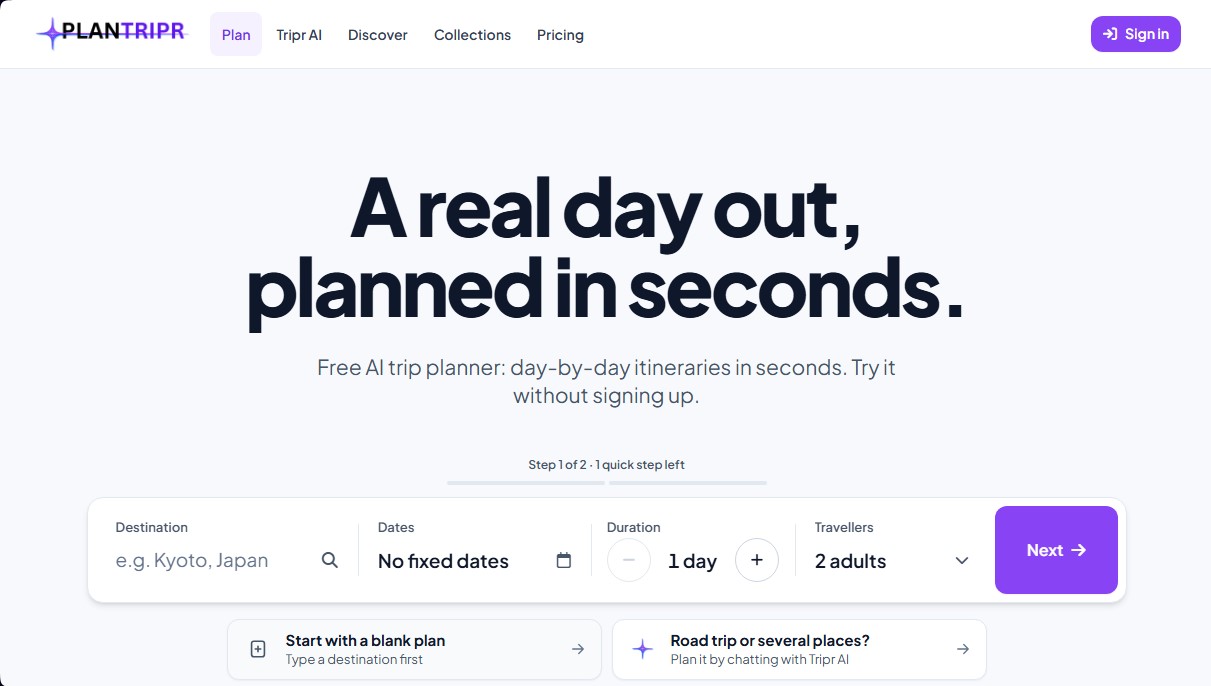
Plantripr operates through a simplified process. The user enters their destination, dates, and the number of travelers (adults, children, or pets). From there, the AI algorithm selects real locations based on up-to-date Google data, organizing them sequentially to minimize travel time. The system doesn't just list monuments; it integrates stops for breakfast, lunch, and dinner, adapting to the pace of the trip and the local hours of each region.
The application uses Tripr AI, an advanced conversational assistant that allows users to adjust their plans using natural language. Through this chat, users can plan complex routes, such as multi-day road trips, or request specific changes on the fly, like searching for nearby points of interest or modifying a specific stop. One of the key advantages of Plantripr is that all visual and descriptive information comes from verified sources, ensuring that photos, ratings, and distances between points are accurate and realistic.
Key features include:
- Smart itineraries with exact walking times and distances between each stop to avoid unnecessary travel.
- Advanced personalization based on the traveler's profile, including step-free accessibility options and dietary preferences.
- Selection of up to 12 different travel styles or "vibes" to tailor recommendations to the user's taste.
- Full route visualization on interactive maps based on OpenStreetMap or Google Maps.
- Collaboration tools to share the plan with companions, allowing others to vote on activities or add personal notes.
- Synchronization and export to Apple, Google, or Outlook calendars, as well as PDF and spreadsheet formats for offline access.
For the user, the practical benefit lies in the total automation of logistics. Plantripr acts as an intelligent travel guide that even suggests live events and local experiences on the selected dates. The ability to manage shared budgets and generate automatic packing lists makes this AI travel tool a comprehensive solution for organizing efficient trips from any computer or mobile device.
Plantripr features and use cases
How to use Plantripr
Plantripr FAQ
What exactly is Plantripr, and how can it help me plan my trip?
Plantripr is an AI-powered travel planner that creates detailed, day-by-day itineraries based on your preferences and real-world Google destinations.
Can I use Plantripr for free without signing up?
Yes, you can generate an itinerary of up to 15 days and view the entire first day for free without needing to create an account.
How does Plantripr select the locations and routes for my itinerary?
The tool uses real locations and photos to organize stops in a logical order for walking or short commutes, including scheduled times for meals and breaks.
Is it possible to modify the activities suggested by Plantripr’s AI?
Absolutely. You can swap stops, reorder your day, or use the Tripr AI chat to request specific adjustments based on your personal preferences.
What additional benefits do I get by subscribing to the Plantripr Premium plan?
The Premium plan allows you to view every day of your trip, use Google Maps integration, invite friends to vote on activities, and export your plan to a PDF or your personal calendar.
Can Tripr AI help me plan a multi-day road trip?
Yes, you can use the Tripr AI chat to describe a more complex journey, such as a road trip, and the tool will organize the route day by day.
Does Plantripr automatically book flights or accommodations?
No, the tool focuses exclusively on itinerary planning and organization. It does not handle bookings or payments on behalf of the user.
What languages are Plantripr itineraries available in?
Currently, you can generate detailed travel plans in English, Spanish, French, German, and Italian.
What if I don't want a monthly subscription but need all of Plantripr's features?
You can opt to purchase credit packs, which allow you to unlock specific trips with all premium tools included without a recurring subscription.
How can I share my travel plan with others?
You can share your trip link with your travel companions so they can view the itinerary, add notes, and vote for their favorite stops.
Plantripr pricing and plans
Guest (Free)
Price: $0 (No registration)
1 trip available.
Limited access to the first day of the itinerary only.
1 travel style (vibe) to choose from.
Free Account
Price: $0 (Registration required, no credit card)
2 trips per month.
Limited access to the first day of each trip only.
Up to 4 travel styles (vibes).
Dietary and travel pace settings.
20 daily message limit with Tripr AI.
Premium
Price: $6.99/month or $59.88/year ($4.99/month)
Includes a 3-day free trial, no credit card required.
Up to 20 trips per month.
Full itineraries for up to 15 days per trip.
Access to all planning tools.
Google Maps integration.
Export to PDF, spreadsheet, and calendars (Apple, Google, or Outlook).
Collaboration features to share trips and vote on stops with friends.
Tripr AI with web search capabilities.
Credits (Pay-as-you-go)
Price: Starting at $2.79
100 credits equal 1 full trip (up to 15 days) with all Premium tools.
Purchased credits never expire.
200 credit pack: $2.79.
500 credit pack: $6.99.
1,200 credit pack: $13.99.
3,250 credit pack: $34.99.
Plantripr Screenshots
Plantripr user reviews
Write a review
Checking your session...
Plantripr Reviews
Loading reviews...
Plantripr alternatives




Astrocartography Calculator
Find ideal places to move or travel by projecting your birth chart onto the world map. Analyze planetary influence on your career, relationships, and personal growth.


Muse AI by Meta
Personal AI agent that automates errands, books appointments, and shops for you. It integrates with your apps to securely complete complex tasks.