

Share
What is Scenaloom?
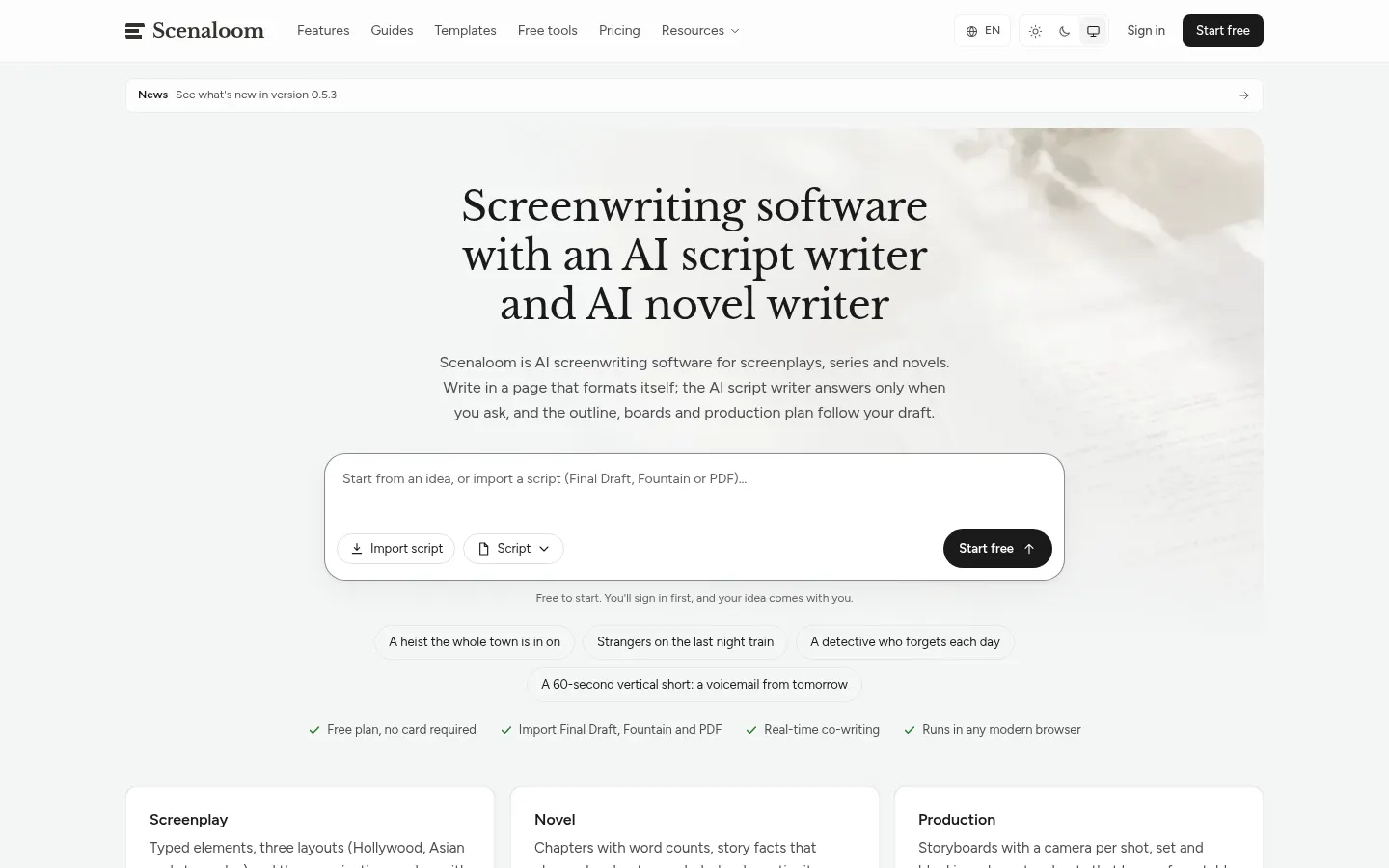
Scenaloom is AI screenwriting software for features, series, stage plays and novels: you write on a page that formats itself, and the AI script writer only steps in when you ask, offering proposals you accept or reject. It is made for screenwriters, novelists, film students and small production teams who want writing, planning and pre-production in one place.
What is Scenaloom used for?
In screenplay mode every line is a typed element, with Hollywood, Asian and stage play layouts and three pagination modes. Novel mode handles chapters with word counts, a story bible whose facts can change by chapter, and a whole-book continuity check that quotes both passages when they disagree. It imports Final Draft, Fountain, PDF, Word and plain text, and also exports to EPUB, Hangul and Markdown.
How does Scenaloom's AI help with production?
AI is optional and works on the scope you pick: a line, a scene or the full draft. From the script you can build storyboards with a camera per shot, character sheets that keep a consistent face, table reads with a voice per character, animatics and video takes. Co-writing is live, with roles, comments and restorable version history, and a single switch in Settings turns AI off for the whole account.
Who is Scenaloom for?
- Screenwriters: industry formatting and real-time collaboration.
- Novelists: continuity control across long series.
- Small studios: storyboards and previs straight from the script.
- Vertical video creators: micro-dramas and one-minute shorts.
Scenaloom pros and cons
Its ask-before-editing AI and signed authorship record, with disclosure answers for KDP or the WGA, set it apart from other writing apps. It runs in any modern browser, in eight interface languages, and opens previously loaded projects offline. The downsides: there is no desktop app, and scripts on the entry tier stop at 400 lines.
Scenaloom features and use cases
How to use Scenaloom
Scenaloom FAQ
What is Scenaloom?
Scenaloom is online screenwriting and novel software with an AI assistant that acts only when asked and returns reviewable proposals.
Is Scenaloom free?
There is a free tier with no card, limited by projects and script length; paid options are listed under pricing.
Can I import Final Draft files?
Yes. It imports .fdx, Fountain, PDF, Word and plain text, and exports back to Final Draft.
Will the AI change my script on its own?
No. The AI returns proposals and nothing changes until you apply them, with every change kept in version history.
Which languages does the interface support?
Eight: English, Simplified and Traditional Chinese, Spanish, French, German, Japanese and Korean.
Do I need to install anything?
No. It runs in Chrome, Safari, Edge and Firefox on desktop, tablet or phone, and opens loaded projects offline.
Can I co-write in real time?
Yes, with roles, comments, @mentions and restorable version history.
Does it work for novels too?
Yes, novel mode offers chapters, a story bible, a continuity check and EPUB export.
Can I turn the AI off?
Yes, one switch in Settings disables AI for your whole account.
What are some Scenaloom alternatives?
Related tools in the directory include Sudowrite, Squibler and Novel to Screenplay.
Scenaloom pricing and plans
Reference price: 20 USD / month. Source · Verified: November 22, 2026
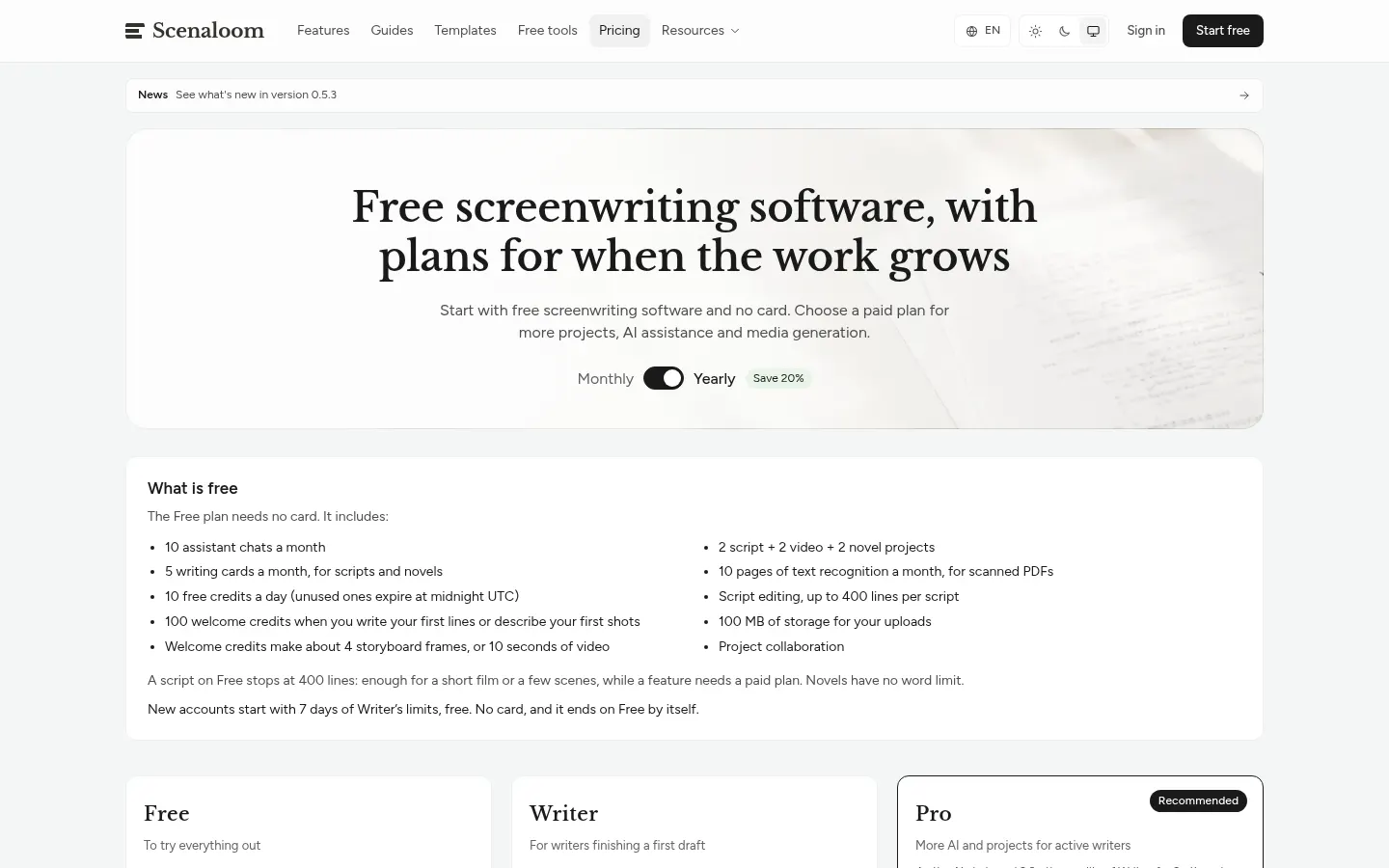
Prices in US dollars (USD) from the official website, excluding tax. Checked on: 22/11/2026. Yearly billing saves 20%. Writing never uses credits; credits pay for image, video and audio (a storyboard frame is 25 credits, a 10-second video shot 65 credits).
Free: $0. 10 assistant chats and 5 writing cards a month, 10 credits a day, 2 projects of each type and scripts up to 400 lines. New accounts get Writer limits for 7 days.
Writer: $20/month billed monthly or $16/month billed yearly ($192/year). 500 chats, 1,200 credits a month and 10 projects of each type.
Pro: $60/month or $48/month yearly ($576/year). 2,000 chats and 4,600 credits a month.
Studio: $100/month or $80/month yearly ($960/year). 3,000 chats, 9,000 credits and unlimited projects.
Studio Max: $400/month or $320/month yearly ($3,840/year). 9,999 chats and 44,000 credits a month.
Scenaloom Screenshots
Scenaloom user reviews
Write a review
Checking your session...
Scenaloom Reviews
Loading reviews...
Scenaloom alternatives
Novel to Screenplay
Novel to Screenplay is an AI converter that adapts novels and short stories into film or TV scripts and exports the draft as DOCX, FDX or Fountain.


FIRSTVERSE
Screenwriting software that analyzes your style to draft scenes in your voice. Generate drafts from your ideas with professional, industry-standard formatting.

DramaPilot
Generate AI micro-series and short dramas. Create scripts, characters, and storyboards to produce cinematic videos automatically and quickly—no filming required.

First Read
Screenwriting assistant that analyzes your style to develop film and TV scripts. It preserves your unique voice from the initial idea to the production script.